
EventAI & Automation
What’s next? How data, automation & AI are reshaping business
17 November 2026 · 11:00 · 20 Stories, Manchester

News
Operations Management Suite is the Microsoft tool for monitoring infrastructure environments whether they be cloud based, on premise or a hybrid. It can be thought of as the next generation product of SCOM.
Operations Management can be deployed on a huge number of services including,
Once connected to a data source OMS can provide the following services,
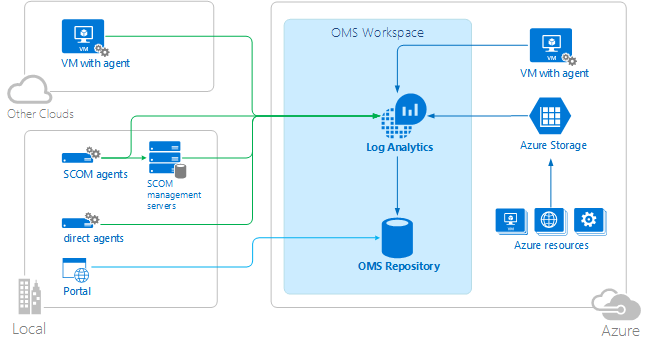
Operations Manager Suite has a completely free model meaning if you want to try out all the functionality you can do so. The free version has limitations on the size of data it can collect but perfectly adequate for small environments and testing.
There are a few paid options to choose from E2 giving you everything including Backup & Site Recovery and E1 which contains the basics. You can also choose to select each module on a pay as you go basis but the costs are a lot more than an E1 or E2. A nice include is the license for System Center which can save you money or add additional value.

More details about the pricing can be found here,
https://www.microsoft.com/en-gb/cloud-platform/operations-management-suite-pricing
OMS is easy to deploy and get started with. First, you’ll need an Azure subscription and then you need to create an OMS portal. Click Add Resource and search for Log Analytics.

If you have machines that you’d like to monitor within Azure its really easy to switch on. Browse to your Log Analytics Instance > Select Virtual Machines > Click each of the VMs and click Connect to monitor them.

If you want to track On Premise or other Cloud servers you can browse to your OMS Portal typically something like https://example.portal.mms.microsoft.com or by clicking OMS Workspace from your Log Analytics instance within Azure.
Click the Settings Cog > Connected Sources > Download.
From here you can download the setup files and see the required keys which will be requested during the installation.

Once you’ve deployed OMS you’ll have several options available to you including some prebuilt dashboards/views and the ability to start creating your own. Below are some of the out of the box controls you have by enabling various solutions and some useful queries that you can use within the log searching.
Out of the box there are a number of useful alerts including the following,
Some useful alerts especially in larger environments would be to create some automated alerts when security groups are changed especially groups such as Domain Admin or even monitoring when local admins are added to servers. See an example below on how to create a basic search that would monitor this.
Type=SecurityEvent EventID=4728 OR EventID=4732 OR EventID=4756
By default, OMS won’t be enabled to collect Windows Performance Counters. We need to turn this on,
If we go to the Cog (Settings) > Select Data > Windows Performance Counters
Here we can enable and determine the interval for the monitoring.
Once we’ve activated that and let the agents collect some data we can report back on this using Log Analytics by going to Log Search and entering some of the sample queries below.
Type:Perf CounterName=”% Processor Time” InstanceName=”_Total” | measure avg(CounterValue) by Computer Interval 1HOUR
Type:Perf ObjectName=Memory CounterName=”Available MBytes” | measure avg(CounterValue) by Computer Interval 1HOUR
Type:Perf ObjectName=LogicalDisk CounterName=”% Free Space” | measure avg(CounterValue) by Computer Interval 1HOURS
Type:Perf ObjectName=LogicalDisk CounterName=”% Free Space” InstanceName=”C:” | measure avg(CounterValue) by Computer Interval 1HOURS
Finally, we may want to configure some alerts that email our staff members based on critical events that are detected whether this be a security event or a server reporting critical events to the event log.
Type=Alert SourceSystem=OpsManager AlertSeverity=error TimeRaised>NOW-24HOUR
Type=Alert AlertSeverity=warning TimeRaised>NOW-24HOUR
Type=Alert SourceSystem=OpsManager TimeRaised>NOW-1DAY | measure count() as Count by AlertSeverity
Valto are experts in Operations Management Suite and we can help your organisation roll this through the following process,
Our blog post barely scratches the surface of the full capabilities of OMS there are many more solutions and capabilities. Below are a few of these,
We’ll cover each of these solutions over the coming months keep an eye out and subscribe to our blog
We’ve deployed OMS for a number of key clients during larger Azure migration projects to assist with the ongoing support and management of the environment. This includes the following,
17 November 2026 · 11:00 · 20 Stories, Manchester

13 October 2026 · 11:00 · Corrigan's Mayfair, London
