

NewsMicrosoft 365
How Microsoft AI Is Evolving in 2026
Our best practices and tips for designing SharePoint Department Sites. Training, development and support for Microsoft services.
20 November 2025

News
Explore new adoption and measurement tools for Microsoft Copilot from Ignite 2024, including personalised prompts, real-time dashboards, and business outcomes reporting.

Microsoft Ignite 2024 unveiled a range of updates to empower organisations in adopting and measuring the impact of Microsoft Copilot.
These announcements are designed to ensure that businesses can seamlessly integrate Copilot into their workflows while tracking its value and effectiveness.

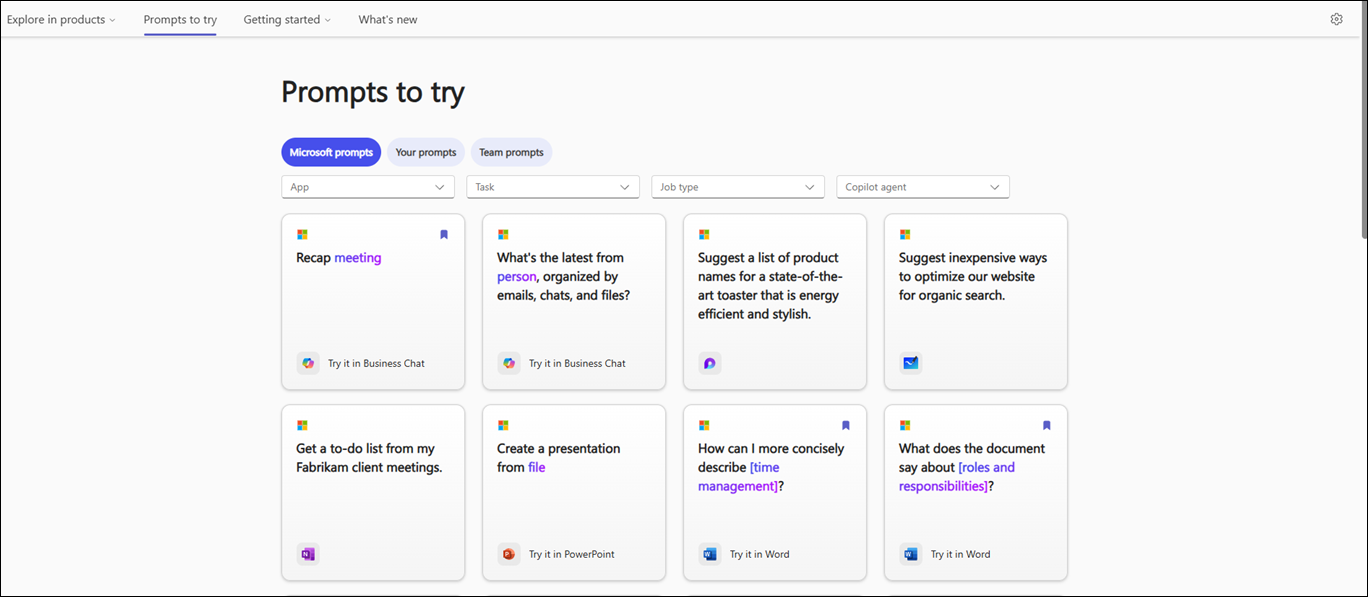
Formerly known as Copilot Lab, the Copilot Prompt Gallery is a powerful new tool that offers personalised prompt recommendations tailored to your organisation’s needs, powered by the Microsoft Graph. It is now generally available and will allow users to create, save and then share their most favourite Microsoft Copilot prompts to their colleagues. Why not share prompts that help you prepare for meetings or even use them to generate ideas for your next upcoming project. Prompt suggestions There are plenty of suggested prompts that you will find valuable including: Leaders within your business can share their prompts across your organization in order to help boost awareness and boost your adoption journey of Microsoft Copilot. It was also announced at Microsoft Ignite 2024 that Copilot prompt gallery will also be including prompts for Copilot Agents. Agent prompt support ensures users can easily interact with Copilot to achieve their goals. Microsoft are helping you discover more use cases for Microsoft Copilot each day. Trending Prompts Trending prompt lists provide insights into the most popular and impactful prompts being used across organisations. This feature improves how employees interact with Copilot, making it easier to discover and use prompts that drive productivity. It is useful to understand what prompts are trending around your business as it gives you a better understanding of how your workforce are using Microsoft Copilot. You might discover a better way of achieving a specific task and saving yourself more time. We see that one of the best ways to adopt Microsoft Copilot is to share as much knowledge as possible between different teams and departments. Provoking food for thought on how best to use Microsoft Copilot. Another great reason to keep an eye on what prompts are currently trending within your business is to discover things which maybe employees are not able to find or common questions that maybe more content needs to be created to assist them. Then feedback this to the relevant content owners. For example if there is a trending prompt around “how much annual leave do I have” perhaps you should consider speaking with HR in order to update the annual leave policy to make this easier to discover for your employees.
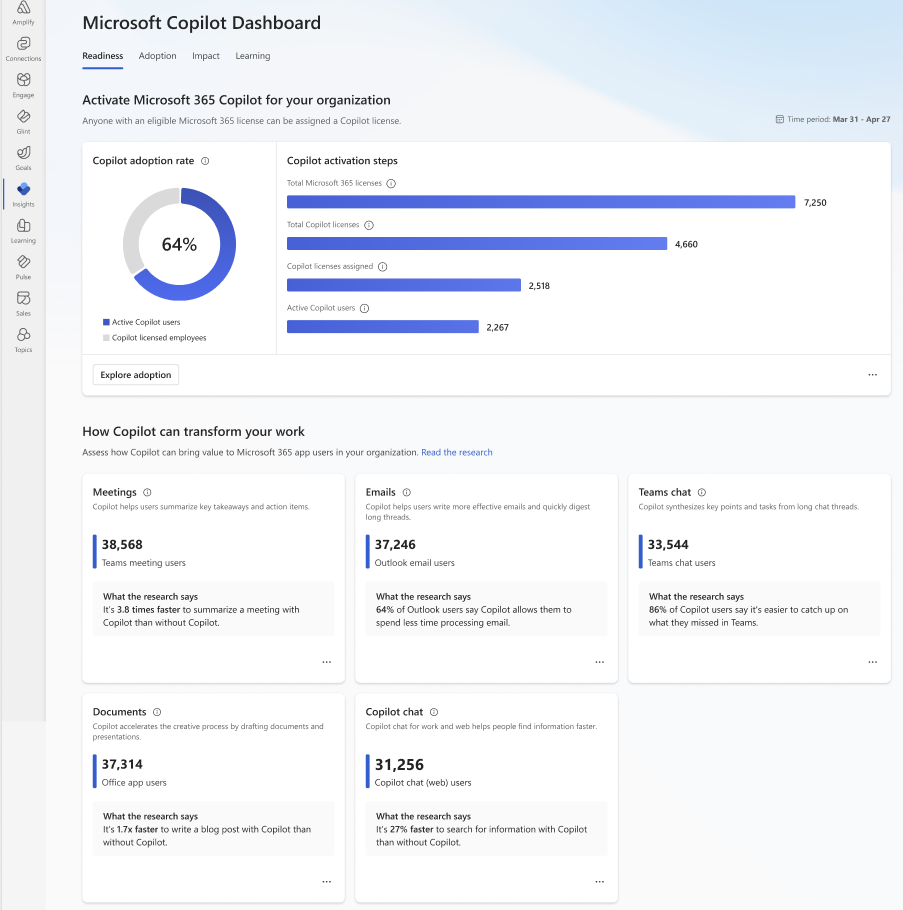
The new Microsoft Copilot Dashboard provides a comprehensive view of Copilot’s performance across key categories:
• Readiness: Assess how prepared your organisation is for Copilot adoption.
• Adoption: Track how widely and effectively Copilot is being utilised within your organisations.
• Impact: Measure the tangible benefits Copilot brings to workflows.
• Sentiment: Gain insights into user feedback and satisfaction.
Included in the Microsoft 365 Copilot license, this dashboard empowers IT and business leaders to make informed decisions based on real-time data.
To help organisations understand the impact of Copilot on business performance, Microsoft introduced the Copilot Business Outcomes Report.
This tool analyses how the use of Copilot relates to business success across various functions, including:
• Sales
• Finance
• Marketing
By connecting Copilot adoption to measurable outcomes, this report provides actionable insights that help organisations improve their use of AI to drive value.
Microsoft’s focus on adoption and measurement reflects its commitment to helping organisations maximize the value of Copilot.
With tools like the Copilot Prompt Gallery, Dashboard, and Business Outcomes Report, businesses can adopt AI with confidence and track its impact across teams and functions.
“We work with organisations across many sectors of different shapes and sizes from 10 to 100,000 employees.”
Contact our team today!
Our best practices and tips for designing SharePoint Department Sites. Training, development and support for Microsoft services.
20 November 2025
Our best practices and tips for designing SharePoint Department Sites. Training, development and support for Microsoft services.
8 October 2025

Explore how Microsoft Copilot supports IT and Marketing teams with real-world scenarios, helping automate tasks, analyse data, create content, and accelerate project delivery.
7 May 2025