Valto — Keep ahead of tomorrow

News

Model Driven PowerApps Examples

We will demonstrate some commonly used model driven PowerApps examples. All of the examples are free templates from Microsoft to start today!

PowerApps
Published
14 July 2022

Model Driven PowerApps Examples

We will demonstrate some commonly used model driven PowerApps examples.

Model Driven App Examples in Practice

To better understand how model-driven apps can be used in the real world, it’s helpful to look at some practical examples. The scenarios below highlight how model-driven Power Apps can be applied across different use cases, from asset management to innovation tracking and internal fundraising initiatives.

Asset Checkout App Example

This particular Model Driven PowerApp is used as a self-service business application to book resources such as tools, vehicles, hardware, and other equipment your business needs to operate day-to-day.

This particular Model Driven PowerApp is used as a self service business application with the ability to book resources such as tools, vehicles, hardware or other equipment your business needs to operate their day to day job.

It will then calculate inventory and provide a bunch more useful functionality.

Using Tables in Model-Driven Apps

The app has the ability to add in new products that users can choose to reserve.

All of these products are stored within a table called Products that can be accessed via the left hand navigation bar, also known as the “site map” within a model driven PowerApp.

Model Driven App Products Table

Using Forms in Model-Driven Apps

From here you can choose to click the +New button to create a new product within the table.

Clicking on this button will then open the create new product form. This form contains multiple options including the ability to choose the colour, category and model number amongst other properties.

All of these options within the form could be updated to capture exactly what information you would want for your specific products.

Model Driven App Example Form

Innovation Challenge App Example

The Model Driven PowerApps allows your business to inspire colleagues to come up with creative ideas for new innovation.

Once ideas have been submitted they can then be reviewed by colleagues and even voted on to be able to identify key popular ideas.

The best ideas that then surface to the top of the list will then get recognition by the senior leadership team and rewarded with funding to proceed.

Model Driven App Example Valto

Set Innovation Challenges

The Model Driven App will allow a certain group of users to be able to create challenges that the business is currently facing.

This will contain key details of the challenge such as a name, owner of the challenge item and description of why resolving the challenge is important to the business.

This page will also show relevant stakeholders of the current challenge and any contributed ideas to resolve that challenge.

PowerApps Examples Model Driven PowerApps

Model Driven PowerApps Examples PLAY ME

View All Ideas Submitted via the Model Driven App

The PowerApp will show you all of the ideas that have been submitted in a list view that can be filtered by name, challenge, number of votes and the overall idea score.

The list of ideas can also be filtered via a bar chart that shows the tip 5 idea by the total number of votes that the idea has received.
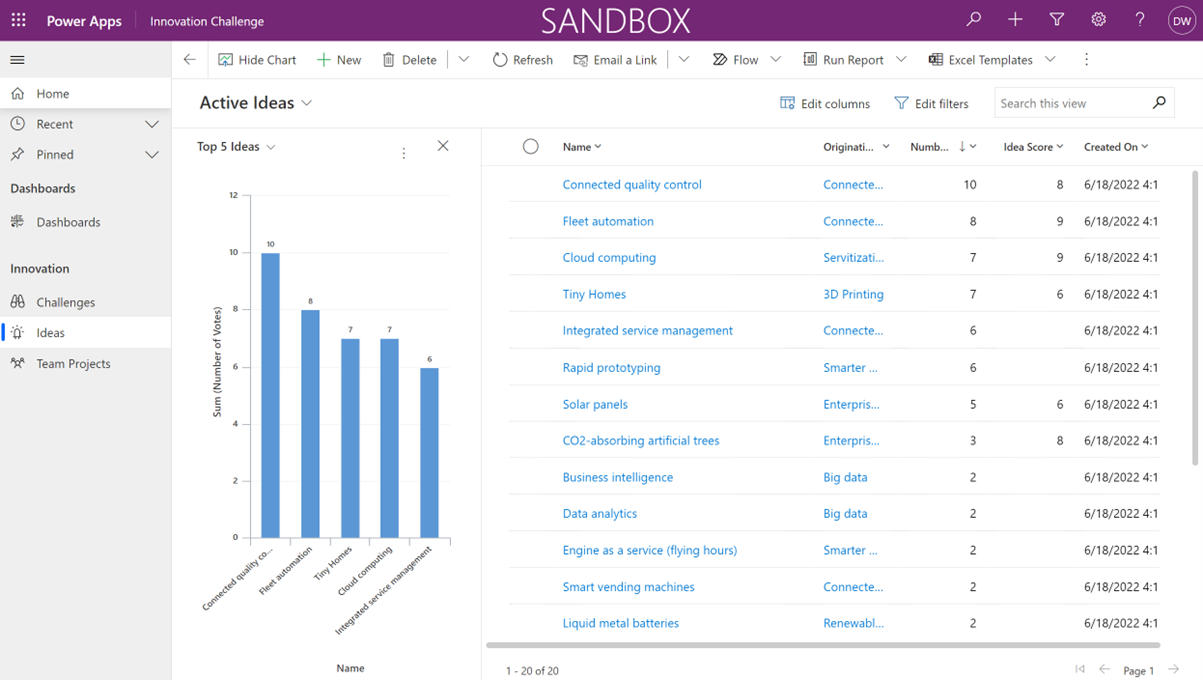
Chart in Model Driven App

Fundraising App Example

This Model Driven App allows colleagues the ability to donate time or even money towards causes they company is passionate about contributing towards.

This app will enable your business to start a fund raising campaign for your favourite cause then set goals of what you wish to achieve towards that campaign.

Once goals have been established you will then track the overall performance that has been submitted towards those goals.

Fundraiser Model Driven PowerApp from Microsoft

Model-Driven App Templates and Starting Points

Templates provide a useful starting point for organisations that are new to model-driven apps. Microsoft offers a range of pre-built structures that demonstrate how data models, forms, and views can be configured to suit different use cases. 

These templates can be tweaked to suit specific business needs and allow organisations to accelerate app development while maintaining control over how they are structured. They are very useful for teams looking to quickly prototype ideas before committing to a more fully-rounded solution.

Working with an experienced Power Platform partner can help ensure these templates are configured with your exact needs in mind. 

PowerApps – Next Steps

I hope you found this article useful, if you are interested in getting some assistance with SharePoint Online or PowerApps, please feel free to contact me with any questions using our contact us form.

You might also be interested to read What is the Best Database for your Microsoft PowerApps in 2022 (valto.co.uk)

Author

Dougie Wood

Solutions Architect

Frequently asked questions

A model-driven app is a type of Power Apps application that’s designed around your data model rather than a custom-designed interface. It uses Dataverse to structure data and automatically generates the app layout.
Canvas apps focus on custom design and UX, whereas model-driven applications focus on data structure and a business’s processes. 
They are often used for managing structured data such as asset tracking, CRM systems, and internal workflows.
Yes, very. Model-driven apps are designed to scale with your organisation and include built-in features such as security roles, design, and integration with Microsoft Dataverse.

Talk to our team

Topics
Share this

Related reading

NewsMicrosoft 365

Dynamics 365 vs Model Driven Power Apps

Explore how SMEs can use Microsoft Model-Driven Apps to create affordable, custom CRM-like systems. Learn how to manage customer data, track sales, automate tasks, and access powerful reporting—without the high cost of Dynamics 365.

22 January 2025

NewsPowerApps

Power Apps vs. Power Automate

Explore the differences between Power Apps and Power Automate and learn how combining them can deliver powerful, low-code solutions for businesses. Discover how these tools work together to streamline processes and improve efficiency.

21 January 2025

NewsPowerApps

Using The UpdateContext Function In Power Apps

Discover how to efficiently use the UpdateContext function in Power Apps to manage context variables, optimise memory usage, and enhance app performance. Learn best practices and practical examples for Canvas Apps.

21 January 2025