Valto — Keep ahead of tomorrow

News

Test Studio in Microsoft PowerApps

Watch our short overview video to discover how Test Studio in Microsoft PowerApps automates quality management testing of your Canvas Power App. We offer a wide range of PowerApps Services with the UK's leading PowerApps Developers and the best PowerApps Support.

Office365PowerAppsSharePoint
Published
26 August 2021
Test Studio Logo

How to Test Apps using Test Studio in Microsoft PowerApps

Watch our short overview video to discover how Test Studio in Microsoft PowerApps automates quality management testing of your Canvas Power App. We offer a wide range of PowerApps Services with the UK’s leading PowerApps Developers and the best PowerApps Support.

Watch our demo of Test Studio in Microsoft PowerApps

Watch the video (opens in a new tab)

What is Microsoft PowerApps Test Studio?

Power Apps test studio is a great new feature inside of Microsoft Canvas Power Apps studio that will allow you to automate tests of your application.

You can either write your own checks using the same low-code formulas that you have built your Canvas PowerApps or you can choose to record your screen.

Once you have recorded your screen the PowerApps Test Studio will automatically turn this into expression for you.

You can then choose to build up multiple test cases for different features and functionality within your app.

So if you ever have an update to an existing feature you can run specific tests against that feature to see if any new bugs or issues have arisen.

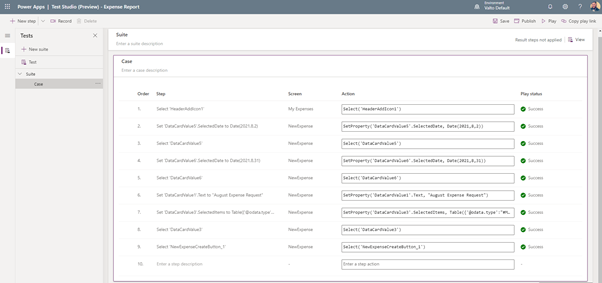
What does PowerApps Test Studio look like?

As the PowerApps Test Studio is contained within the Canvas Power Apps designer it looks and feels exactly the same as building your application, as shown below.


Test Studio Logo

Next Steps

I hope you found this article useful, if you are interested in getting some assistance from our PowerApps Consultancy experts around PowerApps Services or want to view more PowerApps Examples, please feel free to contact me with any questions using our contact us form.

If you are interested in PowerApps then please download our free PowerApps white paper.

Author

Free Icon Download | Linkedin Dougie Wood

Solutions Architect

Frequently asked questions

It can be really useful to automate your tests for a number of reasons. This will mean that you can speed up repetitive tasks such as data entry. You will also mitigate human errors which will increase the overall quality of the testing process. The test cases that you build are all self-contained within the Canvas PowerApps. Meaning if you choose to move the app between environments or even tenants the test cases will remain with the app.
A test case is a set of instructions or potential actions known as steps. These are used to ensure that specific features in your app are working as you expected.
These test suites within PowerApps Test Studio are designed to categorise and group together your specific test cases. These might be grouped together for specific features or functionality contained within your Canvas PowerApp.
For each of the test cases that you create within your Test Studio they should all have an expected result. To confirm the expected result of a test compared against the actual result of the test you can create test assertions. This is an expression that will result in either a true or false statement. If the assertion is false at the end of the test then it has clearly failed.
Firstly you want to think about what tests you actually need to automate. Not every test for your app you will actually need to automate. Often you will need to weight up the time vs benefit of actually creating a test case for each of the features that you create. For small applications with not many features you might not need to even go down the route of creating a test suite with PowerApps Test Studio. However, if this is a critical application to the organisation or testing will involve a lot of manually data entry, then you should likely be creating a testing strategy for quality control management that includes PowerApps Test Studio.

Talk to our team

Related reading

NewsSharePoint

Mastering Document Control with SharePoint

Struggling with document versioning, policy visibility or outdated files? Learn how Valto’s SharePoint-based Controlled Documents Solution solves the most common document control challenges.

7 May 2025