

News
Channels Vs Group Chats in Microsoft Teams
This article looks to explore the difference between a channel and group chat within Microsoft Teams, and when it is appropriate to use them.
Microsoft Teams
- Published
- 27 January 2022
Channels Vs Group Chats in Microsoft Teams
As part of our Hybrid Working blog series, the 1st of these looks to address a question we hear all the time: Should I use a group chat or Channel within Microsoft Teams?
The Answer: It depends on the circumstances however, the detail below should assist you in making the right choice.
Microsoft Teams: Teams Channels
Teams Channels (opens in a new tab) are best used for structured conversations. The ability for you to add a subject, tag the team or specific individuals, and share files provides the best platform for you and your colleagues to work together and collaborate effectively. The points below detail some of the advantages of choosing a Teams channel over a group chat:
Structured posts:
Adding a subject to your posts within a channel gives a clear indication on what your post is about. By assigning a topic to your post like this, you’re providing guidance and structure within your Teams environment. Should another Team member wish to make a comment or add to a particular conversation, they now have a forum to do so.
Recreating the ‘across the desk’ conversation:
With remote working becoming more prevalent in companies across the UK, Teams is able to recreate those ‘across the desk’ conversations we’re used to in an office environment. So long as you have access to a Team, you have access to all of its content including posts that you might not necessarily be tagged in. Even though may not be directly tagged within the conversation, you are still able to read all of its content and even contribute towards it.
Sharing Files:
Files shared within a channel are saved into the SharePoint site that is assigned to the Team. This opens up avenues for collaborative working and allows for the files to be shared externally and internally. Version history, ‘Move to’ & ‘Copy to’, and autosave are all useful features available once your documents are living within Microsoft Teams.
Add Tabs
Adding tabs and other applications can help your Team stay organised. Wiki, Planner and To do are all great applications to assist with the productivity of your Team. Team admins are able to add a number of tabs which are unique to the channel. A great way of tailoring the channel to your Teams’ needs.
Private Channels
For those conversation or topics which are perhaps a little more sensitive, or not to be seen by all team members, private channels (opens in a new tab) can be created to host them. Private channels are only open to those who have been added to them by the owner of the Team, ensuring your typical end user doesn’t have access to its content.
Microsoft Teams: Group Chats
Group chats (opens in a new tab) should be used for your more informal conversations in your Microsoft Teams environment. Perhaps you need to ask a colleague a quick question or have a quick call. The points below detail some of the features of using group chats within Teams.
Chat History
When adding a new member to the group chat, you get to decide how much chat history to share with them. You can choose a custom date range or select from a couple of pre-defined options (e.g. Last 7 days, last 30 days etc)
Content
Only people within the group chat are able to see it’s content. You should therefore think of the content as something the entire team doesn’t need to access to. The same can be said for the files shared within group chats – They are only accessible within the chat itself, so it’s recommended you keep these in your Teams Channels.
Number of Users
A group chat cannot exceed 100 users, however certain features are turned off after more than 20 users have joined the chat. These include:
-
- Outlook auto-replies and Teams status messages
- Typing indicator (e.g. Joe Bloggs is typing…)
- Video and audio calling
- Screen sharing
- Read receipts
- Set delivery options
Notifications
Unless you decide to mute the group chat, you will receive a notification every time there is a new message.
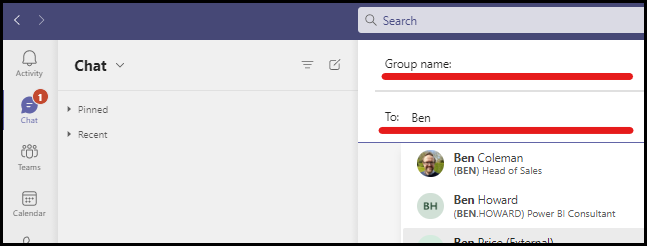
View your group chat participants
Name your group chat and add members
Chat notifications will appear unless the chat is muted.
Channels Vs Group Chat – Which is better?
Ultimately there is no right answer, it depends entirely on the circumstances and what you are trying to achieve. For your more structured conversations, where you have topics, threads, meetings and the ability to tag certain people – we recommend Channels. However, for your more informal check-ins and quick questions to colleagues we would recommend group chats.
About Valto Microsoft 365 Specialists
Valto are here to help you with all your Microsoft 365 projects.
If you’d like to sign up for our newsletter or learn more about anything outlined within this post Email, Contact Us or Call on 03335 779 009.
Channels are best used for sharing information with the entire Team. This could be announcements, information on new opportunities or products, and project discussions.
The video above shows how you can quickly create an announcement, tag the team and set it to ‘important’. The heading and subject create a topic and structure to the post straight away. Just a couple of the advantages of Channels over Group Chats
Frequently asked questions
A channel within a Team that is primarily used to host Structured conversations.
The main features within Microsoft Teams Channels include:
Tag the Team or an individual
Store files within your channel
set up team meetings
Subject/Topics to conversation
make announcements.
A group chat within Teams is a chat with a number of colleagues for more Informal, less structured conversations. This is a great place to ask quick questions and converse with colleagues.
The main features within a group chat on teams include:
Only those included in the group can see its content
You can add up to 100 members
new message notifications.
Talk to our team
Topics
Related reading

EventAI & Automation
What’s next? How data, automation & AI are reshaping business
17 November 2026 · 11:00 · 20 Stories, Manchester

NewsAI & Automation
Valto and Holstein UK launch major multi-year digital transformation programme
New partnership will modernise core systems and create a connected, data-driven platform powered by Microsoft technologies.
6 October 2026