

NewsMicrosoft 365
How Microsoft AI Is Evolving in 2026
Our best practices and tips for designing SharePoint Department Sites. Training, development and support for Microsoft services.
20 November 2025

News
Eight months ago, Microsoft launched Copilot for Microsoft 365 to alleviate digital overload and enhance productivity, allowing individuals to concentrate on tasks that require a human touch. The pressing question now is: will generative AI truly revolutionise the workplace, and in what ways?

Eight months ago, Microsoft launched Copilot for Microsoft 365 to alleviate digital overload and enhance productivity, allowing individuals to concentrate on tasks that require a human touch. The pressing question now is: will generative AI truly revolutionise the workplace, and in what ways?
Recent data confirms that the productivity benefits are substantial. Microsoft undertook comprehensive research, combining surveys and experiments to gain a thorough understanding of how Copilot is changing the work environment—learning from and with our customers as we expand its use.
So far, Copilot has proven to boost productivity, foster creativity, and save time.
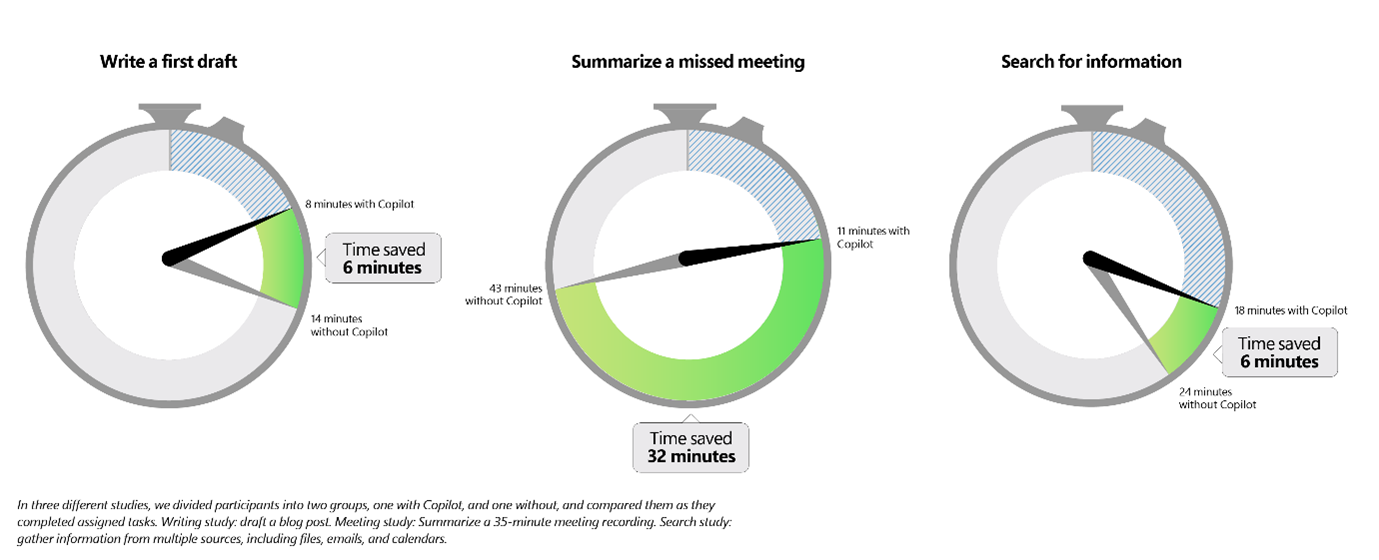
Microsoft surveyed 297 participants in their Copilot for Microsoft 365 Early Access Program to understand how they are utilising Copilot, from attending meetings to drafting documents. 70% of Copilot users reported increased productivity. 73% mentioned they could complete tasks more quickly. 64% indicated Copilot helped them spend less time on email. On average, users saved 14 minutes daily, or 1.2 hours weekly. 22% reported saving more than 30 minutes per day. When asked how they used the extra time saved, the majority (53%) dedicated it to focused work, with only a small fraction (7%) spending it on administrative tasks like data entry. Interestingly, the second most common use was attending additional meetings (16%), which could be counterproductive given the already high number of meetings. Quantitative results show that Copilot enhances efficiency in tasks such as writing, summarising meetings, and searching for information.
There is an urgent need for Copilot to address the skills gap in the cybersecurity workforce, with 3 million positions unfilled globally as cyber threats become more frequent and severe. In a study, Microsoft explored how Copilot for Security can assist defenders, regardless of their experience level. They evaluated the performance of 149 early-career security analysts, split into two groups: one group used Copilot, and the other did not. Both groups were tasked with identifying scripts used by cyber attackers, creating incident reports, and determining suitable remediation steps. Results showed: Copilot users were 44% more accurate and 26% faster across all tasks. 86% said Copilot for Security helped them improve the quality of their work. 83% said Copilot reduced the effort needed to complete the task. 86% said Copilot made them more productive. 90% said they want Copilot next time they do the same task.
In finance, people cited simplifying financial reporting (73%) and validating data quality (72%).
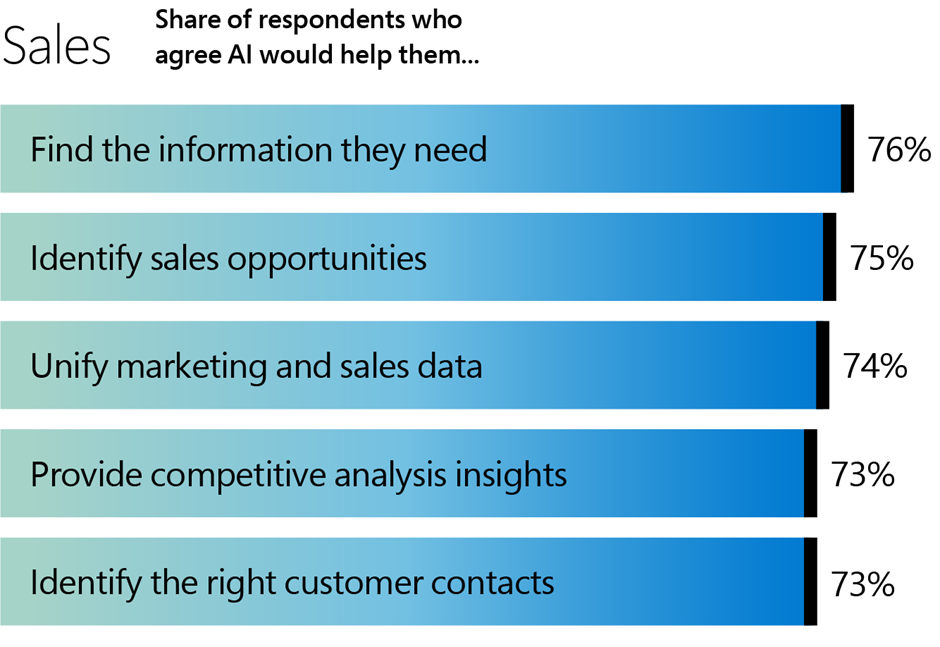
Salespeople cited identifying sales opportunities (75%) and unifying marketing and sales data (74%).
While these are early findings, over time we expect Copilot to result in more deals closed, more customer service cases resolved, and happier customers.
The data indicates that the productivity improvements from Copilot are both real and substantial.
However, transitioning from individual experimentation to creating an AI-driven organisation requires a commitment to new working methods.
Those who view Copilot not as a mere search engine but as a highly skilled, endlessly patient, and constantly accessible assistant will reap the greatest benefits.
Much like exercising or learning a new language, achieving productivity gains with Copilot requires consistent, intentional practice.
Those who begin cultivating this habit early will gain a significant advantage.
Unlocking Copilot’s full potential necessitates the ability to delegate, use sound judgment, and apply subject-matter expertise—the critical human skills for the machine age.
Every employee must learn to manage their AI assistant, discerning when to assign a task to Copilot and when to rely on their own unique human insights.
A key leadership imperative is to ensure that employees use the time saved with Copilot effectively.
Managers can allocate more time to coaching and supporting their teams.
Sales professionals can focus more on nurturing customer relationships and closing deals, while marketers can find time to innovate and develop new products.
Moving forward, everyone will have more energy to dedicate to the rewarding tasks that bring the most value and impact to the organisation.
“We work with organisations across many sectors of different shapes and sizes from 10 to 100,000 employees.”
Contact our team today!
Our best practices and tips for designing SharePoint Department Sites. Training, development and support for Microsoft services.
20 November 2025
Our best practices and tips for designing SharePoint Department Sites. Training, development and support for Microsoft services.
8 October 2025
Explore how SMEs can use Microsoft Model-Driven Apps to create affordable, custom CRM-like systems. Learn how to manage customer data, track sales, automate tasks, and access powerful reporting—without the high cost of Dynamics 365.
22 January 2025