


News
Customising Microsoft Learning Pathways For Your Organisation
Add customised training and learning pathways to your company’s SharePoint tenant. Training, support and more from Valto’s experts.
- Published
- 28 October 2024

Customising Microsoft Learning Pathways For Your Organisation
Customising Microsoft Learning Pathways for your organisation can significantly enhance the learning experience for your employees and is a key tool for improving efficiency, progression and development.
Microsoft 365 Learning Pathways is a flexible, customisable platform that allows organisations to curate and deliver tailored training content aligned with specific needs and goals.
What is Microsoft 365 Learning Pathways?
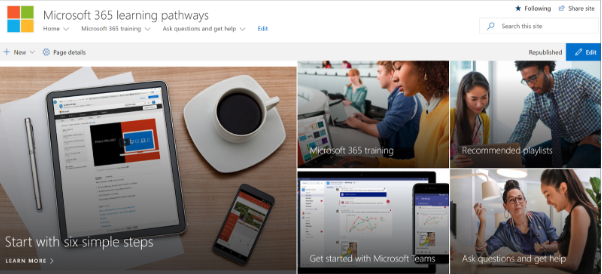
Put simply, Microsoft 365 Learning Pathways is a learning portal that can be used as a solution to customise training programmes or custom pathways. Microsoft Learning Pathways functions within the SharePoint platform, and you’ll create your portal as a SharePoint communication site.

What are the benefits of Microsoft 365 Learning Pathways?
As a standalone platform, there are several benefits of Learning Pathways for any organisation: Customisable Learning Content: You can tailor learning pathways for your team(s) by adding or removing training modules to focus on the skills your colleagues need. On-Demand Learning: Employees can access the learning materials anytime, from anywhere, enabling flexible training schedules that can move with your workflows. Microsoft 365 Integration: Learning Pathways is seamlessly integrated with Microsoft 365, providing tutorials and guidance for tools like SharePoint, Teams, Outlook, and more. Curated Learning Tracks: Learning content is organised into pathways, which guide users through specific skills or toolsets, helping them progress through the material in a logical, intuitive order. Automatic Updates to Content: Content in the learning pathways can be automatically updated, curated and then delivered (via GitHub CDN) into your tailored portal.
How to customise Microsoft Learning Pathways for your organisation
To get started, you’ll need to add the Learning Pathways tool to your SharePoint Online tenant – our SharePoint Consultants can help you get this done correctly so you’re up and running.
Once it’s properly installed, you and key stakeholders can access the admin platform, with an interface that allows you to configure all the training content.
Customise learning content
Learning Pathways is intuitive and completely customisable, you’ll be able to modify the Microsoft-created content to your liking – whether that’s adding or removing content, or simply tailoring
You can add, remove, or modify the content provided by Microsoft to suit your organisation’s needs. It’s really easy to create completely custom content for your teams – for example as part of a particular campaign, or for adherence with certain regulations.
Add Custom Playlists
Create custom playlists or training modules tailored to specific internal processes or tools by uploading external resources (such as company videos, PDFs, or links to other SharePoint Hub Site content).
Reorder or Remove Content
Adjust the order of playlists and pathways to match your training priorities, or remove content that isn’t relevant to your organisation to keep everything streamlined.
Use Multilingual Content
If your company operates in multiple languages, you can enable multilingual support for Learning Pathways to offer content in various languages. This can be particularly useful for onboarding new teams internationally.
Add Custom Training Content
Integrate content from third-party learning platforms to your Learning Pathway platform – for example content from LinkedIn Learning or Coursera.
Use Custom Branding for the Learning Portal
An easy way to make Learning Pathways feel more personalised and accessible is adding your company branding – e.g. colour schemes, fonts and specific logos. Choose a theme or add custom design elements, making the sites and portals feel like an extension of your other internal tools.
You can also use SharePoint custom Web Parts to add elements like banners or announcement bars to draw your team’s attention to important notices or updates.
Track Engagement and Training Time
In-built analytics tools and intuitive usage reports will monitor employee engagement and time tracked on the learning tools. If your organisation has a training target, it’s easy to set up custom reporting to make sure KPIs are hit.
For example, you’ll be able to track how many users are engaging with and completing specific learning pathways, or integrate surveys to gauge feedback on certain courses or material.
Work With Valto
For help setting up custom Learning Pathways or integrating SharePoint Online with your systems, get in touch with our team of Microsoft-trained SharePoint Developers for a free quote.
Trusted by Leading Brands
“We work with organisations across many sectors of different shapes and sizes from 10 to 100,000 employees.”
Contact Form
Contact our team today!
Talk to our team
Contact Us
Related reading

EventAI & Automation
What’s next? How data, automation & AI are reshaping business
17 November 2026 · 11:00 · 20 Stories, Manchester

NewsAI & Automation
Valto and Holstein UK launch major multi-year digital transformation programme
New partnership will modernise core systems and create a connected, data-driven platform powered by Microsoft technologies.
6 October 2026