

NewsMicrosoft 365
How Microsoft AI Is Evolving in 2026
Our best practices and tips for designing SharePoint Department Sites. Training, development and support for Microsoft services.
20 November 2025

News
Explore how SMEs can use Microsoft Model-Driven Apps to create affordable, custom CRM-like systems. Learn how to manage customer data, track sales, automate tasks, and access powerful reporting—without the high cost of Dynamics 365.
I have lost count of how many requests we get from SMEs for a CRM – but these requests never really progress past the pricing/licensing stage.
The reason for that in my opinion is that for many small and medium-sized enterprises (SMEs), implementing a full Customer Relationship Management (CRM) system like Microsoft Dynamics 365 is a too larger undertaking.
The high licensing costs and advanced features tend to overwhelm many SMEs and these projects never seem to hit all the right spots.
SMEs have an affordable alternative with Microsoft Model-Driven Apps. This option allows businesses to create their own tailored ‘CRM-like’ system, without having to invest in the full Dynamics 365 platform.
A Model-Driven App allows you to build a custom ‘CRM-like’ system that fits your specific business requirements but without paying for the more advanced features that come with Dynamics 365.
These apps are built on Microsoft’s Dataverse platform, meaning your business data is securely stored in the cloud and easily accessible for reporting, automation, and tracking.
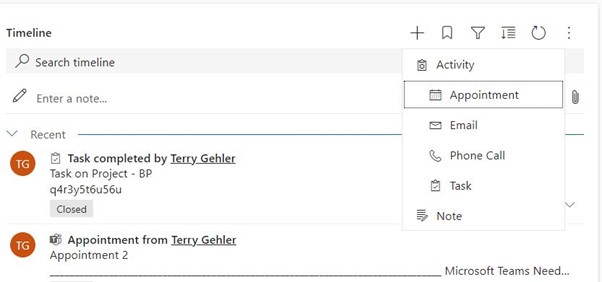
Customer Management At its core, a Model-Driven App allows you to build a custom customer database tailored to your needs. You can store and manage contact details for both individuals and businesses, adding custom fields that align with your specific workflows. Beyond just basic contact details, you can track interactions, preferences, and engagement history, providing a 360-degree view of each customer. This central repository can help your team build stronger relationships by keeping all important information in one easily accessible place, available to everyone from sales to customer service. Sales Tracking and Lead Management Every SME needs an efficient way to monitor leads and opportunities. With Model-Driven Apps, you can capture leads from various sources—whether they come in via your website, email, or a phone call. These leads can be automatically assigned to sales team members based on your criteria (e.g., territory, industry, or potential value). From there, you can track progress through each stage of the sales pipeline, from qualification to closing. Converting Leads into Projects One of the more powerful features of Model-Driven Apps is the ability to seamlessly transition a lead into a project once a deal is closed. Let’s say your sales team has nurtured a lead, walked them through the proposal stage, and finally closed the deal. Instead of manually recreating data in a separate project management tool, your app can be designed to automatically transition the lead into a project. This process could involve generating a new project record with the relevant details pre-populated (e.g., client contact info, scope of work, timeline), assigning project managers or team members, and even triggering project-specific workflows, such as task creation, scheduling meetings, or setting up milestones. This makes it easier to ensure continuity and avoid the typical handoff problems between sales and project teams. Task Management Managing tasks is crucial for both internal teams and customer interactions. Model-Driven Apps can be designed to automatically assign tasks to relevant team members based on triggers, such as a new lead entering the system or a project reaching a certain milestone. Additionally, your app can be built to track task completion, send automated reminders, and keep everyone aligned on deadlines. By logging all customer-related activities, it ensures nothing gets overlooked—whether it’s following up with a lead or sending an important document to a client. Power Automate The integration of Power Automate within your Model-Driven App is a game-changer for improving efficiency. Repetitive tasks, like sending follow-up emails, generating invoices, or notifying a team member when a project reaches a critical point, can be fully automated. Let’s say a lead hasn’t been contacted in a few days: Power Automate can be configured to send an automated follow-up email to re-engage them. Or perhaps once a project is marked complete, a workflow can trigger the generation of a project report and send it directly to the client, saving time and reducing human error. Reporting and Analytics One of the standout features of Model-Driven Apps is the ability to easily build custom reports and dashboards. Since your app runs on the Dataverse, all your business data is stored in one place, making it simple to analyse trends, measure key performance indicators (KPIs), and generate detailed reports. For example, you could create a real-time sales dashboard that tracks the status of all leads, conversion rates, and the performance of individual salespeople. For project managers, you could have reports that show project progress, overdue tasks, or upcoming deadlines—all visible at a glance. This level of insight helps businesses make more informed decisions without needing complex third-party analytics tools.
Business Process Flows
Consistency is critical, especially when it comes to sales and customer service. Business Process Flows provide structured, repeatable processes that your team can follow, ensuring that key steps aren’t skipped.
For example, your business can design a flow that dictates how sales reps qualify leads, what information must be collected at each stage, and when a lead should be moved to the next stage of the pipeline.
Once the lead becomes an opportunity, the app can enforce a standard sales process, guiding your team through proposal creation, contract negotiation, and deal closure.
Beyond sales, Business Process Flows can be used to manage customer support cases, ensuring that issues are logged, escalated, and resolved in a timely manner according to your established procedures
One of the biggest barriers for SMEs when considering a CRM solution like Dynamics 365 is the price. While it’s a powerful platform, it comes at a significant cost.

Price: £4.10 per user per app per month (excluding VAT).
More bang for your buck: The ability to build a custom app that handles CRM tasks, without the extra costs associated with a full Dynamics 365 license. This plan is ideal for SMEs that need only one app for managing their CRM.
What you get: The flexibility to build and use unlimited apps within your organisation. This plan is suitable for businesses that want to develop multiple apps for different functions, all while keeping costs significantly lower than Dynamics 365.
Price: £16.40 per user per month (excluding VAT).
In typical Microsoft fashion, they offer significant discounts to charities:
I bet you didn’t know that MS donates 10 free Power App per app licenses to all eligible charities.
By opting for a model driven application, SMEs can control their expenses while still gaining access to essential ‘CRM-like’ functionality.
This flexibility makes a Model-Driven App a compelling choice for SMEs looking to scale without the burden of high monthly fees.
“We work with organisations across many sectors of different shapes and sizes from 10 to 100,000 employees.”
Contact our team today!
Our best practices and tips for designing SharePoint Department Sites. Training, development and support for Microsoft services.
20 November 2025

Our best practices and tips for designing SharePoint Department Sites. Training, development and support for Microsoft services.
8 October 2025
Explore the differences between Power Apps and Power Automate and learn how combining them can deliver powerful, low-code solutions for businesses. Discover how these tools work together to streamline processes and improve efficiency.
21 January 2025