Valto — Keep ahead of tomorrow

News

Getting Certified in SharePoint

Explore the benefits and steps to getting certified in SharePoint. Learn how certification can boost your career and enhance your SharePoint expertise

SharePoint
Published
9 August 2024
Getting Certified in SharePoint

Getting Certified in SharePoint

Have you ever explored exams and certifications relating to SharePoint and wondered what path to take?

In this blog I am aiming to lift the lid on the approach to SharePoint Certifications, and help readers understand if these are available and worth the time and monetary investment.

What is SharePoint?

Before we begin, let me tell you about SharePoint, a platform within the Microsoft 365 suite of products available both on premises and on the cloud.

SharePoint is a little bit like a Swiss Army Knife, with various features and functionalities that help organisations streamline operations, boost productivity and enhance collaborative working in our fast-paced digital world.

It is common for businesses to embed Microsoft 365 and SharePoint into their operational foundations to deliver features, such as those below:

• Intranets and Communications
• Document Management, Control and Collaboration
• Data Management and Automation
• Knowledge and Information Sharing
• Customised Processes and Solutions
• Document and Data Security

With so many tools at a users disposal you would think a certification pathway primarily for SharePoint would be available, however this is where Microsoft make it a little more difficult.

This is not to say it is not achievable, but be prepared to answer questions about SharePoint amidst other topic areas covering server administration and Power Apps management etc.

Getting certified in sharepoint
Getting Certified in SharePoint

Is SharePoint Certification Worth It?

In my opinion, all certification has a value as it can assist in demonstrating a competency in a specific subject area. This may assist for building out your profile to help move up a career ladder or switch into a different role. However, will always feel that performance and delivery will outweigh a certificate when it comes to expressing your skill set. Take driving as an example. Driving instructors are teaching a skill, but are also teaching you that skill in a way that allows you to pass a test. The real training begins when you are behind the wheel, by yourself and heading on to the motorway for the first time! With this analogy in mind, I believe it proves that experience will outweigh a certificate as yes I can achieve over 75% in a test, but do I have experience of building and configuring the applications in multiple industry pillars. If working for a Microsoft Service Provider (MSP) then certifications are absolutely worth it, as they help organisations build up their partnership status with Microsoft which leads to additional benefits. If just getting started in SharePoint, then the pathway to achieve certification is worth it as it will help guide you on a journey to learn the foundation of the platform. However, I advise that you always look at putting the lessons you learn into practice time after time to build actual knowledge in the platform as opposed to just being “book smart”! A strategy I like to use when bringing Junior Employees through the ranks of Modern Work and SharePoint within Valto is to have them setup a demonstration tenancy. This then provides them a space to learn building and configuring SharePoint. Most importantly this gives them a space to fail and to learn lessons from mistakes. Following some training that I deliver on SharePoint, I ask the junior employee to take their lessons and build an Intranet for a brand of their choice, perhaps their favourite football team or car brand. This opens up a pathway for reviewing branding on a particular website, and then bringing the learnings together in SharePoint to deliver against a specific goal. I personally find this a more engaging way to learn, and it also helps build up a portfolio of designs and configurations to showcase SharePoint experience and talent that a certificate will not achieve.

How do I attain SharePoint Certification?

Microsoft provide varying certifications at different levels that include elements of SharePoint. The levels available are defined below.

Fundamental: An introduction of SharePoint Server and SharePoint Online.
Applicable Certification: Microsoft 365 Certified: Fundamentals (opens in a new tab)
Associate: At least 2 years experience with SharePoint.
Applicable Certification: Microsoft 365 Certified: Teams Administrator Associate
Expert: 2 to 5 years of hands on experience with SharePoint.
Applicable Certification: Microsoft 365 Certified: Administrator Expert (opens in a new tab)

As you will see from the above, there are a number of years experience that are advised against each certification. This aligns with the need for a learning strategy to help individuals build experience in the platform.

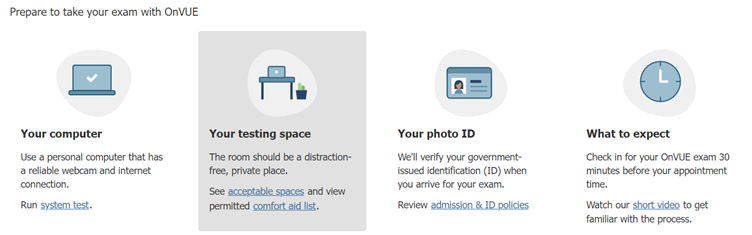
From each of the links above, you will be provided with an option to book an exam, when you are feeling confident you can follow this path to get it in the diary. Exams can be held in person at a test centre, but participants typically now that these online.

Take note of the guidelines that are shared to ensure you have the relevant IDs and your room is prepared, to ensure the exam is not voided and that you give yourself the best opportunity to pass. Remember, preparation is key to success.

SharePoint Certification Testing

Getting Certified in SharePoint – Our Expert Says

Valto have been working in the Microsoft 365 and SharePoint space for many years, with a number of highly skilled consultants and developers across all areas of the application stack.

If you are looking for training in SharePoint, or in other areas of Microsoft 365 then reach out to us, and we can support you through delivery or through our trusted partners.

Furthermore, if you are struggling for time to learn these applications then why not let us take away the worry and deliver your needs through our tried and tested processes.

We are always happy to discuss your development needs for SharePoint, helping you build products, processes and strategies to get the best return on investment for the licenses you already pay for.

Trusted by Leading Brands

“We work with organisations across many sectors of different shapes and sizes from 10 to 100,000 employees.”

Contact Form

Contact our team today!

Each Microsoft Certification provides a set of Learning Pathways that can be used to prepare for the exam, but also build up knowledge with the subject/topic of choice.

You may choose to access the learning Pathways purely to find courses that interest you within the Microsoft 365 space, with all training available to be browsed here (opens in a new tab)

Depending on where you live, you may also have access to instructor led courses delivered in person online. This is useful for subjects that you may be struggling with, or if you have preference for a more structured course delivery vs having to keep yourself motivated to train alone and at your own pace.

Instructor led courses will also allow for you to build connections with others on the same journey, which in itself can be really beneficial to your career. Check out this course delivered by our training partners: Microsoft 365 Fundamentals Training (MS-900) (opens in a new tab)

A quick Google on the exam you are looking to pass can also be beneficial, providing alternate methods for differing learning styles. Here is an example YouTube video that is stacked full of great content to help you pass this exam, just note the dates relating to content you view online, as Microsoft 365 updates rapidly!

Finally, as per my earlier thoughts, putting what you learn into practice is the best way to embed the behaviour and really understand the topics you are learning about.

Therefore, I will always advise that you try to build what has been taught via Google, Learning Pathways and Instructor Courses so that you can gauge your own level of confidence in the subject matter.

What to study?

Each Microsoft Certification provides a set of Learning Pathways that can be used to prepare for the exam, but also build up knowledge with the subject/topic of choice. You may choose to access the learning Pathways purely to find courses that interest you within the Microsoft 365 space, with all training available to be browsed here Depending on where you live, you may also have access to instructor led courses delivered in person online. This is useful for subjects that you may be struggling with, or if you have preference for a more structured course delivery vs having to keep yourself motivated to train alone and at your own pace. Instructor led courses will also allow for you to build connections with others on the same journey, which in itself can be really beneficial to your career. Check out this course delivered by our training partners: Microsoft 365 Fundamentals Training (MS-900) A quick Google on the exam you are looking to pass can also be beneficial, providing alternate methods for differing learning styles. Here is an example YouTube video that is stacked full of great content to help you pass this exam, just note the dates relating to content you view online, as Microsoft 365 updates rapidly! Finally, as per my earlier thoughts, putting what you learn into practice is the best way to embed the behaviour and really understand the topics you are learning about. Therefore, I will always advise that you try to build what has been taught via Google, Learning Pathways and Instructor Courses so that you can gauge your own level of confidence in the subject matter.

Talk to our team

Contact Us

Share this

Related reading

NewsSharePoint

Mastering Document Control with SharePoint

Struggling with document versioning, policy visibility or outdated files? Learn how Valto’s SharePoint-based Controlled Documents Solution solves the most common document control challenges.

7 May 2025

Atlassian Server is end of life
NewsSharePoint

Atlassian Server is End of Life

Is your organisation still using Confluence on an unsupported version? Discover the benefits of migrating to SharePoint Online, including better security, cost savings, and seamless integration with Office 365.

22 January 2025