


News
Key Features of Microsoft Viva Connections
Make your Microsoft Teams a one stop shop for all business needs including employee engagement with Microsoft Viva Connections. Microsoft Viva offers a suite of powerful tools designed to enhance employee engagement. In this blog we are going to dive into the key features of Microsoft Viva Connections.
- Published
- 11 October 2024
Key Features of Microsoft Viva Connections
Make your Microsoft Teams a one stop shop for all business needs including employee engagement with Microsoft Viva Connections.
Microsoft Viva offers a suite of powerful tools designed to enhance employee engagement. In this blog we are going to dive into the key features of Microsoft Viva Connections.
Watch the video (opens in a new tab)
SharePoint vs Viva Connections
I just wanted to start off by telling you though that Viva Connections is based on SharePoint. Although it has its own unique interface that you can access through Microsoft Teams, a browser, mobile apps, it is based on SharePoint.
So, if you’ve already used to using some of the components of SharePoint, like news and events and some of these other kind of features, you’re going to find it very easy to pick up Viva Connections.
In fact, viva connections has a SharePoint site which is associated to it and you can actually manage The dashboard elements of viva connections and see the analytical sides of viva connections directly from the SharePoint site.
Microsoft Viva Connections Newsfeed
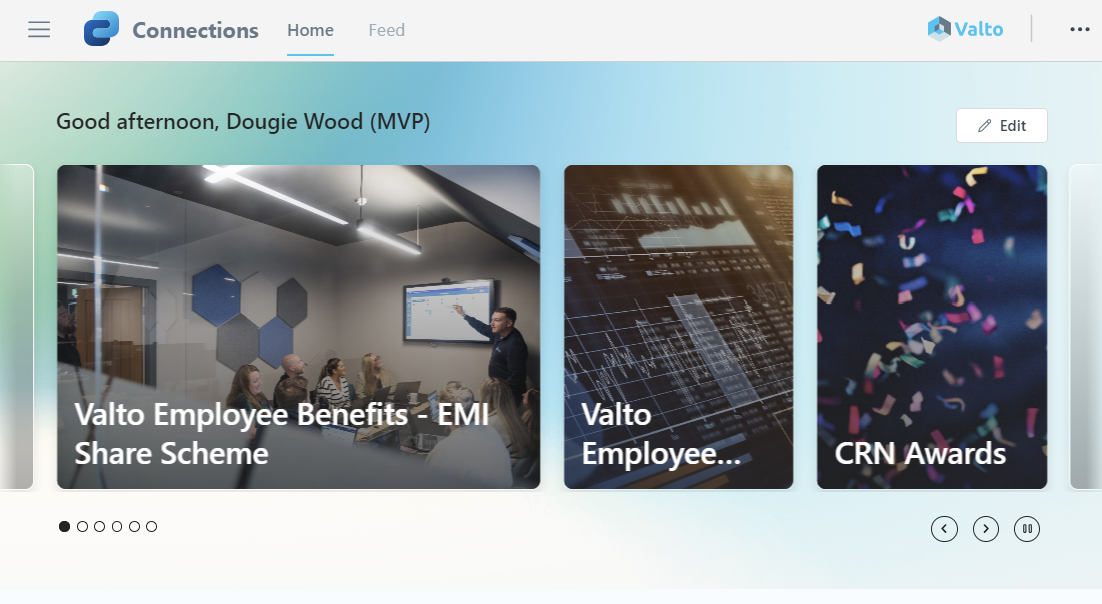
So let’s talk about the first feature of Viva Connections, which is the News component.
Now this is the most visible, obvious feature of Viva Connections, because it’s pushed right to the top of the user interface.
The News bar across the top is essentially pulling from the News site that we’ve got selected. In the background, as I say, it’s based on SharePoint. So it’s nice and simple to create news articles inside of SharePoint, which will then automatically pull through Viva connections.
Now users can choose to cycle through and kind of see different news articles. By clicking on a particular article, it will then launch the full article to display the SharePoint page that was originally creating it.
Viva Connections Dashboard
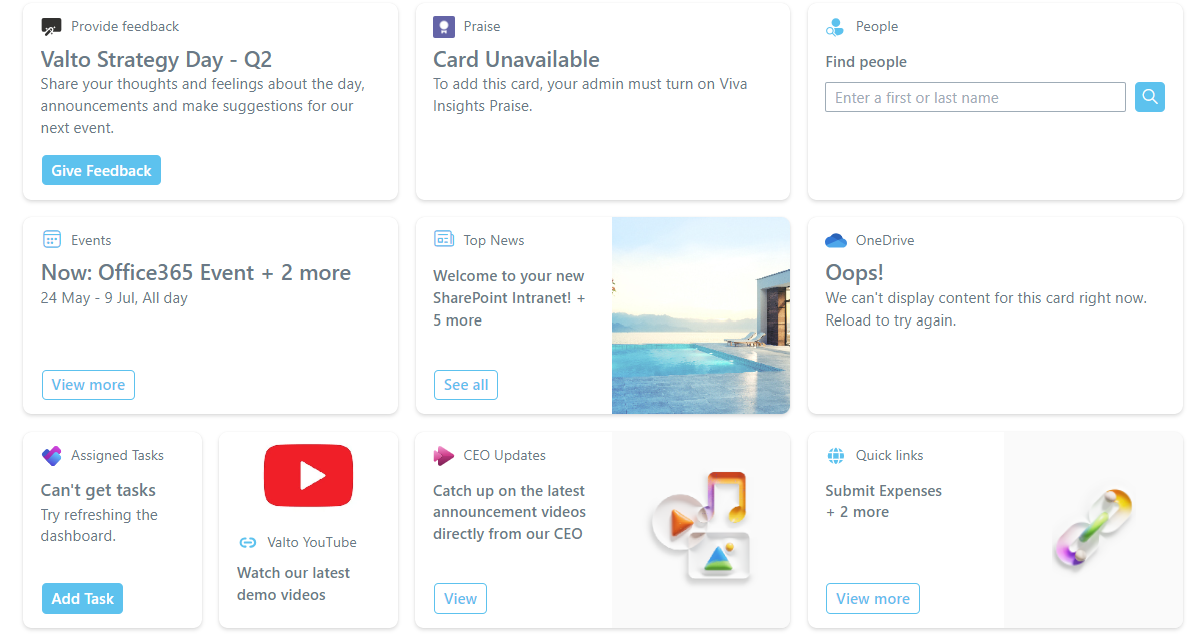
The next feature is referred to as the dashboard. Now the dashboard is essentially a collection of cards, which are almost like quick links in themselves that designed to provide users a quick way of accessing a specific app or functionality. These links are not only Microsoft products but even third parties that you wanted to integrate into as well. So let's go and take a look. So back in Viva Connections, all we need to do is scroll down and you can see we've got this dashboard here. Now, these are basically tiles, or what they refer to as cards, which I have configured onto this example. But you can build your own cards. So what I've done here, is I built a card which basically is asking our employees to share their thoughts and feelings about our recent strategy day. All about the announcements made and make potential suggestions for our next events by clicking on give feedback that will then launch the Microsoft feedback form. Of course then an employee can then go through, fill out the form and then just click submit to submit their answers. But I should also stress that we could make this card into anything we want anything that we've got a title description and a url to to click off to we can actually have multiple buttons as well.
Viva Connections Resources
The next thing to talk about is resources. Essentially resources is a dedicated area for quick links inside of viva connections.
Now, I know we’ve seen that we’ve got a couple of different types of link cards we can already add to viva connections, but there’s also a dedicated area that you could add in small links which are essentially like useful links.
Sometimes referred to as quick links, which really call it out and make it much easier for people to see dedicated links.
As Viva Connections is connected to our SharePoint Online intranet, we can automatically pull through the navigation bar links from the intranet into Microsoft Viva Connections resources bar.
I can import and i’ll automatically pull through each of these quick links. We can then edit them individually if we wanted to to change the icons so we can choose a totally different icons.
So we’ve also got our resources area as I say, it’s a nice way of calling out the individual links on the page so they stand out slightly separate maybe from some of these other kind of busier areas in the dashboard.
Other Viva Suite Products
And then finally inside of viva connections There’s a error at the bottom which is going to promote the use of more viva products So viva as I say is a suite of products.
It’s not just one product. So viva connections doesn’t just kind of exist on its own. There’s so many other viva products including viva insights, viva engage and essentially once you start using these viva products, they all start to integrate a little bit and will start promoting the use of other products with inside of the viva suite. So if I scroll down further you can see there’s explore more Viva apps.
We’ve got Viva in general, engage, insights, learning, as well as the pulse options as well.
So this is a fantastic way of kind of promoting more of the kind of apps of Microsoft Viva and getting adoption of all the Viva suite applications, increasing whilst people are using Viva connections.
Microsoft Viva Connections – Our Expert Says
SharePoint has long been known as the collaboration tool within Microsoft 365, but stand back as Microsoft Viva Connections kicks it up a notch!
I love Viva Connections as it truly simplifies the key elements of a SharePoint intranet for users to access quickly.
The key elements of intranet design include sharing news and announcements, events and quick links. Viva Connections has accomplished this with a really simple and sleek interface that anyone could use.
From my own experience I have seen that once it has been properly deployed it is simple for end users to continue to configure themselves when they need to change something.
Reach out to us today to discuss how we can help you adopt Viva Connections.
Trusted by Leading Brands
“We work with organisations across many sectors of different shapes and sizes from 10 to 100,000 employees.”
Contact Form
Contact our team today!

Talk to our team
Contact Us
Related reading

EventAI & Automation
What’s next? How data, automation & AI are reshaping business
17 November 2026 · 11:00 · 20 Stories, Manchester

NewsAI & Automation
Valto and Holstein UK launch major multi-year digital transformation programme
New partnership will modernise core systems and create a connected, data-driven platform powered by Microsoft technologies.
6 October 2026