
NewsOffice365
New Microsoft AI tools just announced at Microsoft Build 2025
All NEW Microsoft AI tools announced at Microsoft Build 2025 . Discover Microsoft CEO's AI vision to scale businesses with AI Chatbot Agents.
23 May 2025

News
Discover the AI-powered virtual assistant, Microsoft Copilot, and how it can streamline workflows and increase productivity in Microsoft 365.
Microsoft Copilot is an AI-powered virtual assistant designed to help users navigate the complex world of Microsoft 365. This new addition is set to revolutionise the way users interact with the suite and streamline workflows across the entire platform.
Microsoft has already released Copilot as a preview for Visual Studio and Visual Studio Code, which are primarily used by developers.
However, Microsoft has not yet provided a specific release date for when Copilot will be available for the entire Microsoft 365 suite.
As of now, it is still in the early stages of development, and the company has not provided any specific details about when it will be released.
Microsoft (opens in a new tab) has stated that it will be releasing more information about Copilot as it becomes available, so it’s important to keep an eye out for any updates in the coming months.
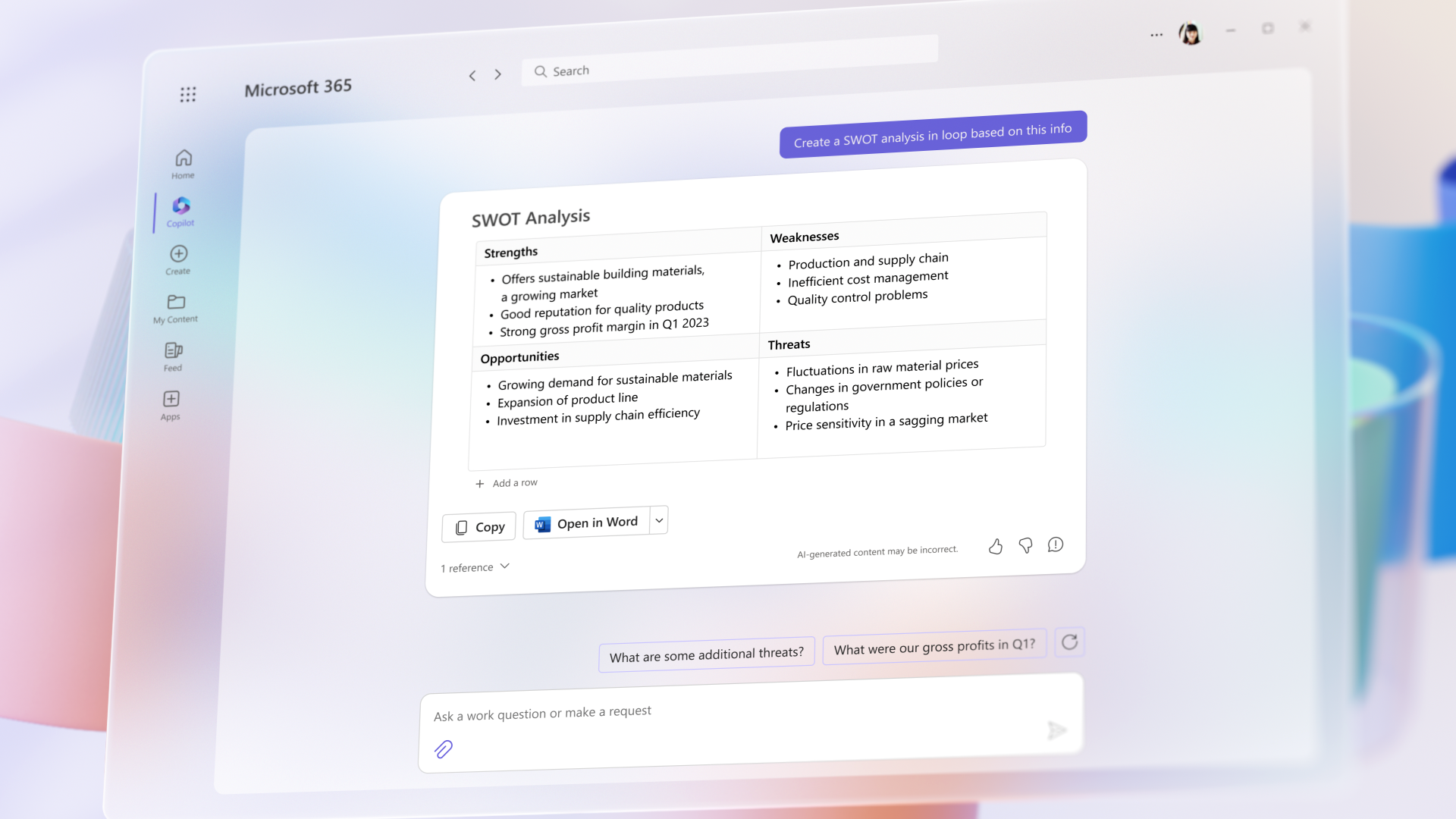
Copilot is a powerful tool integrated into Microsoft 365 applications that can assist users in various ways. In Microsoft Word, Copilot can write, edit, and summarize content as users work, while in PowerPoint, it can turn ideas into a well-designed presentation using natural language commands. In Excel, Copilot can help users identify trends, create data visualizations, and gain valuable insights in less time. In Outlook, Copilot can synthesize and manage emails to improve communication efficiency, and in Teams, it can provide real-time meeting summaries and action items. Additionally, Copilot in Power Platform provides low-code development tools that can help developers of all skill levels streamline development. Finally, Business Chat uses data from across Microsoft 365 to summarize chats, write emails, find important dates, and even create plans based on project files. With Copilot, Microsoft 365 users can streamline workflows, save time, and increase productivity.
One of the most significant benefits of Copilot is that it will help users navigate the suite with greater ease.
Copilot will use natural language processing and machine learning algorithms to understand user requests and provide helpful responses.
This will allow users to find the information and tools they need quickly and easily, without having to navigate through multiple menus and settings.
Another way that Copilot will help users across the Microsoft 365 suite is by enhancing collaboration.
Copilot will be able to suggest collaborators based on a user’s past collaboration history and work patterns, which will help users to find the right people to work with more efficiently.
Additionally, Copilot will be able to suggest appropriate channels for communication and provide real-time translation for messages sent in different languages, which will help to break down language barriers.
Copilot will also help users across the Microsoft 365 suite to be more efficient. By providing quick access to information and tools, Copilot can help users complete tasks faster and easier.
For example, if a user is struggling to find a particular feature in Microsoft Word, they can ask Copilot for help. Copilot will then search through the application’s help files and knowledge base to provide a relevant response.
If the user is still having trouble, Copilot can even offer to connect them with a human support representative.
Copilot can also assist with onboarding new users, reducing the time and resources required for training.
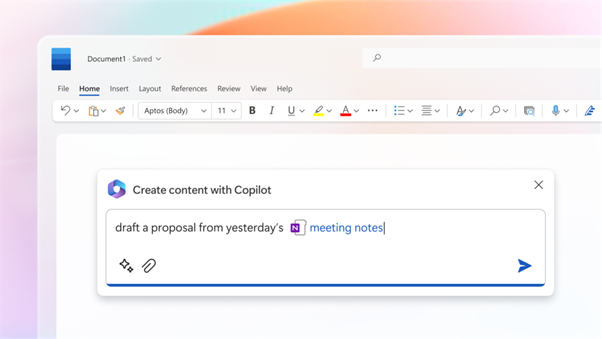
Finally, Copilot will help users across the Microsoft 365 suite by providing personalized recommendations.
Over time, Copilot will learn a user’s preferences and provide customized recommendations based on their work habits.
This will help users to work more efficiently and effectively, as they will be able to access the tools and information they need more quickly.
Microsoft 365 is a powerful suite of applications that helps businesses and individuals streamline their work processes and stay organised. One of the newest additions to the suite is Copilot, a virtual assistant designed to help users navigate the complex world of Microsoft 365.
In this blog post, we’ll explore what Copilot is, how it works, and the benefits it can bring to users.
Microsoft 365 is a powerful suite of applications that helps businesses and individuals streamline their work processes and stay organised. One of the newest additions to the suite is Copilot, a virtual assistant designed to help users navigate the complex world of Microsoft 365. In this blog post, we’ll explore what Copilot is, how it works, and the benefits it can bring to users.
All NEW Microsoft AI tools announced at Microsoft Build 2025 . Discover Microsoft CEO's AI vision to scale businesses with AI Chatbot Agents.
23 May 2025


17 November 2026 · 11:00 · 20 Stories, Manchester