Valto — Keep ahead of tomorrow

News

Microsoft Copilot for HR

We will be showing you a day in the life of a HR hiring manager that's using Copilot for Microsoft 365 to simplify the day-to-day HR manager's job. Demonstrating how to streamline the hiring process for a new position. As a Microsoft partner, Valto, can help you accelerate Microsoft Copilot adoption by conducting employee training sessions, and we also offer fixed price adoption strategies.

Copilot
Published
18 September 2024
Copilot for Human Resources

Microsoft Copilot for HR

Our resident Microsoft MVP and Microsoft Copilot expert Dougie Wood recently created this video to show you how Microsoft Copilot for HR is revolutionizing the world of Human Resources.

We will be showing you a day in the life of a HR hiring manager that’s using Copilot for Microsoft 365 to simplify the day-to-day HR manager’s job. Demonstrating how to streamline the hiring process for a new position. As a Microsoft partner, Valto, can help you accelerate Microsoft Copilot adoption by conducting employee training sessions, and we also offer fixed price adoption strategies.

Watch the video (opens in a new tab)

Creating interview questions from a job description

Microsoft Copilot for HR purposes truly is a game changer. There are so many tasks that could be automated or streamlined using AI.

So let’s jump into the day of a hiring manager and look at how Copilot for Microsoft 365 can make his life easier.

Starting off at the beginning of the day we’re going to use Copilot to create a set of interview questions based on a job description.

Omar the HR Manager has several meetings lined up today to interview potential candidates for a senior animation designer role. But in fact, I am going to use a real-world example of a PowerApps Developer, role that Valto have got open currently.

I am going to start off by going to the Valto website, under the about us section, I’m going to go to join our team, and then I’m going to go and find our job role.

We have got a job role here for our Power Platform developer. Then what I’m going to do is just select all the text on the page, copy that, and then I’m going to go into Microsoft Copilot.

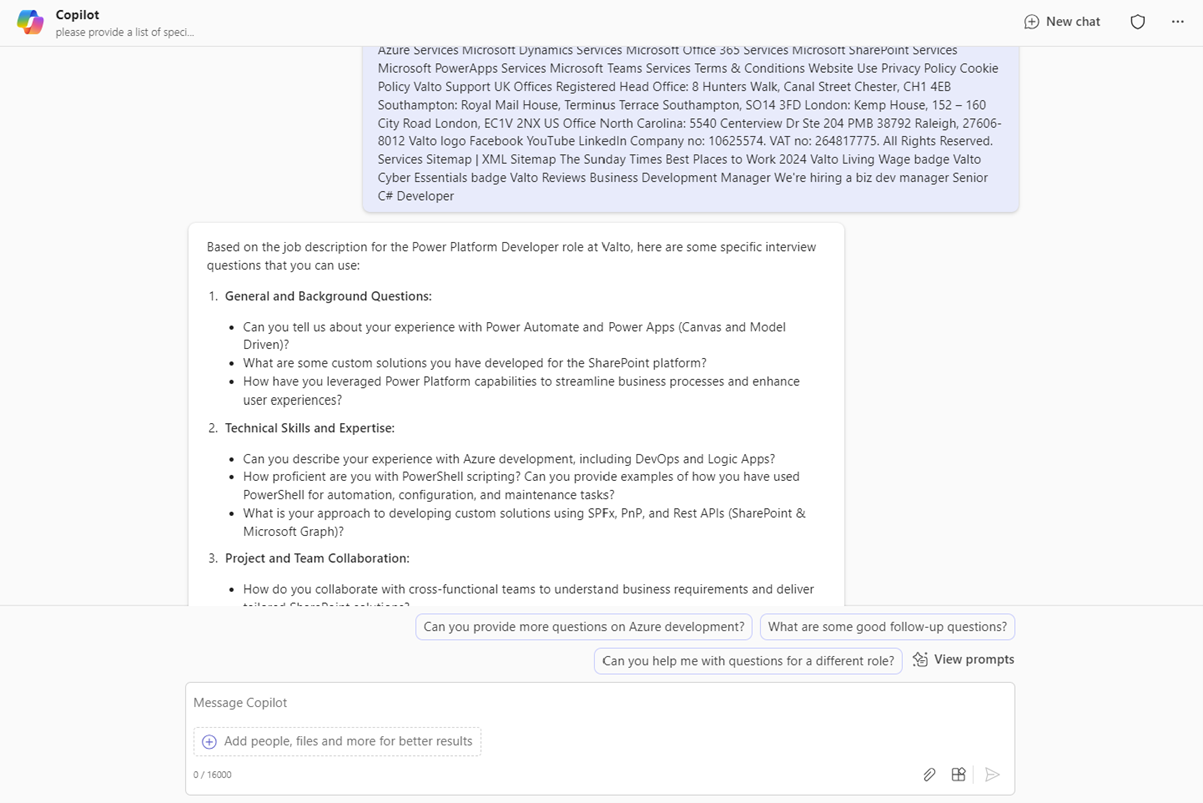
I’m going to say to Copilot, please provide a list of specific interview questions. Based on the job description below.

Here’s some great questions Microsoft Copilot has come up with such as:

  • Can you describe your experience PowerApps specifically with Canvas Apps and Model Driven apps?
  • How would you utilize power platform capabilities to enhance business processes or user experiences in your previous roles?
  • Can you provide examples of custom solutions?

These are all fantastic questions as obviously the HR hiring manager would not be a PowerApps specialist, but they can quickly get some questions to determine in the first interview whether this person would be a good fit for this role.

Summary of email in Outlook

Summarise a candidates CV with Microsoft Copilot AI

Now we’ve got our interview questions, but before each of the interviews, Omar has Microsoft Copilot summarize the next candidate’s resume highlighting their skills, experiences, and qualifications.

So what he will want to do is based on candidate and then their CV provide a summary of their skills, experiences, and qualifications of the candidate.

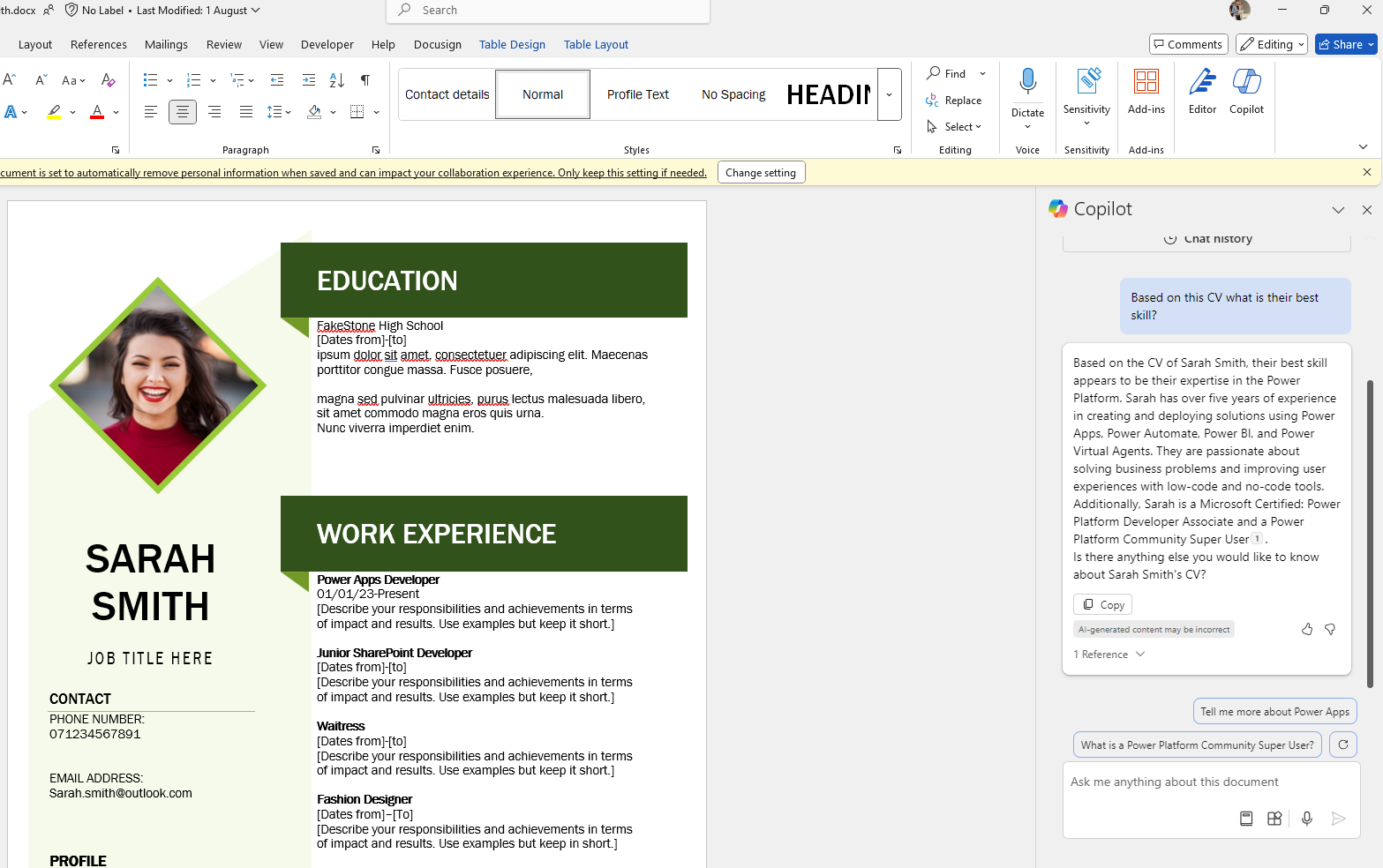
I can open up a CV in Word, which might look a little bit like this as a sample.

Then I can ask Copilot  to please provide a summary of this CV obviously this cv is very light as it is an example. It’s just a sample.

I’ve just knocked together So it’s not going to have a load of details in here. But a lengthy CV might need to be summarised quickly to save time.

They’ll be quite large can be over multiple pages So this is a great way of pulling out that kind of information.

So you can see here it’s pulled up that power platform developer with five years of experience creating and developing power app solutions.

Microsoft Copilot for Outlook summary of email
Copilot for Human Resources

Generate follow up questions post interview

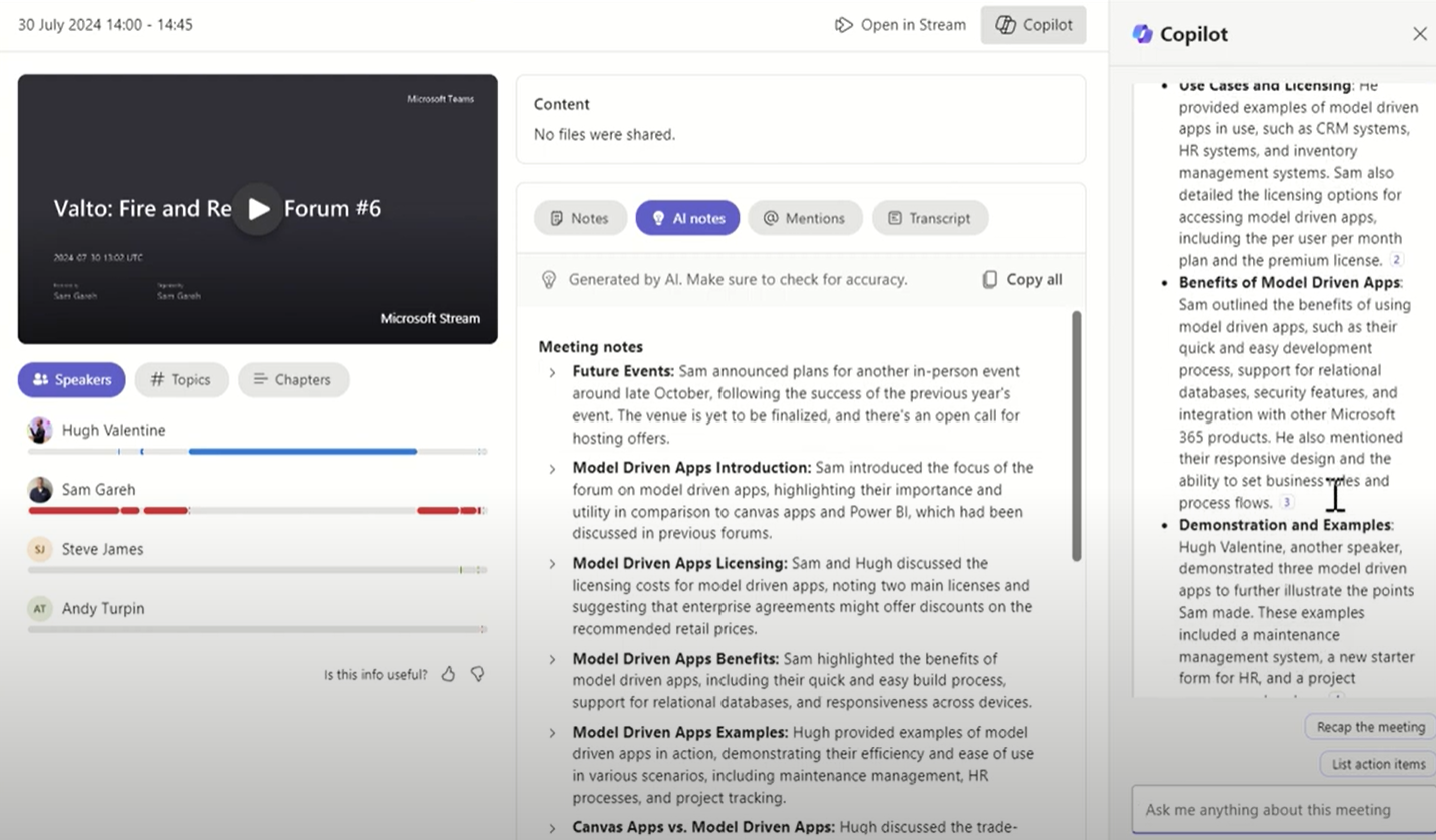
The next thing omar can do is after each interview Omar commands copilot to suggest follow up questions and summarize the key points the candidate made so in copilot in teams You can use copilot to summarize the key points made by that candidate and suggest follow up questions to learn more about their skills and experience. I don't obviously have a real interview video that's been recorded and processed by teams, but I do have a meeting that I recently joined, which was the fire and rescue forum. So we get together all the fine rescues inside of the UK and we talk to them about different Microsoft technologies. My colleague Sam was presenting during this, so I can ask Microsoft Copilot, for example, what was the key points that Sam made during this meeting? And that's going to go away, it's going to look over this. Now, of course, with the recap section, we've already got the meeting notes. We can see some key things here. But you can see this is where It's not going to break down the key points I made. He obviously did the introduction, which we can see he did. He talked about use cases and licensing, the benefits of model driven apps, and he gave a demonstration as well of this. We could go into this further and if this was an interview situation, obviously we could ask it to generate some follow up tasks, follow up questions, based on what the person said. But I just wanted to evidence here that you can see that teams is fully aware of what has been spoken about presented during the meeting and then we can use Microsoft Copilot to drill into that a little bit more to get more insights. And maybe I say if it was an interview, some more questions that we might go back to the candidate with.

Microsoft Copilot creating job interview questions

Catch up on your work day with Copilot for Microsoft 365

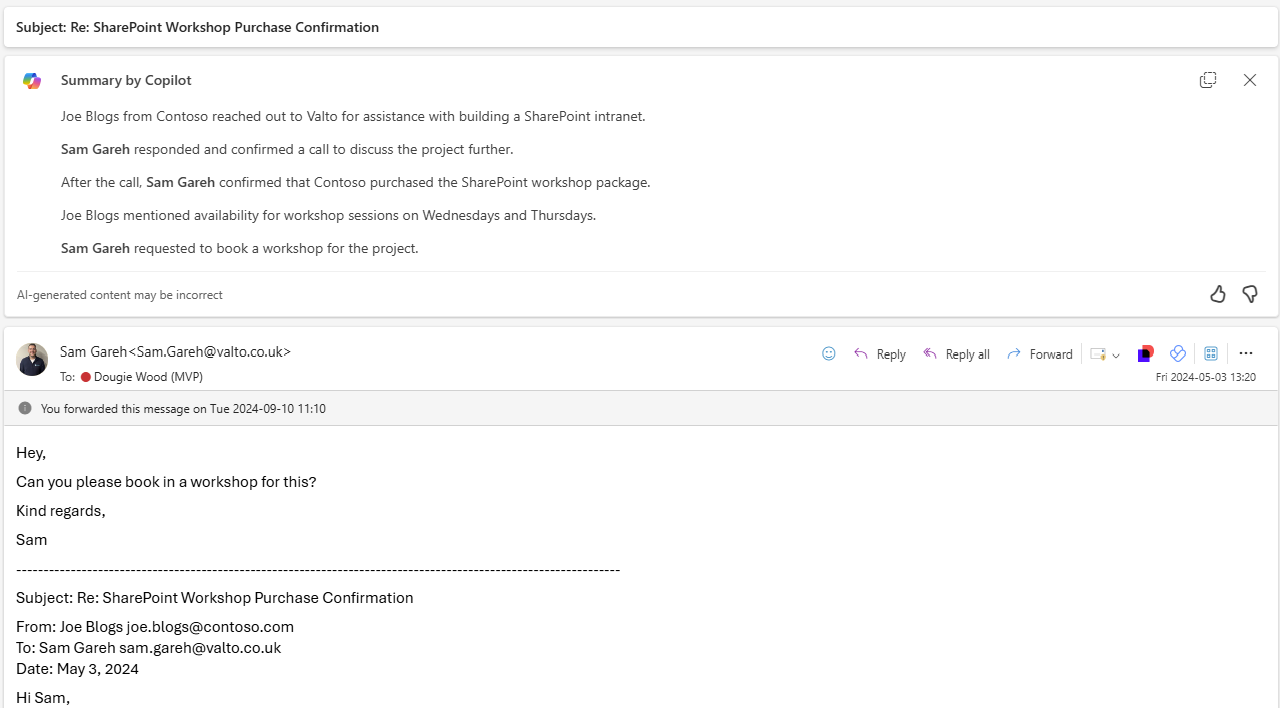
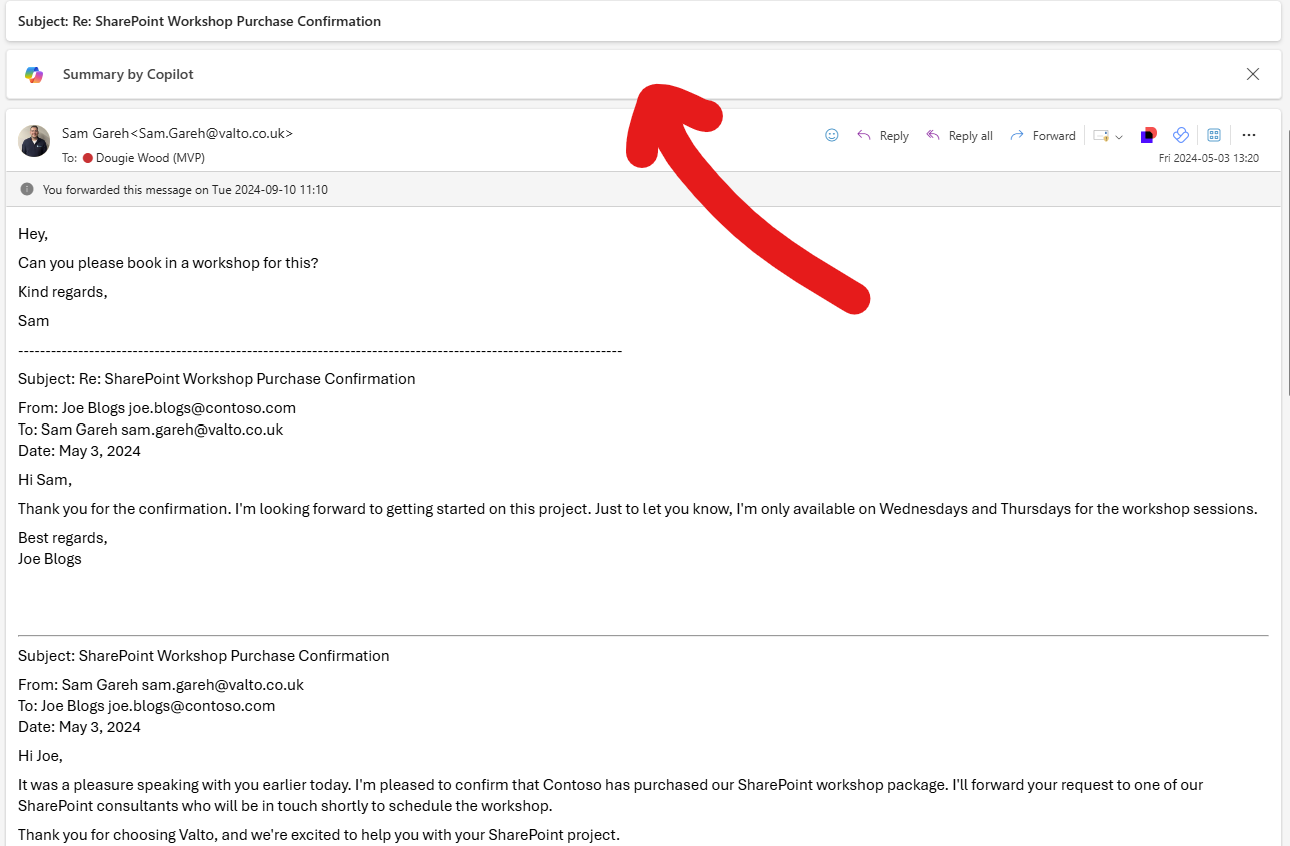
And then finally at the end of this process Omar has missed a few calls and a few emails whilst he's been inside of these different interviews. He can command Microsoft Copilot for Outlook to summarize the email threads he needs to catch up on quickly. There's a couple of different ways he could do this. You could get Copilot inside of Outlook to summarize all of his emails or even if it was a one very lengthy email that he was were looking at he could get it to summarize just the one. In this example here I have got this very lengthy email that Sam has forwarded on to me. So instead of going through and scrolling back maybe weeks months or even years sometimes email threads can go on for Instead I can click on the summary by co pilot and what this will do is it's going to scan the email It's looking for the key points. It's combing through the information and it's providing me a summary. So you can see below, It says Joe Blogs from Contoso reached out to Valto For assistance with building a SharePoint intranet. Sam from Valto confirmed that Contoso purchased their SharePoint workshop. Joe Bloggs informed Sam that they can only be available for Wednesdays and Thursdays for a workshop. And Sam asked me to book in that workshop. Joe Bloggs is looking forward to getting started on the project. So that means I don't have to go through all of that email thread. Tens, hundreds of responses in there. It summarized it for me exactly what I need to do. So, wearing my hat now as Omar, If this was the HR manager, you're going to be in and out of a lot of meetings, recruitment, things like that. There could be a lot of emails. You could use Microsoft Copilot to help summarize your emails afterwards to get back up to speed quickly.

Microsoft Copilot can prioritise emails in Outlook

Now, a lot of people are using Microsoft Copilot from an efficiency point of view to actually get back up to speed. Not just provide sort of text and words and building documents quicker, they’re also using Microsoft Copilot AI to catch up quickly.

Microsoft announced in 16th of September 2024 the new release wave 2 of Microsoft Copilot.

In this announcement they released a new feature that will also help prioritise emails from specific contacts to help you tackle your mailbox quicker. Responding to the priority emails quicker.

This means Omar would not need to waste time filtering through all of the emails to find the urgent ones he needs to reply to with whatever remaining time he has left at the end of the working day.

If you’re in a lot of meetings and you’re maybe missing messages, missing emails, things like that, you can use Microsoft Copilot to essentially catch you up much quicker than you would have been able to do purely just do on your own.

I hope you enjoyed that. I said the day in the life of Omar the HR manager. If you need any help with Microsoft Copilot reach out to us today.

Microsoft Teams meeting summary

Our Experts Opinion

Microsoft Copilot for HR is going to drastically transform Human Resource departments!

The question HR departments should be asking themselves is not “should we adopt Microsoft Copilot”. It should be “Can we afford not to”. Following on from a successful Copilot adoption project, we have seen the largest time savings coming from HR departments. They are so admin heavy tasks that is simply streamlined using Microsoft Copilot AI.

– Dougie Wood, Microsoft MVP

Trusted by Leading Brands

Our Microsoft Copilot Consultants work with organisations across many sectors of different shapes and sizes from 10 to 100,000 employees.

Speak to Microsoft Copilot Consultants

Speak to a Microsoft Copilot expert in our team today!

Sarah CV Example for Microsoft Copilot AI

Talk to our team

Book FREE Consultation

Topics
Share this

Related reading

A day in the life of a copilot user
NewsCopilot

A Day in the Life of a Copilot User

Discover how our consultancy team uses Microsoft Copilot across Outlook, Teams, Excel, Word and more to streamline workflows, boost productivity, and deliver high-quality client engagements.

7 May 2025