Valto — Keep ahead of tomorrow

News

Microsoft Copilot Plan Designer

Discover the new Power Platform Plan Designer, powered by Copilot, and how it helps developers and consultants build intelligent applications quickly and efficiently with AI-driven prompts and multimodal inputs.

CopilotPowerApps
Published
6 January 2025
Microsoft Copilot Plan Designer

Introducing the Power Platform Plan Designer, powered by Copilot

I recently attended the Power Platform Community Conference 2024, hosted in the MGM Grand Las Vegas, and what an event it was. A great many speakers and community of members attended the event and hosted various sessions and workshops to help spread knowledge regarding the Power Platform.

One key release that was shared was the Plan Designer, which will no doubt be renamed a couple more times, perhaps PowerPlan, PilotPlan or CoPlan – let’s wait and see.

This new tool was definitely the standout release and was the talk of the talk for the conference, so it is for that reason I would like to introduce this tool and provide my thoughts regarding it.

Intelligent Applications, Built Intelligently

Firstly, before diving into the Plan Designer features and functionality, I feel it is important for readers to understand the vision that has led to this release.

This vision relates not only to the creation of intelligent applications through inclusion of Copilot and artificial Intelligence (AI) functionality, but also to ensure that consultants, developers and architects have tools at their disposal to intelligently start creating these applications through Copilot prompting.

It is from these discussions, held internally within Microsoft, that the Plan designer was conceived providing an intelligent solution to building intelligent applications.

using Microsoft 365 to enable business growth

So, what is Plan Designer?

If I were to create an elevator pitch for what I feel the Plan Designer delivers as a tool it would be as follows;

A consultancy/developer support tool, utilising AI to analyse a set of multimodal prompts and artefacts, which enables users to create and manipulate plans for the development of one to many Power Apps.

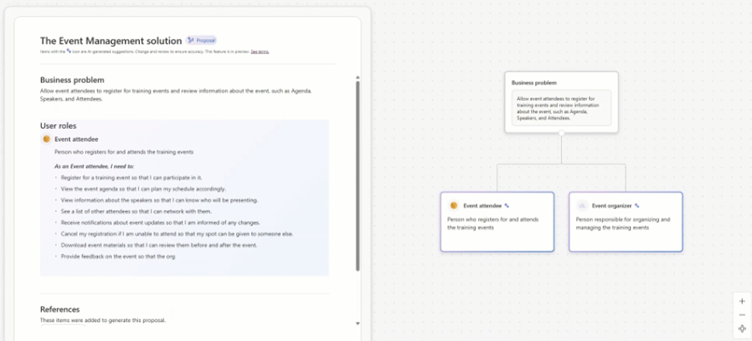
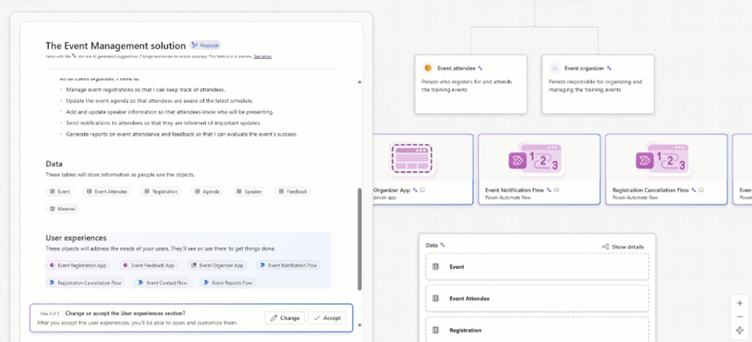
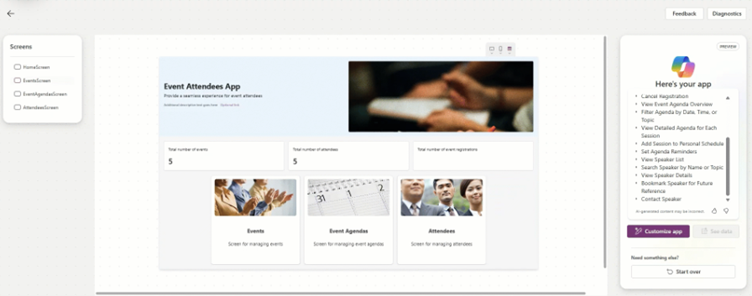
The delivered plan will consist of user roles, requirements, technologies and data models, all of which are used to then automatically create an app designed to meet the needs of the original prompt.

copilot plan designer
Microsoft Copilot Plan Designer

How does Plan Designer work?

Plan Designer will reside within the Power Apps Studio, allowing for creators (or Makers as Microsoft will define them) to initiate the build of an application via a Copilot prompt which outlines their business problem e.g. To be able to manage corrective and preventive actions from with a central location and track their status, based on the number of tasks created against each of them. The initial prompt can also be improved with the use of attachments, therefore users may include process diagrams, ERD diagrams, pictures of existing apps and pictures of apps they like as inspiration. Documents that are attached may either be created in Microsoft Office Suite tools like Visio or just simply a picture of a whiteboard with it drawn out. It is this ability to attach multiple types of files which adds to your initial Copilot prompt which leads the tool to be known as being multimodal. Once the initial prompt and information sharing is complete, Copilot will analyse the request and over time generate documentation that aligns with the application needs, suggests differing technology to be used. Once stage has been concluded, it is time for users to review the outputs and potentially make additional prompts to help amend the output e.g. Copilot may have suggest that admis can create a Corrective Action but it may be that the full management team (more than 2) will need access to review this. The analysis will continue to be updated through extra documents and extra context being given, until the user stories and diagrams have been confirmed. It is following these steps that a Model Driven App, Canvas App or both will be created including all require tables, metadata and even dummy data for testing. Once in place developers can continue to work with the system and finalise the design and functionality, however they would have saved a large amount of time with the initial delivery by Copilot and Plan Designer.

Copilot Agents in Plan Designer

As a continuation of understanding how Plan Designer works, reader should also learn about Copilot Agents.

These agents can be developed to use AI so that they can act independently to provide answers, information or automate tasks following a specific trigger e.g. A Copilot Agent may watch for an email to hit a specific inbox, when it does it will extract data from that email and create a new record in SharePoint including specific answers or recommendations based on the data in relation to all other grounding data.

I like to think of Copilot Agents a little like having personal assistants or some junior members of staff.

In current times a user may get another person in an organisation to enter some data into a new location, however wouldn’t it be great if this could be automated, well with Copilot Agents it can be.

The image above represents this in a very simplistic fashion. Essentially we take our Power Platform User, and add Copilot into their workflow allowing them to create a prompt.

Furthermore, a set of Copilot Agents then support Copilot in generating a number of different outcomes from the prompt based on their specialism that they have been grounded to deliver e.g. Scenario Agent, Data Model Agent, Solution Architect Agent and Ap Design Agent. All of these pieces come together to form the plan that is delivered by Plan Designer.

building an app with copilot plan designer

Power Platform Plan Designer, powered by Copilot – Our Expert Says

Much like the great majority of the Power Platform community, I was amazed when I saw this demonstrated live within the Power Platform Community Conference 2024.

It was only a few weeks prior in which me and my consultancy team explored Copilot together to see how it would behave when trying to generate user stories based on our workshop transcripts. Little did we know that Microsoft were hiding something up their sleeves!

I cannot wait to get my hands on this tool, which we anticipate releasing in perhaps a couple of months, and have already signed up for the Early Adopters Program here. (opens in a new tab)

I believe this tool will greatly support citizen developers in build their applications, as well as supporting senior developers in starting their applications quickly saving a large amount of time and effort.

Trusted by Leading Brands

“We work with organisations across many sectors of different shapes and sizes from 10 to 100,000 employees.”

Contact Form

Contact our team today!

tweaking app in plan designer

Talk to our team

Contact Us

Share this

Related reading

A day in the life of a copilot user
NewsCopilot

A Day in the Life of a Copilot User

Discover how our consultancy team uses Microsoft Copilot across Outlook, Teams, Excel, Word and more to streamline workflows, boost productivity, and deliver high-quality client engagements.

7 May 2025