Valto — Keep ahead of tomorrow

News

Power Apps IF Function (With Examples)

Learn how to use the IF function in Power Apps to add conditional logic to your applications. This blog covers the basics of syntax, practical examples, and tips for creating dynamic and responsive apps.

PowerApps
Published
20 January 2025

Power Apps IF Function (With Examples)

Power Apps is a powerful tool that allows users to create dynamic and interactive applications, and one of its most useful features is the IF function.

This function provides a simple yet effective way to implement conditional logic within your apps, enabling them to make decisions based on specific conditions.

Whether you’re building Canvas apps, Model-driven apps, or Desktop flows, the IF function is a key component in creating responsive and intelligent solutions.

In this article, we’ll break down how to use the IF function in Power Apps, show you practical examples, and explore how conditional logic powers decision-making in your app.

What is the IF function?

The IF function is a conditional logic function within Power Apps, in summary it evaluates a condition and returns one value if the condition is true and another value if the condition is false.

This capability is crucial for creating dynamic and responsive apps that react to user interactions. The following article applies to Canvas apps, Dataverse formula columns , Desktop flows , Model-driven apps , Power Pages and Power Platform CLI.


Quick question, what is conditional logic?

Conditional Logic is a fundamental concept in software development that allows applications to make decisions based on specific information know to the application, this is essentially the “decision making” brain of an application.

One way to think of this is making choices in everyday life – such as If I’m hungry at lunch I’ll go grab a sandwich, else I’ll sit down and watch an episode of “The Real Housewives of Cheshire” (Put those judging eyes away I know you love it too). This is also known as if-then-else statements and they are everywhere in your day to day life.

About if-then-else statements

Some real life applications of this are you will have seen in you while wandering the internet
– check if a valid email address; if the email is valid, the app can proceed, else prompt the user to enter a correct email.
– check the stock levels of products, if in stock display availability, else show out of stock message
– In a flight booking system, check if a seat is free to allow it to be booked, else show the seat as being taken

Great - How do I use IF in Power Apps?

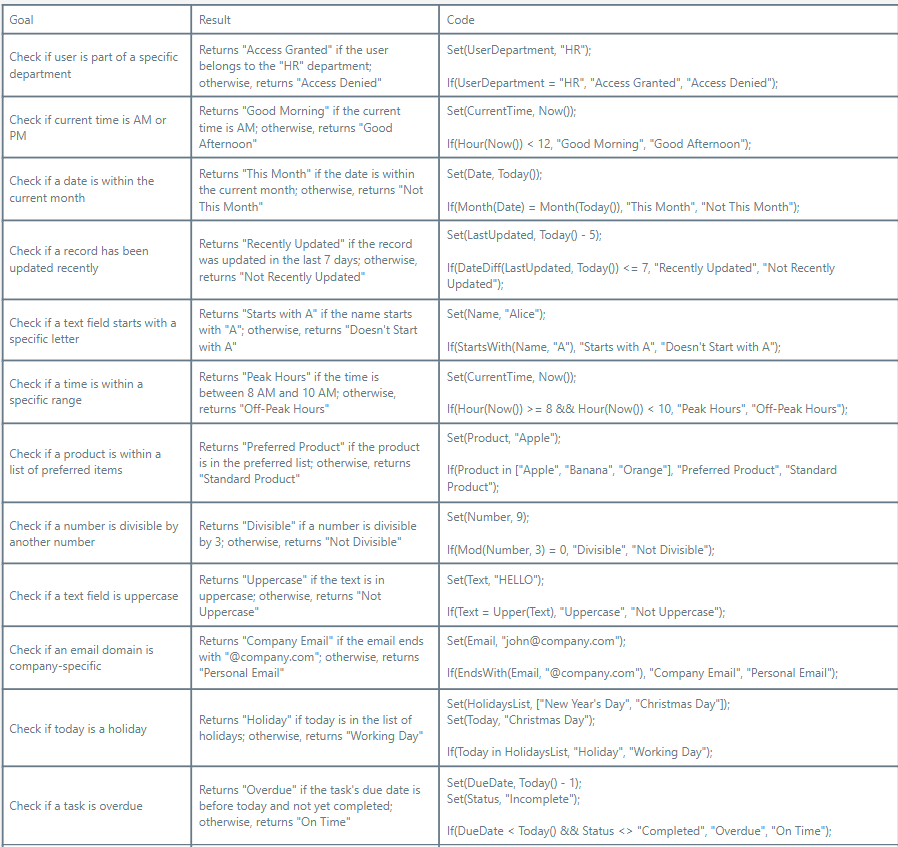
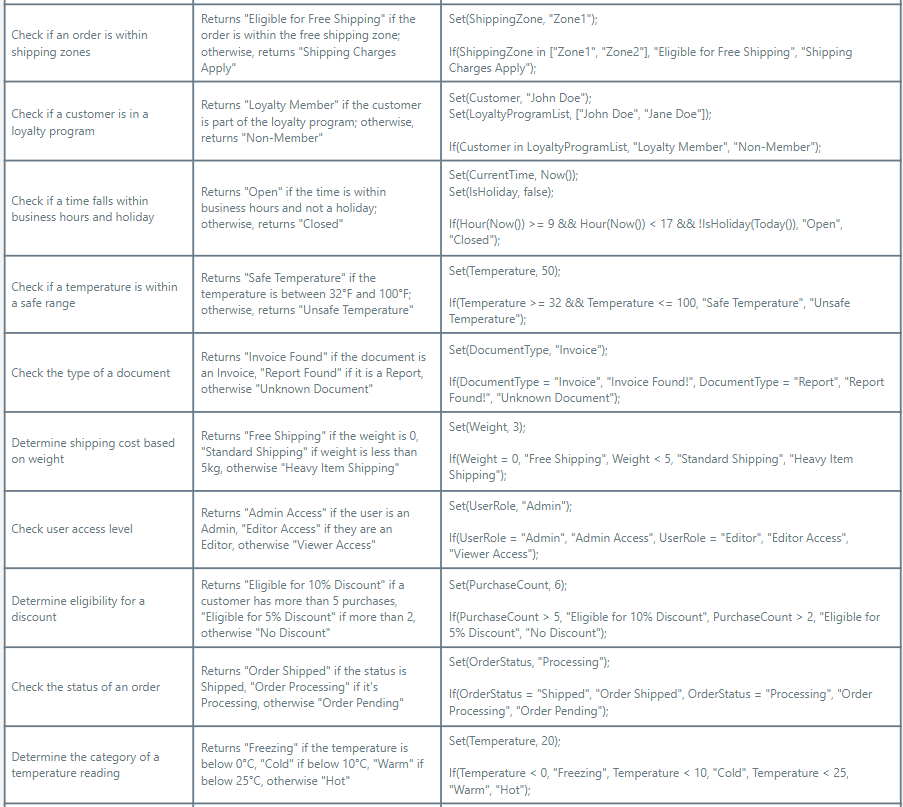
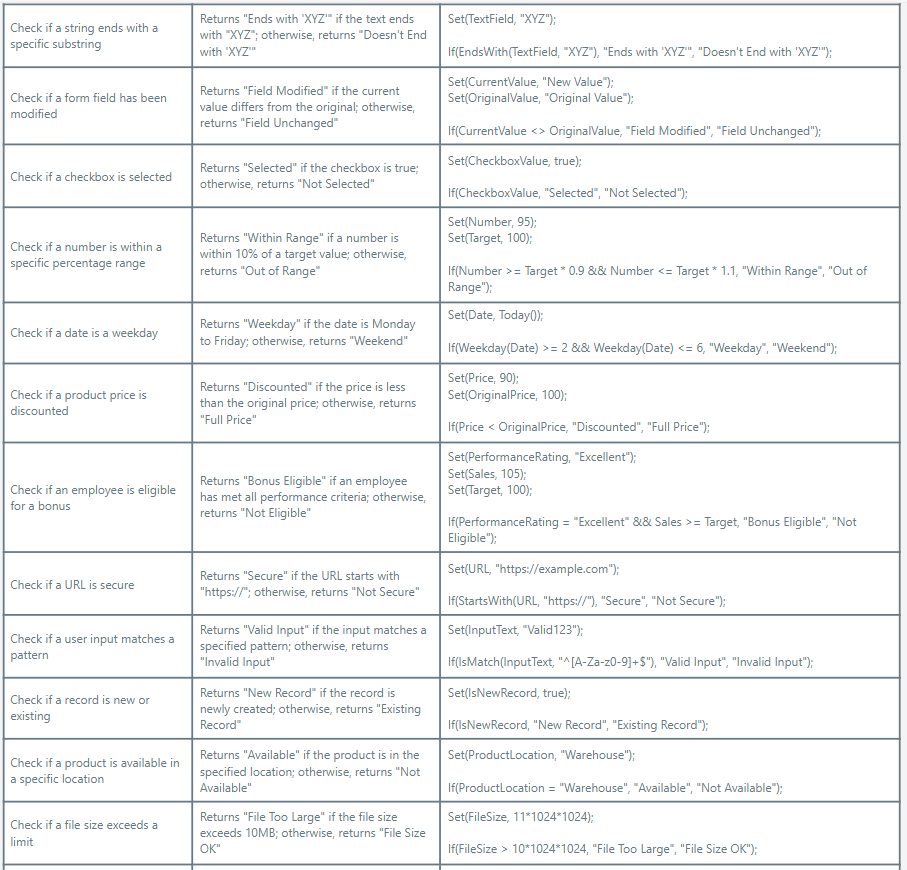
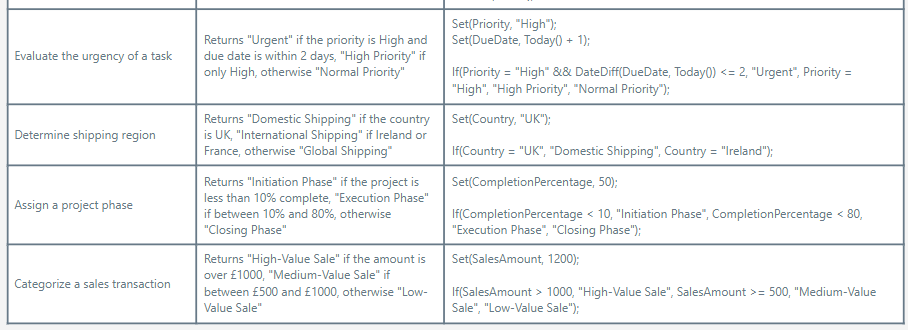
First lets start with the Syntax / Structure of the IF function (Thanks Microsoft) If( Condition, ThenResult [, DefaultResult ] ) If( Condition1, ThenResult1 [, Condition2, ThenResult2, ... [ , DefaultResult ] ] ) Condition(s) - Required. Formula(s) to test for true. Such formulas commonly contain comparison operators (such as , and =) and test functions such as IsBlank and IsEmpty. ThenResult(s) - Required. The corresponding value to return for a condition that evaluates to true. DefaultResult - Optional. The value to return if no condition evaluates to true. If you don't specify this argument, blank is returned Now lets break this down with some examples that may bring the above to life. Feel free to grab these code snippets and have a play around to get to grips with the power and flexibly that the IF function can provide you. Take these examples away into your own power apps use them to help you create the solutions you need!

Power Apps IF Function - Our Expert Says

Conditional logic is an essential building block when developing dynamic applications in Power Apps. It allows us to create smarter, more responsive apps that adapt based on real-time user input or data. The IF function, in particular, is incredibly versatile – from simple decisions, like determining if a number is divisible by another, to more complex ones, such as validating user access based on multiple conditions. By incorporating IF statements into your Power Apps projects, you're not only enhancing user experience but also enabling the application to function intelligently and intuitively. Keep experimenting with different scenarios, as this flexibility is one of Power Apps' greatest strengths!

Trusted by Leading Brands

“We work with organisations across many sectors of different shapes and sizes from 10 to 100,000 employees.”

Contact Form

Contact our team today!

Talk to our team

Contact Us

Topics
Share this

Related reading

NewsMicrosoft 365

Dynamics 365 vs Model Driven Power Apps

Explore how SMEs can use Microsoft Model-Driven Apps to create affordable, custom CRM-like systems. Learn how to manage customer data, track sales, automate tasks, and access powerful reporting—without the high cost of Dynamics 365.

22 January 2025

NewsPowerApps

Power Apps vs. Power Automate

Explore the differences between Power Apps and Power Automate and learn how combining them can deliver powerful, low-code solutions for businesses. Discover how these tools work together to streamline processes and improve efficiency.

21 January 2025

NewsPowerApps

Using The UpdateContext Function In Power Apps

Discover how to efficiently use the UpdateContext function in Power Apps to manage context variables, optimise memory usage, and enhance app performance. Learn best practices and practical examples for Canvas Apps.

21 January 2025