
NewsMicrosoft 365
How Microsoft AI Is Evolving in 2026
Our best practices and tips for designing SharePoint Department Sites. Training, development and support for Microsoft services.
20 November 2025

News
Learn about Microsoft Ignite 2024's security and management updates, including Copilot Control System, advanced SharePoint content governance, and streamlined admin tasks in Teams and Microsoft 365.
Our head Modern Work Rob Thomas has been at this year’s Microsoft Ignite 2024 reporting back all of the massive announcements made relating to Microsoft 365 security and management features.
Microsoft have introduced powerful new features to enhance security, streamline IT management, and simplify administrative tasks across Microsoft 365 apps.
Here’s a breakdown of the key Security and Management announcements:
The Copilot Control System will help you govern your Copilot and Agents. It is a complete set of IT capabilities designed to provide a trusted way to manage and secure the data that Copilot and AI agents use.
There are a lot of additional security and safety considerations when it comes to Microsoft Copilot and especially the newly announced Copilot Agents that are going to be running AI autonomously.
Valto have heard a lot of feedback from customers that although Microsoft Copilot features and benefits are fantastic. There is still a lot of concern around how it is going to be controlled. This is where Copilot Control system will step in. With robust IT controls, admins can measure business value and track ROI effectively.
This system ensures that organisations have full visibility and control over their AI implementations.
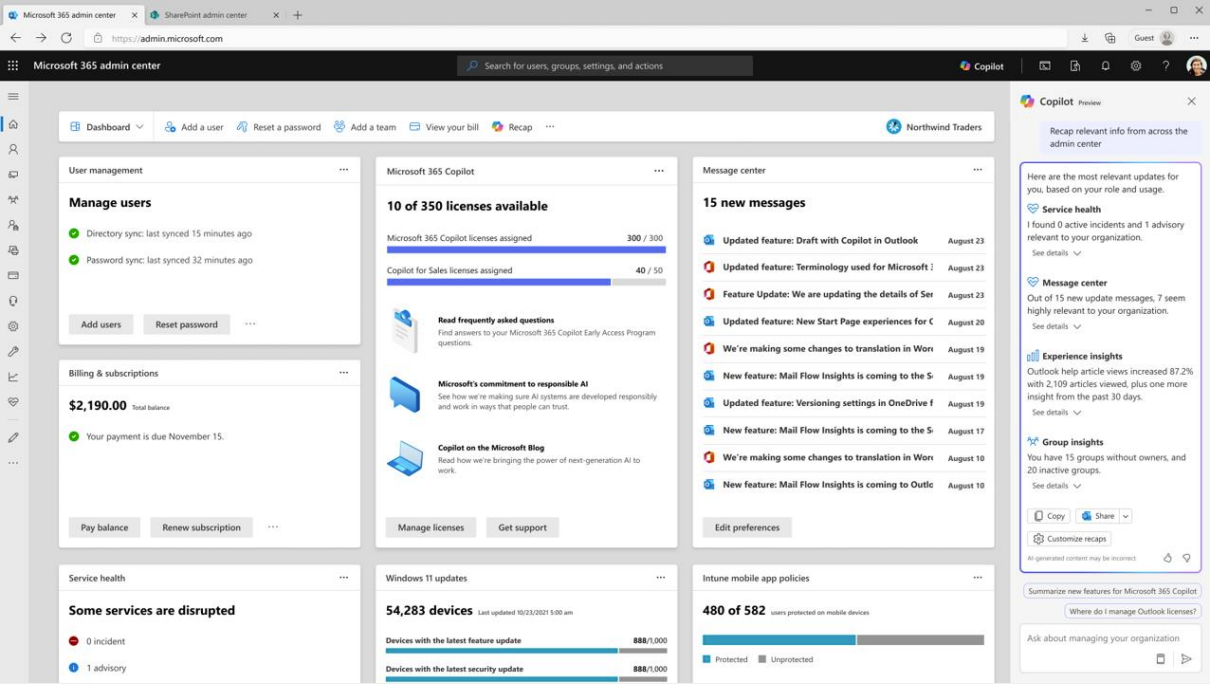
As part of Microsoft commitment to helping you properly administrate Copilot has now been added into the Microsoft 365 admin center.
This will give you key insights into Copilot usage such as the amount of licenses you have purchased vs how many have been allocated.
IT admins and adoption specialists can now harness the power of Copilot in Microsoft 365 Admin Center to receive real-time, contextually relevant information across the Microsoft 365, Teams, and SharePoint admin centers.
The admin portal also contains guides and recommendations for the deployment of Microsoft Copilot. Including sections for issuing welcome emails to employees that have been assigned a Microsoft Copilot license.
Another useful feature is to enable the ability for employees to provide feedback surrounding their experience with being onboarded and using Microsoft Copilot.
Use Copilot to properly explore and configure your Microsoft 365 admin center.
This feature improves informed decision-making, enabling IT teams to act faster and more effectively.
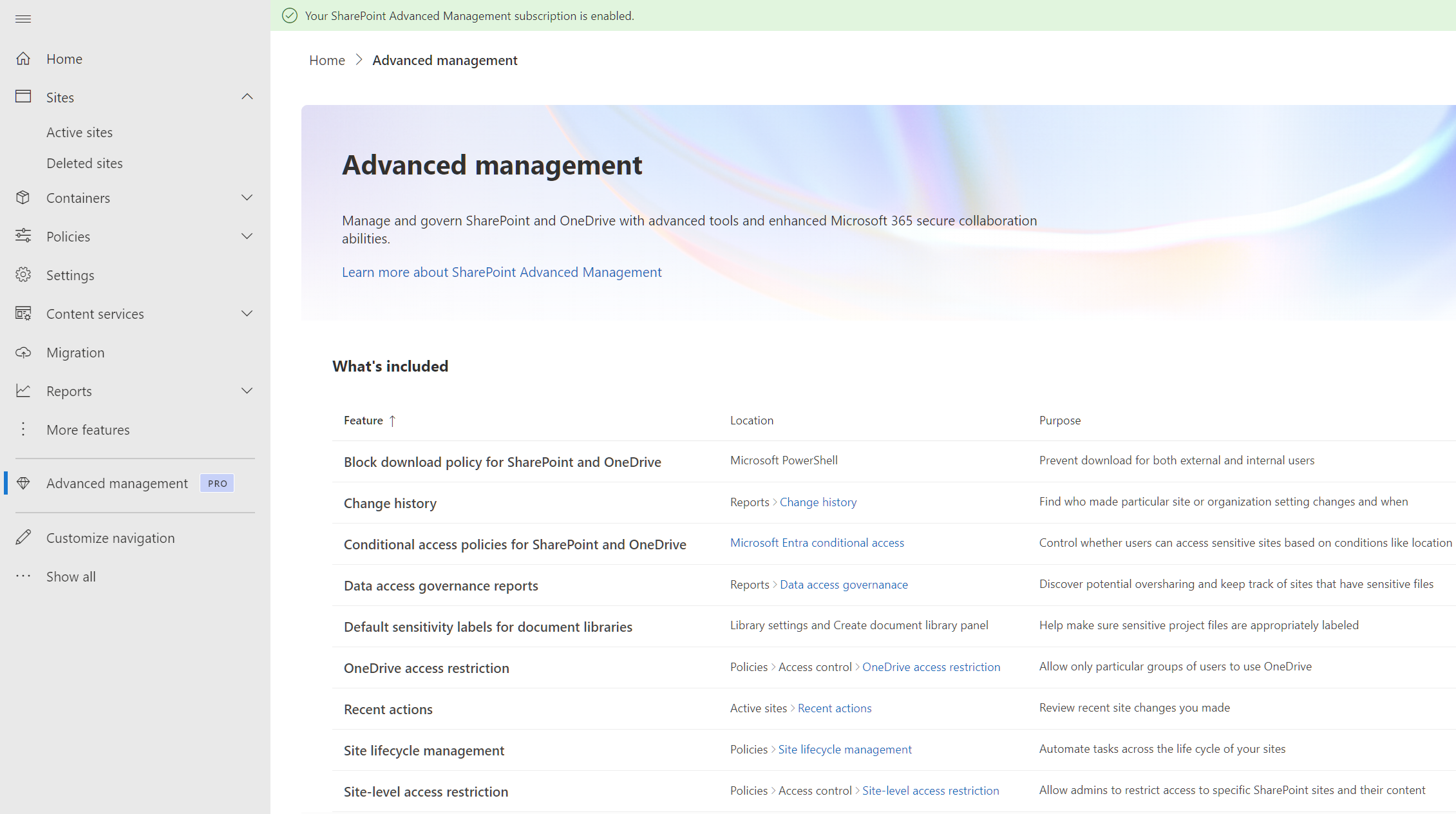
The new SharePoint Advanced Management (SAM) takes content governance to the next level. At its heart it is designed to help you manage content sprawl, governing ever increasing amounts of content is critical for SharePoint admins. It will also prevent oversharing by using built in tools to identify areas of content that have been over shared. SharePoint admins will know the struggle of dealing with broken inheritance as it will put the content at risk of being shared incorrectly, especially once Microsoft Copilot becomes involved. The SharePoint advanced management portal will allow SharePoint admins to control Copilots access to specific areas of content. Valto have heard from its customers that the existing tools in place from Microsoft take too long to properly take action to secure content ahead of deploying copilot. However, SharePoint advanced management will provide the capability to take action in near real time. This is important to ensure you have control of what content Copilot can access. SAM will improve the general oversight for SharePoint and OneDrive by preventing content sprawl and oversharing, ensuring simplified content management. It will now be available with a Copilot license, integrating key governance tools and controls to accelerate deployments and automate oversight at scale.
The Copilot in Teams Admin Center allows you to take control and properly govern Microsoft Teams by providing you with your very own Teams admin assistant.
It simplifies administrative tasks and delivers actionable insights to enhance the Teams experience or all of your users.
Now with the ability of Copilot in Teams admin centre, your IT admins can:
These updates make it easier for IT professionals to maintain high-quality Teams environments while reducing administrative overhead.
It will also mean those that are less experienced with managing their Teams environment will get a helping hand towards ensuring that they have everything configured correctly.
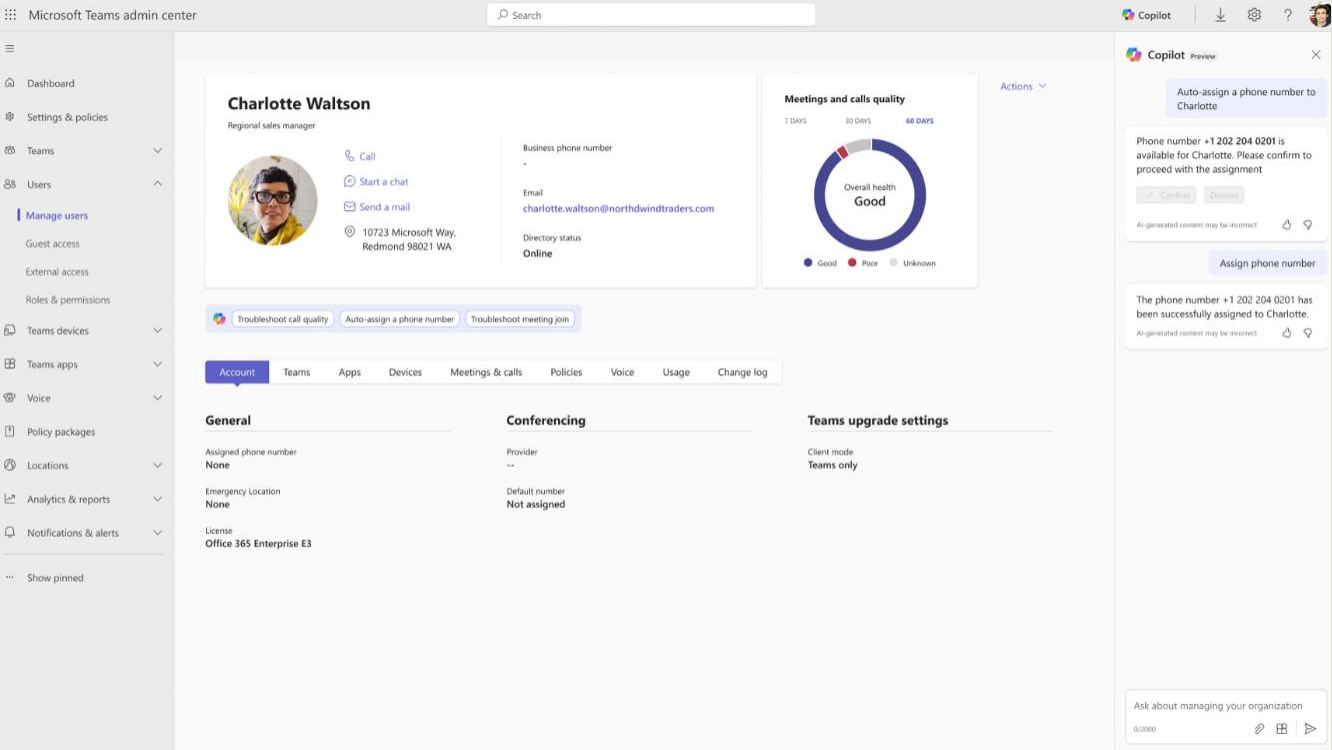
Microsoft’s latest announcements highlight a commitment to strengthening security and management capabilities across its applications.
With tools like Copilot Control System and SAM, organisations can confidently manage their data while improving workflows and enhancing collaboration.
If you have any questions about how you can implement these Copilot features, book your free consultation below and I would be happy to discuss them with you.
“We work with organisations across many sectors of different shapes and sizes from 10 to 100,000 employees.”
Contact our team today!

Our best practices and tips for designing SharePoint Department Sites. Training, development and support for Microsoft services.
20 November 2025
Our best practices and tips for designing SharePoint Department Sites. Training, development and support for Microsoft services.
8 October 2025
Explore how Microsoft Copilot supports IT and Marketing teams with real-world scenarios, helping automate tasks, analyse data, create content, and accelerate project delivery.
7 May 2025