Recently, I have seen a growing number of our clients utilising both Box and SharePoint, meaning they are paying for 2 licenses!
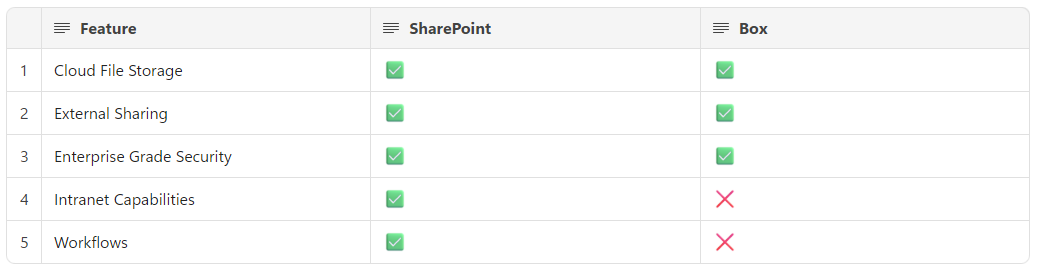
But is this necessary? To aid with this, I have created the following comparison table to help understand the features of both:
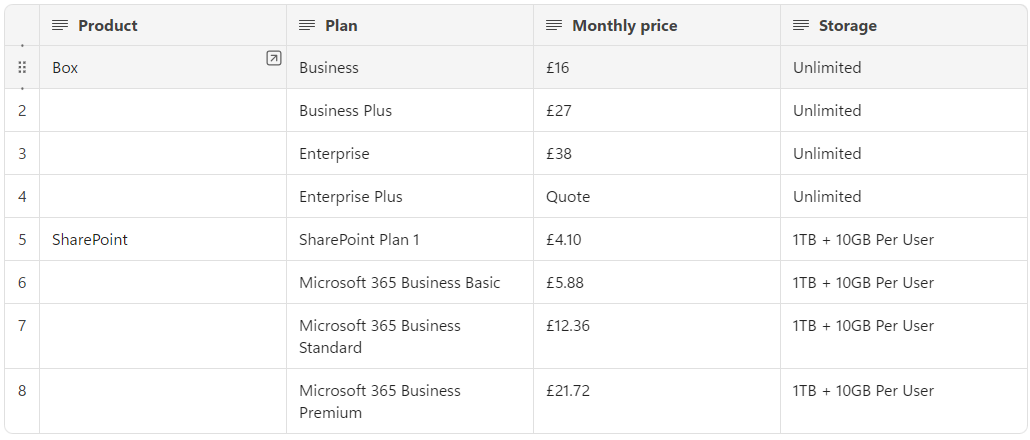
From the comparison table above, you can see that both SharePoint and Box have very similar offerings, but how do they compare when it comes to pricing?
Now, it is worth noting that the pricing above is not all that meets the eye, you will need to consider that:
– Both products offer discounts for annual subscriptions.
– Both products have enhanced features for the more expensive plans (e.g. Box has larger file uploads, Microsoft 365 has additional products).
– SharePoint storage options may seem limited, but included in that is 1TB storage per user in OneDrive – this means that storing your files in the right location is important.
– If you truly need unlimited storage, Box could be the solution for you. However, it’s worth doing the maths and calculating which is the most cost effective for your business.
Now we have an idea of the capabilities and pricing of both options, we can hopefully make a more informed decision on which one to choose, and whether you need both.
I think that both tools have their place and neither tool is necessarily better than the other in regard to file storage and external collaboration.
However, paying for both is simply unnecessary.