Valto — Keep ahead of tomorrow

News

The Top 12 SharePoint Intranet Examples

View top ten SharePoint intranet examples and discover how Modern SharePoint Intranets make a difference to employee engagements

Office365SharePoint
Published
25 January 2022
Top 10 SharePoint examples cover for the video

The Top 12 SharePoint Intranet Examples

Not only do we offer the best Microsoft SharePoint Services in the UK we also provide extensive demos of ten excellent SharePoint Intranet examples or scroll down for more information and screenshots.

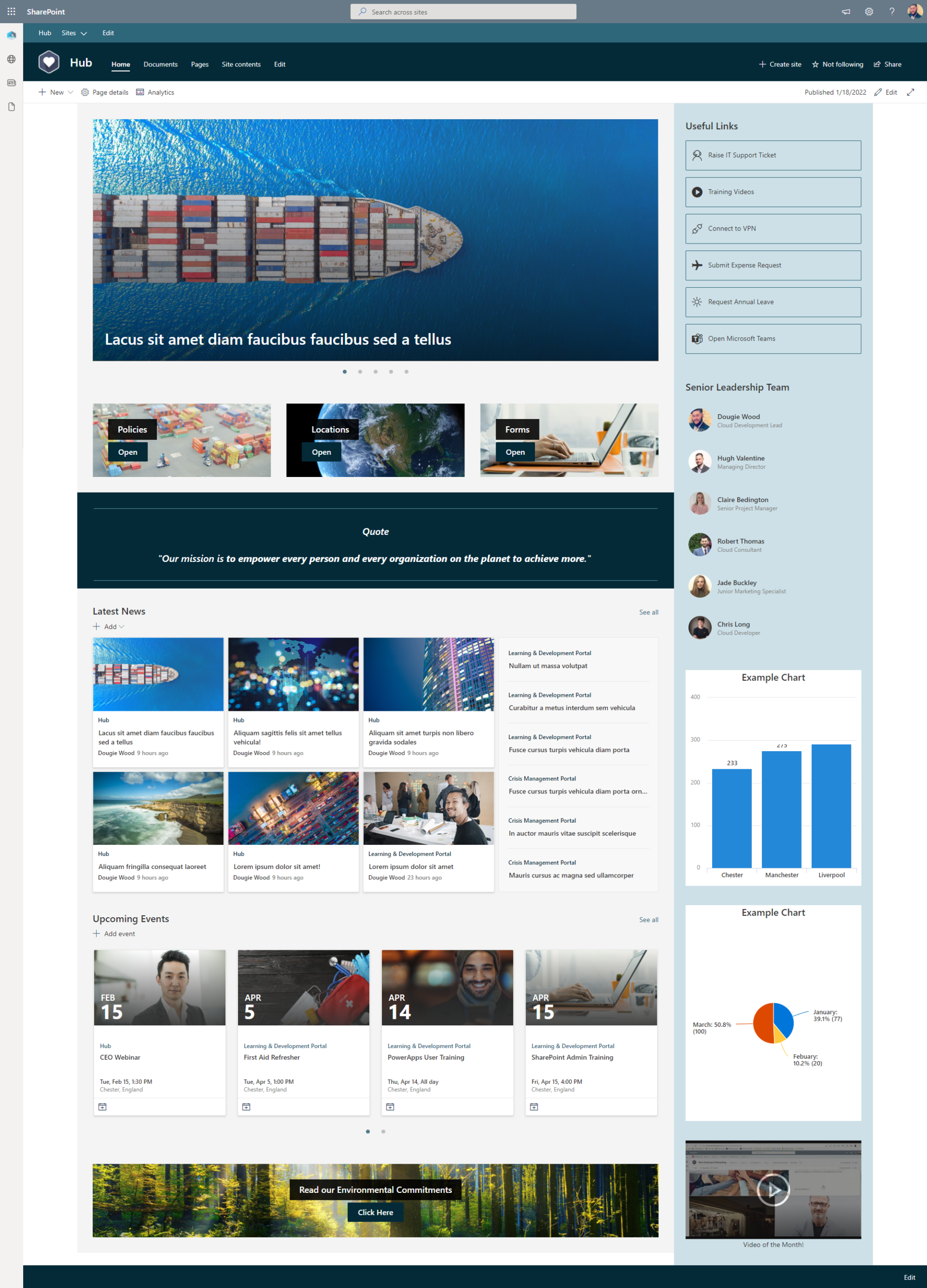
#12 – SharePoint Hub Site

This SharePoint examples’ purpose is to provide a landing page for your overall modern SharePoint intranet.

It will typically contain a combination of dynamic information web parts and navigational elements.

We often tell our clients when designing their intranet homepage to picture if you were a new starter within the organisation, could you find important information you are looking for from the homepage within three clicks.

Not only does a Hub site act as a landing homepage for the rest of the intranet, it will also use web parts to roll up key documents, news articles and events from throughout the SharePoint intranet.

The Hub site defines the mega menu navigation bar throughout a modern intranet.

Microsoft no longer recommend building subsites under your Intranet home pages.

Instead they suggest creating independent sites such as the other examples we have demonstrated, then link them all together using a Hub site.

A SharePoint Hub site will also allow you to control permissions from the Hub that is then inherited by sites associated to it.

It will also control the branding that is applied to all of the sites to keep them consistent.

Top 10 SharePoint examples cover for the video

#11 – IT Support Site

This SharePoint Intranet example is usually a sub component of an intranet. Linked to from the Hub Site homepage to allow end users to submit then track IT support requests.

The design of this SharePoint site is clean and clear to make it as user friendly as possible for employees to access the information they require.

At the top of the layout we see a combination of a the quick links web part and the hero web part. Both are designed to allow for simple navigation to areas of interest to end users.

Below that there is a simple SharePoint list. This list allows the IT department to publish known issues and outages that they are already working to resolve. Having a space to publish this on the homepage of their SharePoint site means users can see known issues before submitting a duplicate support ticket.

It might be that your IT support team can take issues in live time via a chat interface. We can see an example of a call to action web part being used that can link to URL or Hyperlink, including SharePoint pages, documents or a third party chat interface.

Any IT Support SharePoint design should include an element of a knowledge base. SharePoint acts as a fantastic knowledge base tool. So include buttons to key resources, training materials and knowledge articles.

Also consider a frequently asked question section known as an FAQ. This can be achieved in a number of ways, but a nice simple way is to embed a quick links web part onto the page linking to useful resources.

A modern SharePoint intranet being displayed on a computer

#10 – Human Resources SharePoint Site

A Human Resources SharePoint design is mostly comprised of different types of navigational SharePoint web parts to provide a self-service portal that is easy for employees to use.

Typical information that employees go in search of on a Human Resources SharePoint site is information on policies, booking annual leave, employee benefits information, career development and so much more.

This SharePoint design uses large hero web part tiles at the top to set the expectations of the user that there will be aspects specially for employees but also for managers. Often referred to as a managers toolbox, this area will provide materials to support line managers with HR functions such as interviewing, personal development and disciplinary.

On the right hand side of the SharePoint design we can see a “How do I” section. This is just like the FAQ sections we have seen before but laid out in a different way. It makes it easier for people to find useful resources when it is provided in a format that aligns to the question they would be searching for example “How do I take a leave of absence”.

Not all of the components of a HR SharePoint site will be purely navigational. It is recommended to have news and announcements that will be relevant to employees posted via the HR SharePoint site. These can then be rolled up into other areas of the Intranet such as the Hub homepage.

Highlighting employees, work anniversaries and promotions are all very common types of content then get created and promote via the HR SharePoint site.

A SharePoint Department Site Template

More SharePoint Intranet Examples!

Due to the sucess of this blog article we have recently created another video that showcases our top 10 favourite SharePoint Intranet Examples in 2025. Check out even more examples to get you inspired.

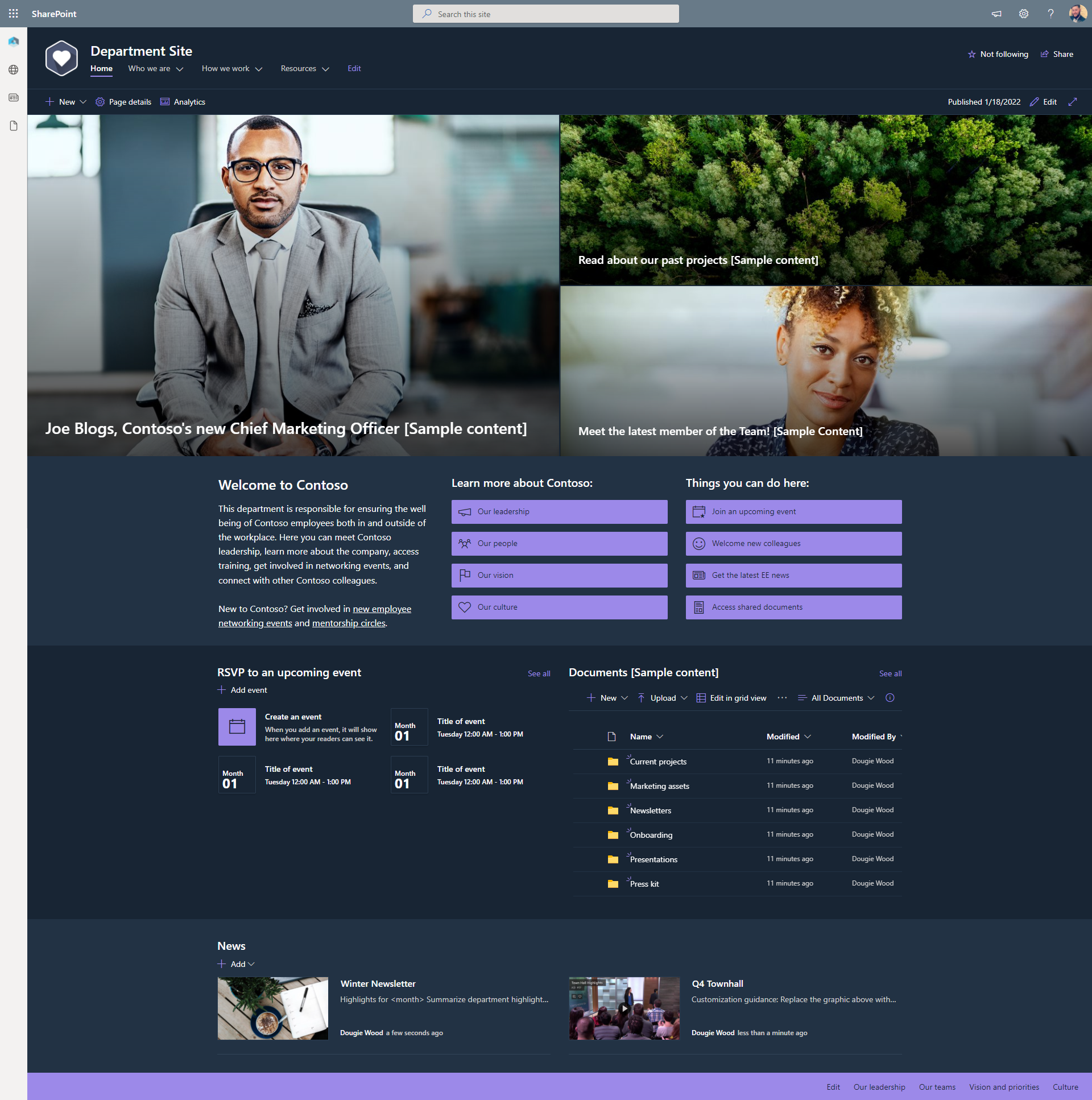
#9 – Department Site

This SharePoint intranet examples is often built as a template that can be re-deployed multiple times for each of the key departments to keep consistency.

This department SharePoint site should contain a “What we do” or “Who we are” type description of the team. Including specific business processes and what services do they offer to the wider organisation.

Bio style pages will be created for key members of the department. Often these pages will contain personal information such as hobbies and interests to help new starters get to know their colleagues better.

Typically these site designs are providing an area for a department to publish files, news and useful information they offer to the wider organisation.

For example a Finance department may publish forecasting or budget information and provide links to the latest expense request form.

This site design is using what is know as a Communication site template. This means it is an area to communicate published content to the wider business and not being used to store everyday documents.

However, typically a department will also have a Team site where they collaborate on day to day files together away from this department site.

An internal portal for senior leadership internal communication

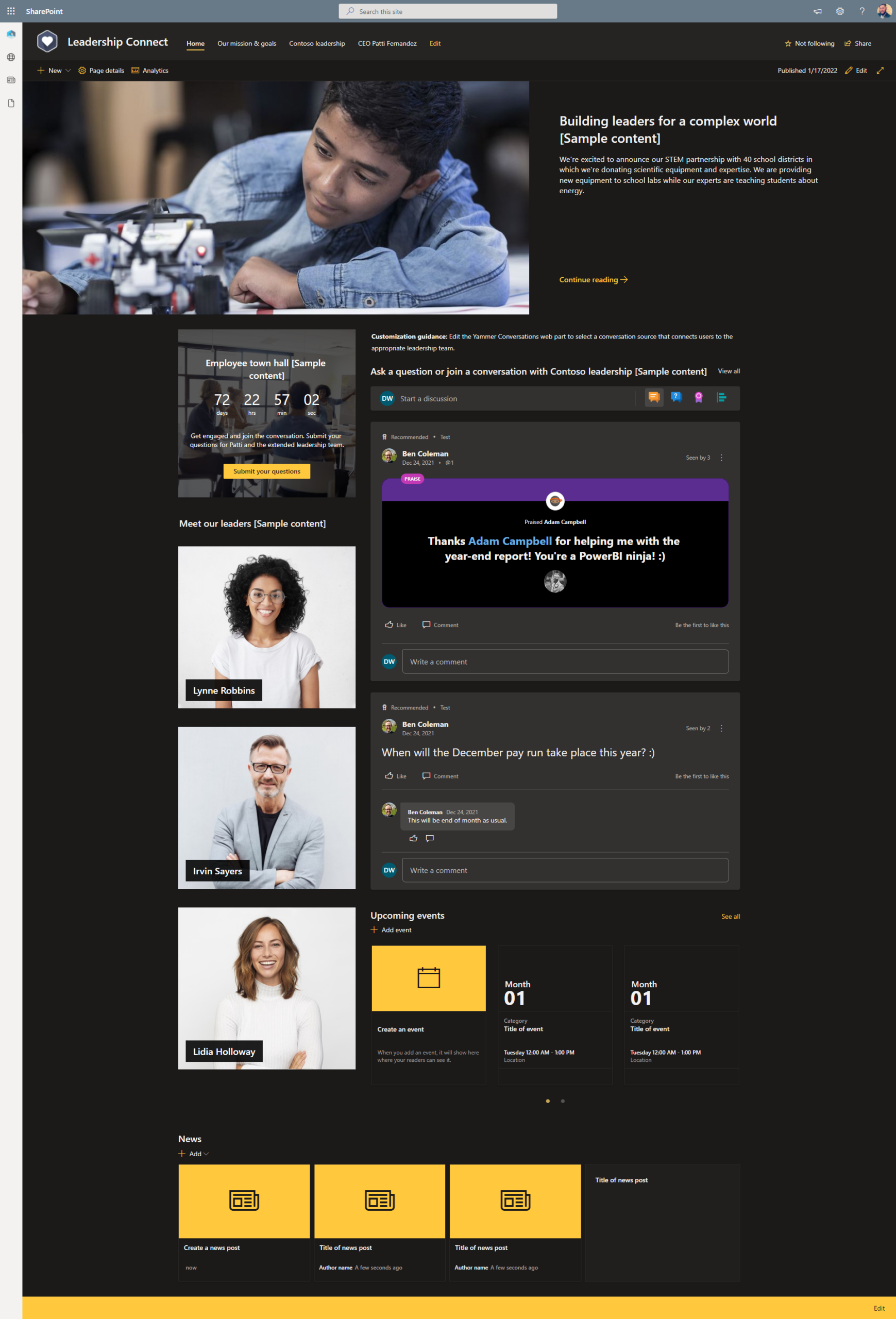
#8 – Leadership Connect

This modern SharePoint site is typically adopted by larger organisations to provide internal communication from the senior leadership team.

Modern intranets typically include a space for their leaders to periodically publish content to keep in touch with a wider audience of colleagues.

A very common reason for employees leaving an organisation is the sense there is no direction from senior management.

Now that a lot of organisations have moved to remote working or at least hybrid working, it has proven to be even more challenging to keep a consistent internal communication flowing from leadership to the wider business.

By creating a Leadership Connect SharePoint site it will provide communication platform for leadership to provide updates and direction to all employees.

As a direct result this will boost employee engagement and be play a vital role in your digital workplace strategy.

#7 – Learning and Development (L&D)

This modern SharePoint intranet design is usually owned by the human resources or L&D team.

Often you might already have a learning and development team site as part of an intranet for storing training materials.

This SharePoint site aims to provide a easy user experience to access those materials.

This site design will usually include the Hero web parts, upcoming events web parts and news web parts that will often feed into the overall company news.

However, we also recommend considering using the Stream web parts to insert training videos directly into SharePoint.

This can often include training videos to replace lengthy inductions and explain your business processes.

Key benefits

  • Provide a simple user experience for accessing training materials
  • Embed training videos directly into SharePoint
  • Publish training event details for users to add into their own calendars

Quality Management System in SharePoint

A very popular solution that we sell as an add-on to our SharePoint intranet solutions, is a pre-built quality management solution built with SharePoint solution known as a Controlled Documents system.

#6 – Microsoft Learning Pathways

This SharePoint intranet examples is a spin off of the learning and development SharePoint site.

We highly recommend deploying this site designs when you are attempting to gain adoption of Office 365 products such as SharePoint Online and Microsoft Teams.

Rolling out Microsoft 365 products can be quite a change to the day to day business processes and working culture.

This example SharePoint site is a great tool as part of your digital workplace by providing users with useful training materials and guides to follow when getting started.

Key Benefits

  • Ready made training materials for products such as SharePoint Online, Microsoft Teams, Planner, To Do and more!
  • Schedule training events specific to Microsoft 365 products
  • Share useful tips and tricks with the news articles

#5 – Controlled Documents

This SharePoint intranet examples is a great site design and showof how Office 365 and SharePoint Online products can deliver amazing intranet solutions.

The purpose of this SharePoint site is to deliver digital transformation of your current policies and key documents.

It will provide a one stop shop for all business processes information such as policies and procedures that will result in a rise in employee engagement using them.

The home pages is made up of multiple Hero web parts to provide navigation to specific areas of the documents site.

Valto have also built an additional automation module that is typically used by organisations looking to build a Quality management system (QMS).

The full automated includes an automated review and approval process. This assists in maintaining a ISO 27001 or ISO 9001 certification.

Watch the video below for a demo or for more information on this product click here.

#4 – Onboarding Portal

This site design is used by all businesses regardless of size. As onboarding is something that every business is challenged with.

The idea is to provide a friendly modern SharePoint intranet that provides the necessary information for a new starter to begin work.

This onboarding portal often contains useful links to tools and software that is recommended to be downloaded.

It will also typically contain an org chart, information on senior leadership and what different departments are responsible for.

The objective of this SharePoint site is to reduce the day to day man hours of supporting a new starter, by providing a self service portal.

This SharePoint site is all about improving the employee experience from their first day.

Creating an onboarding portal is a key milestone when building a digital workplace.

This will often boosting employee engagement and enabling the new starter to get going with their new role.

Valto have also built an automated task management extension module for this intranet solution.

The solution includes an employee database that holds personal information. This database can be configured to hold the information your human resources department wish to store.

For example next of kin information, start date, certifications etc.

It will allow the tracking of tasks for the new starter and existing employees. For example has the new starter been added to parole or had a laptop deployed.

Watch the demo below or click here for more information on this product.

#3 – Company News

This company news intranet design is aimed at larger or enterprise sized organisations that wish to consolidate their news and internal communication into a single page.

It can often be a great replacement for a email newsletter as often these take a lot of time to create a .pdf or email template design. Whereas with SharePoint the news articles are built using a content management system template making it very quick and easy to publish news content.

Building a insightful centralised company news portal is a key pillar for a successful modern intranet. A modern intranet should provide not only excellent navigation but also communicate key information effectively throughout the business.

This intranet solution is built using predominately multiple SharePoint News web parts that could be pulling articles from different locations. These web parts could be audience targeting which articles appear to give a personal user experience.

Company News hubs are often not used as the root homepage of the intranet but instead linked from to from the home site to provide a more detailed breakdown of news from throughout the business.

This site is typically under the control of an internal communication or comms team to manage what content is being published. However, you can also open up the news articles to be published by anyone, typically with an approval process to sign off the content before it is made live.

Expense Request – SharePoint intranet examples Apps

Another of our favourite intranet solutions is a expense request app that allows users to scan receipts and submit them for approval.

#2 – Volunteer Hub

This intranet design is typically used by charitable organisations or non-profits to help provide information to their volunteers.

However, it is not just used by charities it can often be used by medium to larger businesses to coordinate volunteering days to give back to local communities.

This intranet solution can also be enabled for external access, turning it into an extranet.

This means that the home pages of your volunteers hub can be shared to people outside of your charity organisation without the need for them to have an Office 365 license.

Key Benefits:

  • Can be shared with people from outside of the organisation without the need for an Office 365 license, saving money!
  • Navigation to key tools and resources for new volunteers
  • Sharing success stories and how your organisation is making a real difference

#1 – Crisis Management Portal

This site design is an excellent SharePoint intranet example of how Office 365 technology can quickly deliver improve a crisis situation through sharing information.

In recent years we have seen crisis management intranet solutions popping up within modern intranets to assist with delivering internal communications during a time of crisis.

Such examples of when this may have been valuable include the covid-19 pandemic, earthquake displacements and employees operating in war-torn countries.

This SharePoint site offers value through using navigation web parts such as the Hero web part, quick links web part to help navigate users to critical information and resources quickly.

The news web part is typically used to provide updates about how a crisis is progressing. These news articles can then feed into the wider intranet home pages company news area.

Key Benefits:

  • Deliver critical information and updates to users easily
  • Make colleagues aware of the crisis through company news articles published through the SharePoint intranet
  • Streamline navigation to key files and resources to save time

Trusted by Leading Brands

Our SharePoint Consultants work with organisations across many sectors of different shapes and sizes from 10 to 100,000 employees.

Microsoft MVP – Dougie Wood

I have been at Valto for the past 8 years but working with SharePoint for the past 15 years and have been awarded MVP status by Microsoft.

In this time I have seen any variant possible of any Intranet. Get in touch to discuss your requirements.

Talk to our team

View All Case Studies

Share this

Related reading

NewsSharePoint

Mastering Document Control with SharePoint

Struggling with document versioning, policy visibility or outdated files? Learn how Valto’s SharePoint-based Controlled Documents Solution solves the most common document control challenges.

7 May 2025