Below are my top 5 features of a SharePoint Intranet that are readily available to all users of SharePoint Online.
So, you might already be aware that modern SharePoint intranets have a news web part for displaying the latest internal and external news articles.
However, you might not know that you can change the layout of the news web part to an automated slider.
This is not a new feature of SharePoint; it has existed since the dawn of time (well SharePoint). But it can be useful to have certain links only display to certain groups of users.
Now you can show/hide hyperlinks in both the site navigation and the Hub navigation bar by selecting up too 10 specific security groups or Microsoft Teams.
This is a new web part that has been added by Microsoft into SharePoint Online. Previously, if you wanted to show a hierarchy of a Team and who they report too you would have needed to purchase a third-party plug-in web part.
Microsoft now provide this web part completely free and it can be a real asset to any SharePoint Intranet.
Microsoft have put a lot of work into making SharePoint Online intranets look and feel so much better in recent years.
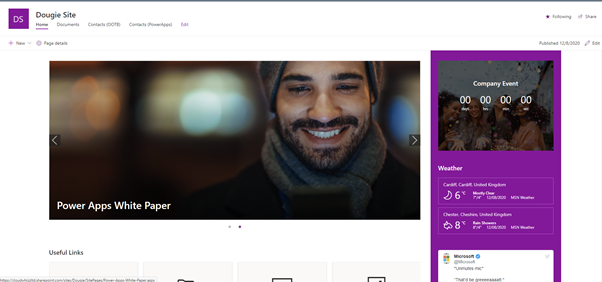
My favorite update to this is the vertical section layout that has been added to the communication site template.
This can be seen in the screenshot above to the right-hand side of the news carousel as a solid purple section of the page.
The layout gives a nice modern feel to the site and breaks it away from feeling like a stuffy corporate Intranet.