


News
Viva Engage vs Microsoft Teams
When should you use each product? In this video I'm going to answer the exact question and compare the key features of Viva Engage vs Microsoft Teams. First off I will be starting by giving you an overview of each of the products. Then I’m going to talk a bit about the key Comparisons of each of the products. Then finishing off with when you should use them in different circumstances.
Viva
- Published
- 7 October 2024
Viva Engage vs Microsoft Teams
When should you use each Microsoft product? In this video I’m going to answer the exact question and compare the key features of Viva Engage vs Microsoft Teams.
Microsoft MVP, Dougie Wood will be starting by giving you an overview of each of the products. Then I’m going to talk a bit about the key Comparisons of each of the products. Then finishing off with when you should use them in different circumstances.
Watch the video (opens in a new tab)
When to use Microsoft Teams
So starting off with Microsoft Teams, it is known for three core feature areas.
The first is real time communication as well as collaboration, Microsoft teams is a central hub for chatting video conferencing file sharing and collaboration with inside of an organization.
It’s best for facilitating seamless communication between team members through channels and direct messages.
It is also known for working on tasks collaboratively and project management.
You can use Teams to integrate with Microsoft 365 apps such as SharePoint, Planner, and OneDrive, allowing users to manage projects, collaborate on documents in real time, and track tasks all in one place.
The third major feature area of Microsoft teams is virtual meetings and webinars. It provides a robust video conferencing capabilities, Teams excels in hosting meetings, webinars, and virtual events, making it ideal for remote work and geographically distributed Teams.
So let’s jump in and take a little look at Microsoft teams now, this is what it looks like inside of the Windows desktop app.
But you can also access it through a mobile phone for the team’s app. You can also get access to it through a web browser as well now amongst many other features of teams.
However, I’m most interested in talking about the actual team’s functionality and comparing that against Viva Engage.
Microsoft Teams can be used within reason for any context you could think of: Departments, Projects, Social Initiatives, Events and so much more.
However, the most common use case of Microsoft Teams are essentially groups of people that are working together on something.
This is our demo finance team. You would typically expect to see a Microsoft Team per department. One for finance, one for IT, marketing sales, and so on.
Microsoft Team Channels
Then within a team, you can have what they call channels, which are essentially, if imagine everybody who’s in the finance department has access to the general channel area, you can then have multiple channels to almost categorize and silo the different conversations.
You could have a channel for invoices, where all the conversations are going to be talking about invoices. We could have a channel for payroll, where everything that’s going on with payroll is talked about in there as well.
It is also possible to isolate it. Meaning only certain members of the department kind of access to specific channels.
So for example, if there was 10 people in the finance team, we might only allow say two of them to access the payroll area, to have conversations and ask questions about payroll.
Microsoft Planner within Microsoft Teams
You can see a navigation bar that is across the top of every single Microsoft Team that is specific to that Team.
These are not just quick links that open externally. They are also essentially embedding apps into You Microsoft teams.
For example, quite often with a team, you’d also create a planner, which is essentially like a almost like a Trello type board Trello being Microsoft’s main competitor to Microsoft Planner that is their answer for a business task and project management planner.
Microsoft Teams would then have this embedded so Microsoft Planner can enable a Team to collaborate and work on tasks together.
Microsoft Teams Meetings
We can also host meetings with our Teams. We can either schedule a meeting or we could just meet right now within a conversational thread that has been created.
If there was a problem with a particular invoice, we could easily spin up a meeting directly inside of this conversational thread the reason why we might do that is we could then record it and then all of those notes and meeting recordings are stored against that particular conversational thread.
It makes it much easier than say for example if someone was off on annual leave and they come back next week we don’t have to get them up to speed.
They can just go and watch the recording of that particular meeting.
So just to recap Teams is really good for that kind of communication but specifically on a Collaborative kind of basis.
It’s really good for project management working together and collaborating on things and it’s fantastic For meetings, as well as webinars and things like that Now, as I say, you can have a social element to teams.
So smaller or SMB type size organizations will often have a social element to their teams.
I have a social area where essentially, it’s just like where we’ve got this finance department, but it’s a whole organization and we get it to be automatically adding every employee into it. And that’s where we can post things that are not work related and keep us socially connected to our colleagues.
This could be related to social events, football, running club’s things like that often get posted inside of that particular area.
We could create channels in there if we wanted to if we want to break out those different social groups into their own areas.
Although it’s often used for smaller organizations in that way, I would not recommend that if you’re in a lot larger organization and you’re looking to have much more streamlined employee engagement and more social media feel to the communications which are going on in your organization. Then it’s time to look at viva engage that brings me nicely on to talking about Viva Engage.

When to use Viva Engage
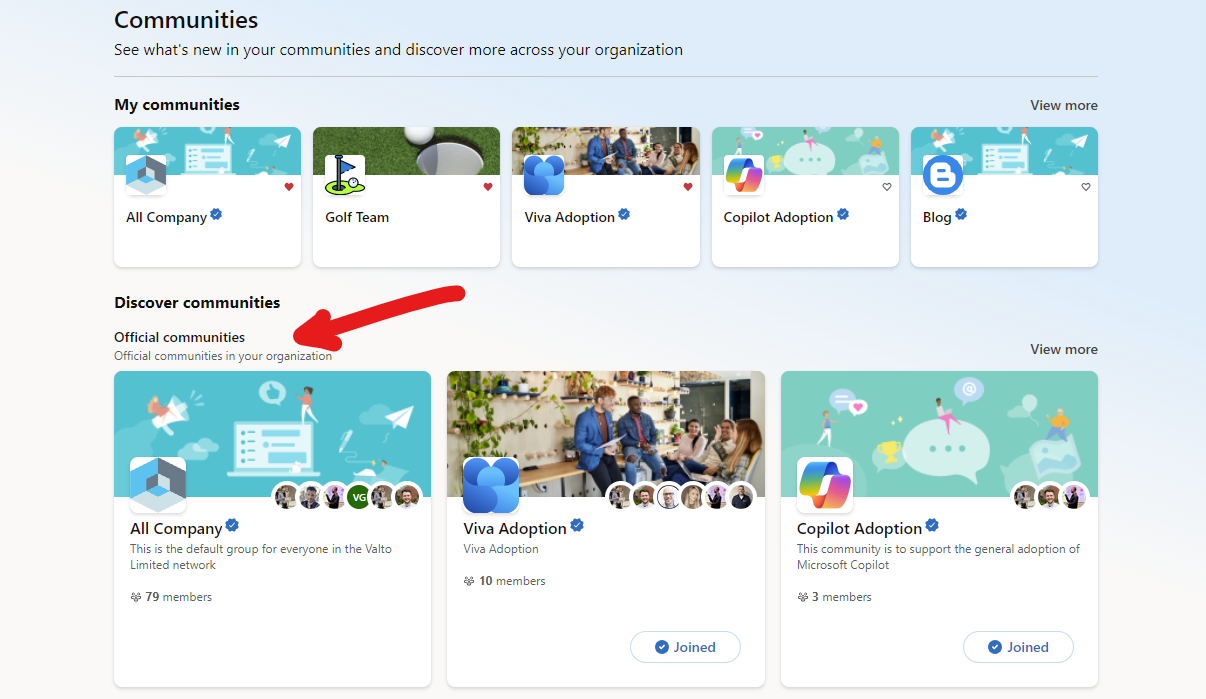
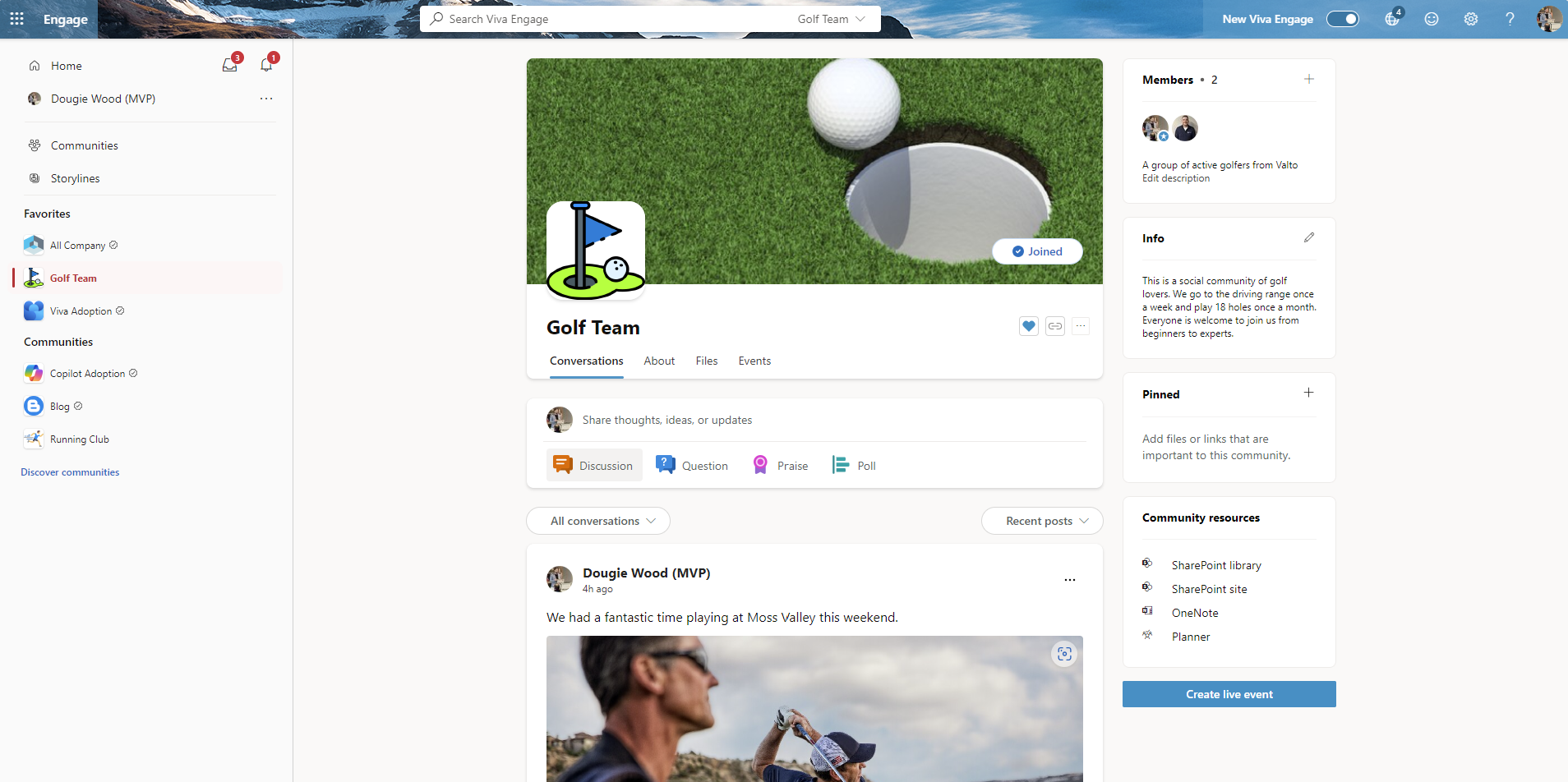
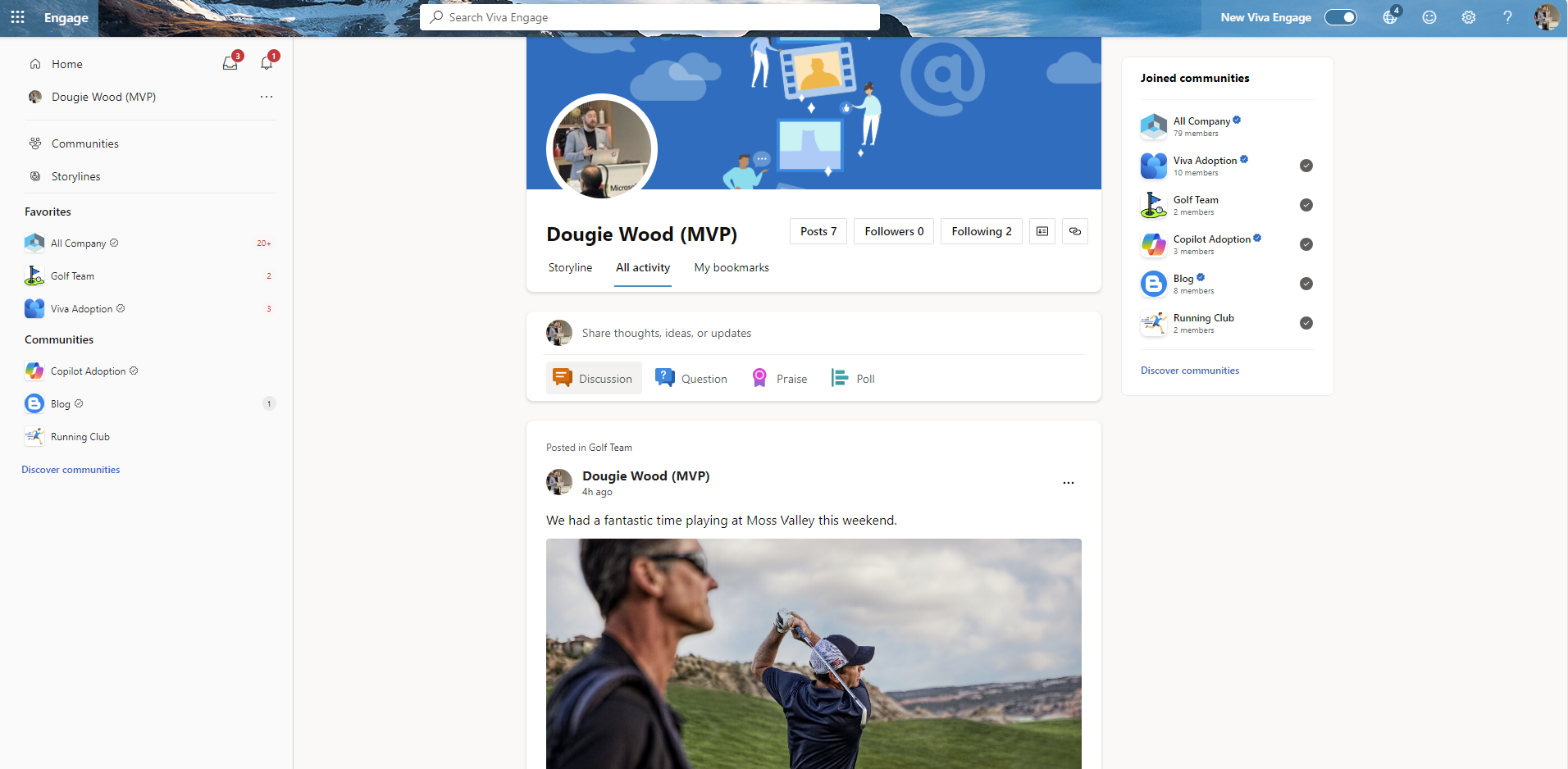
So what is viva engage? Again, I could quickly break down the core areas of viva engage under three main headers. The first being employee engagement and communication platform. So, if you are thinking that this product looks and sounds very familiar, you might be right. Microsoft Viva Engage was formally known as Yammer. If you've ever used Yammer before then Viva Engage is the direct replacement of Yammer. In fact, the functionality and the look and feel still very much resembles Yammer and it's designed to foster employee engagement. It is designed to build a connected company culture through open conversations announcements and community building within the organization. The focus for me here is on how easy it is to create new communities within Viva Engage. This makes it so much simpler to let community leaders create their own spaces compared to Microsoft Teams. This is why it's very useful for enterprise level organizations, which maybe don't have the same level of control over the creation of community spaces. Whereas Viva Engage is much more of an open-door policy where people can create their own spaces, what we call communities to bring people together. It's for social networking within the organization. It allows employees to participate in communities, share ideas, ask questions, and engage in discussions making it ideal for amplifying knowledge sharing and cross department collaboration. It's fantastic for bringing people together and asking questions. The usability of it, I'm going to show you in a second, is really simple. I really love the look and feel. As well as that, it also provides seamless integration. with Microsoft 365. Viva Engage integrates into Microsoft Teams, as we saw a tab in there earlier on, and I'll show you that again in a moment, as well as Outlook and other Microsoft 365 apps, ensuring that engagement, updates, and companywide communications are easily accessible within existing workflows. There's a couple of ways of accessing this, as I say you could do this from Microsoft Teams. But to avoid confusion I’m going to be doing it through a web browser instead. Now I’m not going to run through all the functionality of viva engage If you want a bit more of a deep dive on this, I recently published a video on the Valto YouTube channel which is called “What is Microsoft Viva Engage” go check that out as it goes into a lot more detail. But a high-level summary view you have a profile page so unlike Microsoft Teams where you don't have almost your own kind of profile. Essentially you have your own profile area here, which is known as a storyline. You can then post that storyline and you can see everything that you have recently posted . You can't do this necessarily in Teams, as Microsoft Teams essentially groups its conversations in linear order inside of individual teams. Microsoft Teams won’t allow you to just see everywhere that you've posted. Whereas with Microsoft Viva Engage storylines you can see all activity across everywhere that I’ve posted inside of Engage recently. I can also see any joint communities on the right-hand side. I can either choose to share my thoughts ideas or updates with four different types of posts including: discussions, questions, praise or polls. The key difference between Viva Engage vs Microsoft Teams comes down to these communities. Communities are almost the same concept of a Team, where you've got a grouping of people coming together around a specific topic. Now you do sometimes see them based around departments and teams and things like that which gets a little bit confusing. But often communities are usually something which is outside of the departmental or business unit structure. These are typically things like social initiatives or things like I’m a member of a golf team as you can see below. Now inside the golf team community, you can see we can post here recent pictures and things like that. This is really good and fantastic for especially when hybrid working or working from home. It is a great way of staying social and seeing what our colleagues are up to. Also, it's a way of sharing interests and finding other people to network with internally who have the same kind of interests. Again, within communities we can post in discussions, pictures, polls, questionnaires things like that. We can also customise the look and feel slightly by changing the banner image and the display picture. The community will show us who the members of that particular group are and a little bit of info like a bio about that community. It also allows for pinned links or resources. Viva Engage also integrates with SharePoint nateively to provide a document storage area per community. Just like in Microsoft Teams as well. We saw a files tab in Microsoft Teams, we also have a files tab inside of Viva Engage community. So we can store and upload documents there as well if we wanted to or access the SharePoint site. A community will also create a OneNote notebook for taking notes potentially during meetings if the group has them to note down ideas, minutes and actions. Additionally, a Viva Engage community also creates a Microsoft Planner. Again, similar to what we saw in teams where you could put in tasks assigned to people, but obviously that's more for communities which maybe are working on something specific like an event. Maybe you create a community for planning things like the Christmas party or something like that and you want a planner to keep track of those tasks. Now I should also mention inside of communities that there's this concept of official versus unofficial communities where again, you don't really have that inside of teams. I think this is a fantastic feature, the reason being is you can see here things like where we've got all companies This is all sort of comms going into here or viva adoption or copilot option or our blog These are all what we call official communities. It's a little bit like on X or what used to be Twitter or Instagram where something's made official. It's got a little sort of tick next to it which means that this is an official Valto community. The reason for that is essentially especially in large enterprise sized companies there could be thousands of different communities. If you were to see something pop up like it was saying “there's going to be a really big bonus at the end of this year” or something like that. If that was coming from an official community, you could almost take that as gospel information as it coming from the business essentially. Whereas if that information popped up in say for example the golf team community, it's not likely that's going to be official Information that's coming from the top of the organization. So, it's a good way of letting people know whether this is official information. Which is being managed by the organization and being pushed out to everybody or is it unofficial.
Feature Comparison
Microsoft Teams has a lot of features that Viva Engage does not have. It has things like one-to-one chat messages and calling features. You can have your calendar as in your Outlook calendar pull through as well as Todo tasks.
You can also pull through personal files from your one drive and Teams is almost one stop shop. So much so that teams can embed Viva Engage inside of Teams. So we’ll come on to talk about a little bit later on.
My favourite thing about Microsoft Viva Engage is its user interface and how simple it is to use.
It’s really cut down when compared to Microsoft Teams. There’s not as many buttons or things to do or features or functionality, but that’s not a bad thing because, we want to make it as simplistic as possible for people, especially when they’re going to be managing themselves, they’re going to be the community leaders, they’re going to be owning this functionality.
We want to, we want the user interface to be as simple as possible for people to use.
Integrations
When comparing Viva Engage vs Microsoft Teams things like integrations, Viva Engage does integrate with some native Microsoft 365 products.
As I mentioned before, you can access it through Microsoft Teams simply by clicking on the Viva Engage tab within Teams and then selecting, say, a community and jumping into this.
It’s almost the same usability. Viva Engage also natively integrates into SharePoint.
We get a document library where we can store our files. As you can see in the video I had uploaded an image .
It also integrates into Microsoft OneNote for storing our notes as well as planner for storing our tasks.
Whereas Microsoft Teams has got a lot more integration options again It’s a little bit more complex. So it takes more time to get used to it.
But if you are a more advanced user that’s looks for a lot of additional integrations then Microsoft Teams would be better suited.
It also has the same native integrations that a Viva Engage community has such as SharePoint integrates natively. You can store all your files and things like that directly inside of SharePoint from Microsoft teams. It’s got calendar, so you can integrate a group calendar.
It’s got Microsoft planner and to do so for storing tasks and things like that, we can store them within here.
We can also integrate things like Power Apps or Power BI or Excel documents directly into our Teams as well. But you could also integrate. Third party things which have got nothing to do with Microsoft that has its own URL hyperlink.
Lets say, if you’ve got an Invoice tool like sage that’s got an online portal. You can add your own tabs directly into your Finance Microsoft Team.
Viva Engage vs Microsoft Teams Licenses
Most business and enterprise Microsoft 365 licenses come with the standard version of Microsoft Teams. Everything that has been shown in this blog and associated video only uses Microsoft Teams standard features.
In comparison, Microsoft Viva Engage requires an additional license. You can check the latest price on the Microsoft website. But it roughly works out around £1.64p per user per month and you also get access to viva connections as well as viva amplify.
So, of course this often lends itself more to enterprise companies which are using it specifically for the main benefits that we’ve already talked about So just to round up then, when to use Viva versus Microsoft Teams.
If you want to get the best price possible, contact Valto today and we can review the licenses you require and potentially offer a discount on licenses purchased in batches.
How to choose Viva Engage vs Microsoft Teams
Using Microsoft Viva Engage, focusing on employee engagement, well-being and continuous learning. It give you insights into the inner workings of your organization, productivity, and wellbeing.
You can also use it for creating a learning driven culture in the workplace. It’s so simplistic to use, so simple for people to understand.
It’s really an effective tool to get people started quickly.
However, using Microsoft Teams, you should use this when you need a communication and collaboration hub for teams and projects and working together, as well as that hosting virtual meetings, managing tasks and file sharing and key priorities.
When you need to require a centralized platform for day-to-day work that is essentially what you want to use Microsoft Teams for. Microsoft Viva Engage and Microsoft Teams serve different yet completely complementary purposes. Viva Engage enhances the employee’s experience and being, while Microsoft Teams focuses mostly on collaboration and day to day work.
Valto are Microsoft Adoption specialists. So, if you need any help in deploying and adopting either product, please contact us.
Viva Engage vs Microsoft Teams: Our Experts Opinion
Are you comparing Viva Engage vs Microsoft Teams, these two products play very nicely together.
When it comes to employee engagement, org wide comms and social feeds for your business. I would recommend larger sizes organisations to use Viva Engage whereas smaller organisations to use Microsoft Teams.
For collaboration and daily working practises I would recommend using Microsoft Teams.
Understanding the unique offerings of each product can help organizations maximize productivity and employee satisfaction.
Trusted by Leading Brands
Our Microsoft Copilot Consultants work with organisations across many sectors of different shapes and sizes from 10 to 100,000 employees.
Speak to an expert at Valto
Speak to a Microsoft Copilot expert in our team today!
Talk to our team
Contact us
Topics
Related reading

EventAI & Automation
What’s next? How data, automation & AI are reshaping business
17 November 2026 · 11:00 · 20 Stories, Manchester

NewsAI & Automation
Valto and Holstein UK launch major multi-year digital transformation programme
New partnership will modernise core systems and create a connected, data-driven platform powered by Microsoft technologies.
6 October 2026