

NewsMicrosoft 365
How Microsoft AI Is Evolving in 2026
Our best practices and tips for designing SharePoint Department Sites. Training, development and support for Microsoft services.
20 November 2025

News
In this blog post, we’ll delve into essential strategies and best practices to enhance the security of your Microsoft 365 environment. Whether managing a small medium deployment or an enterprise scale tenant, understanding these security measures is crucial.
Microsoft 365 has become an indispensable tool for businesses, organisations, and individuals.
With its suite of productivity applications, cloud storage, and collaboration features, Microsoft 365 empowers users to work efficiently and communicate seamlessly. However, this convenience comes with its own set of security challenges.
In this blog post, we’ll delve into essential strategies and best practices to enhance the security of your Microsoft 365 environment.
Whether managing a small medium deployment or an enterprise scale tenant, understanding these security measures is crucial.
Microsoft 365 houses sensitive data—emails, documents, Intranets, Teams content and more—making it a prime target for cyber threats.
From phishing attacks to unauthorised access, the risks are real. Valto have worked with numerous customers to implement robust security measures helping them to safeguard organisation data, maintain compliance, and protect against potential breaches.

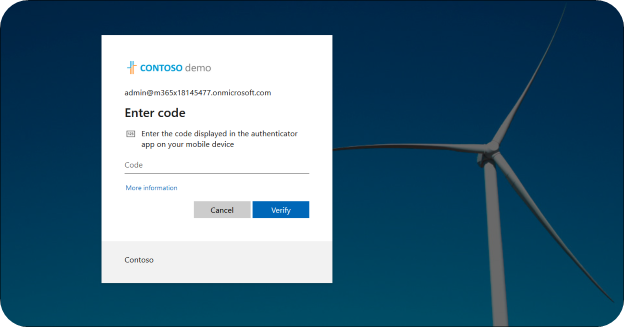
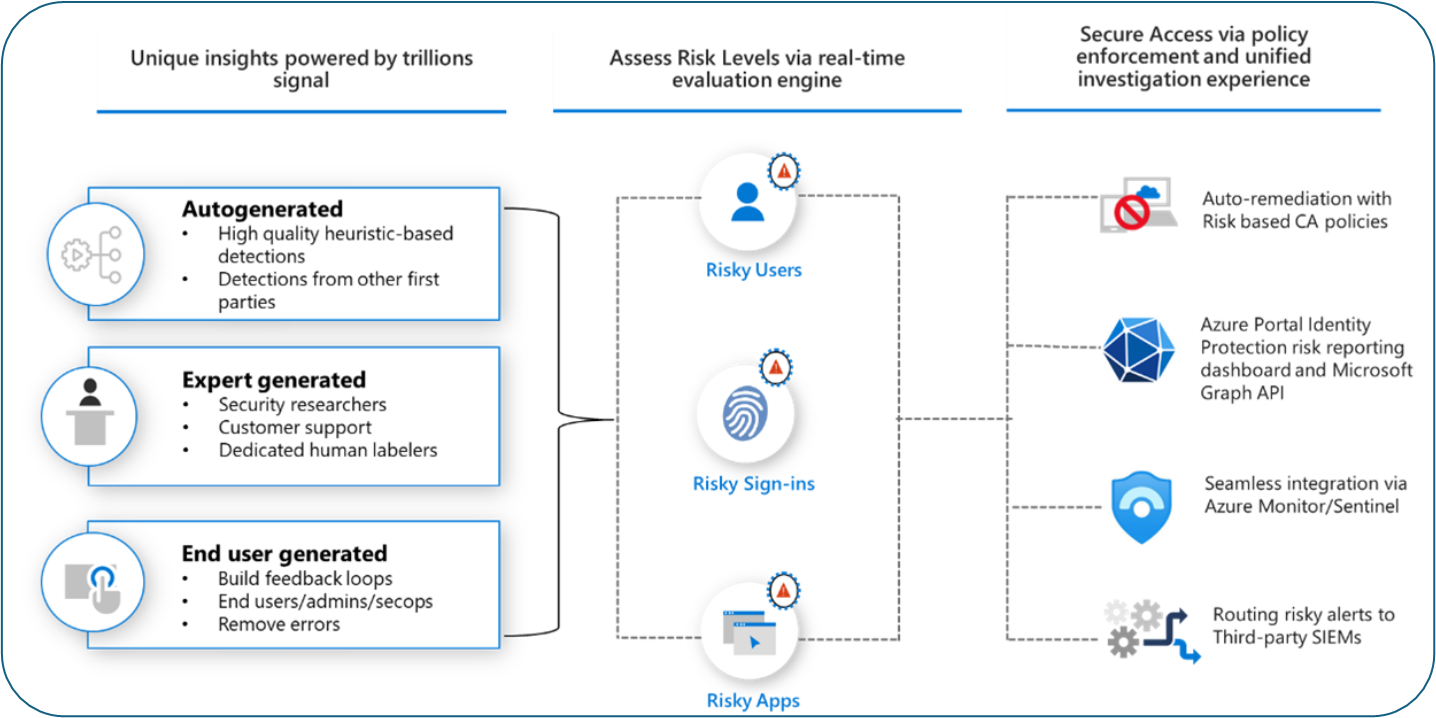
Multi factor Authentication (MFA) is one of the easiest and quickest ways to improve an organisations security posture. Adding this layer of authentication protects a user’s account if the password is breached via phishing attack. MFA requires users to provide an additional verification when logging in. Valto recommend using the Microsoft Authenticator as the main authentication method. Conditional Access Policies: These are critical security components that allow you to create access policies based on trusted devices, trusted locations, user’s security risk level as well as many more controls. These policies allow an organisation to ensure users can only access company resources under administrator defined circumstances. The overall security posture is enhanced by allowing access only under secure and compliant conditions. Valto have helped organisations by deploying best practice and baseline policies to protect Microsoft 365 Tenants. Example baseline policies all organisations should be deploying: • Require MFA for all users excluding trusted locations • Require compliant company devices when accessing Microsoft 365 • Block Legacy Authentication • Require App protection policies for Mobile Apps • Block High Risk Sign-ins • Block High Risk Users • Block unauthorised countries • Admin Session Persistence • Block file Downloads on Unmanaged Devices Entra Identity protection: Configure Identity protection to monitor, detect and remediate identity-based risks in real time. It’s important for larger organisations to implement robust automation to manage risky user accounts. Valto have helped customers to build auto remediation conditional access policies as well as monitoring integrations with via Azure Sentinel. • Anonymous IP address • Unfamiliar sign-in properties • Atypical travel • Leaked credentials
Data Loss Prevention (DLP): Set up DLP policies to prevent accidental or intentional data leaks.
Identify sensitive information (such as credit card numbers or personally identifiable information) and apply appropriate controls to external and internal sharing of data across Exchange, teams and SharePoint
Information Protection: Create and publish Sensitivity labels allowing users to classify sensitive data across Exchange Online, Teams and SharePoint .
Sensitivity labels should include encryption for confidential information preventing content from being consumed outside of the organisation.
Additional labels should also be deployed for the specific departments and business units to protect data on a more granular level. This will also help when adopting products like Copilot for Microsoft 365.
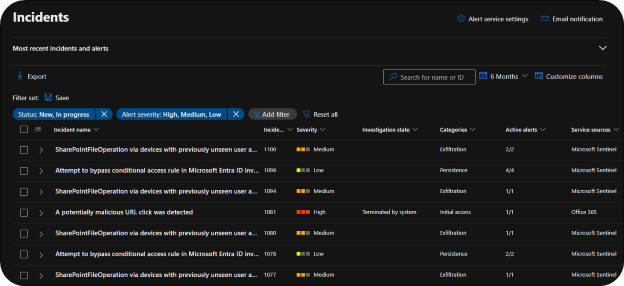
Configure standard Alerts: Enable and setup alerts for all critical events such as suspicious logins, privileged escalation and data exfiltration allowing your organisation to react to security events.
SIEM Integration: Deploy Azure Sentinel to ingest all Microsoft 365 logs and activity to generate detailed security incidents, conduct proactive threat hunting and provide a central space for monitoring your Microsoft 365 estate in real time.
Intune: Implement Intune MDM to enrol and manage your company devices. Intune allows remote management of your end user’s devices by enforcing device compliance, configuration policy sets and application deployment.
Valto work with many organisations and enterprises to establish best practice baseline deployments covering:
• Disk Encryption
• Application Protection
• Security baselines
• Windows Defender Application Control (WDAC)
App Protection Policies: Deploy app protection policies to control application behaviour on user’s personal mobile devices. App protection policies help secure company data and allow BYOD across the organisation.
Valto prove baseline App protection policies covering best practice and Microsoft recommendations for personal mobile device management.
Disable Auto-Forwarding: Disabling the auto-forwarding functionality from the Microsoft 365 admin centre, can prevent attackers from deleting messages, modifying email rules and automatically forwarding all your emails to an external address in the event Exchange Online is compromised.
Secure External Sharing: Limit external sharing to trusted domains or specific users via additional sharing policies in the SharePoint Admin centre.
Review Configuration Analyzer: Review and assess your current configuration against standard and strict templates. The analyser will look for security gaps across Defender for Office 365 and Exchange Online Protection.
Anti Phishing: Create custom anti phishing policies outside of the default policies to enable anti-spoofing and anti-impersonation protection with custom thresholds.
Anti Malware: Defender for office enables the use of real time and ransomware protection. We also recommend blocking common attachments as this is not enabled by default, doing this skips malware verification and keeps Exchange Online safe.
Safe Links: This will enable real time verification of URLs clicked by your users. We recommended adding users to the Standard or Strict preset security policies or configuring custom Safe Links policies to not let users click through to the original URL.
Safe Attachments: This offers an extra layer of security to the anti-malware functionality built into Exchange Online Protection. Files sent via Teams, SharePoint and Exchange will be checked again before they reach the intended recipients.
We recommend enabling the Block action which prevents messages with detected malware attachments from being delivered and automatically blocks future instances of the messages and attachments.
Valto specialises in helping organisations set up and configure Microsoft 365 security to safeguard their digital assets and ensure compliance with critical standards.
Leveraging our extensive experience, we assist businesses in achieving NIST, GDPR, Cyber Essentials, and NIS2 compliance through tailored Microsoft 365 solutions.
We have successfully partnered with numerous companies, guiding them through the intricacies of these regulations by implementing robust security policies, advanced threat protection, data loss prevention, and comprehensive audit logging.
Our approach ensures that your Microsoft 365 environment not only meets compliance requirements but also provides a secure foundation for your business operations.
With our expert support, your organisation can confidently navigate the complexities of regulatory compliance while maintaining a strong security posture.
Microsoft 365 is renowned for its robust security features, which, when configured correctly by an experienced engineer, can provide a highly secure platform for businesses.
Out of the box, Microsoft 365 includes a variety of security measures designed to protect against common threats. However, to meet best practices and tailor security to specific organisational needs, some setup is required.
Valto offers comprehensive security assessments for Microsoft 365 environments to help you identify vulnerabilities and areas for improvement.
Our expert team conducts thorough evaluations of your existing setup, including security configurations, compliance status, and potential risks.
By leveraging our extensive experience and best practices, we provide detailed insights and actionable recommendations to enhance your security measures.
A security assessment from Valto not only highlights immediate concerns but also helps you develop a strategic roadmap for long-term security resilience.
Let us help you fortify your Microsoft 365 environment, ensuring robust protection against cyber threats and aligning your infrastructure with regulatory requirements.
“We work with organisations across many sectors of different shapes and sizes from 10 to 100,000 employees.”
Contact our team today!
Our best practices and tips for designing SharePoint Department Sites. Training, development and support for Microsoft services.
20 November 2025
Our best practices and tips for designing SharePoint Department Sites. Training, development and support for Microsoft services.
8 October 2025

Explore how SMEs can use Microsoft Model-Driven Apps to create affordable, custom CRM-like systems. Learn how to manage customer data, track sales, automate tasks, and access powerful reporting—without the high cost of Dynamics 365.
22 January 2025