
NewsCopilot
Understanding Microsoft Copilot: Free vs. Paid Versions
Learn the key differences between Microsoft Copilot’s free and paid versions, including features, use cases, pricing, and how to boost productivity with the right setup.
7 May 2025

News
Explore how Microsoft Copilot supports IT and Marketing teams with real-world scenarios, helping automate tasks, analyse data, create content, and accelerate project delivery.

Microsoft Copilot provides users with a large suite of tools and features to support varied use cases. To answer the question of “What can Copilot do?” I have decided to explore the Microsoft Copilot Scenario Library available here (opens in a new tab) and discuss some of the key user journeys across a couple of functional areas.
The Microsoft Copilot Scenario Library is another great example of Microsoft adoption materials that I would recommend sharing with key stakeholders throughout your organisations AI transformation project.
This site provides a number of different scenarios that will cover key departments that are common across all businesses, such as Human Resources.

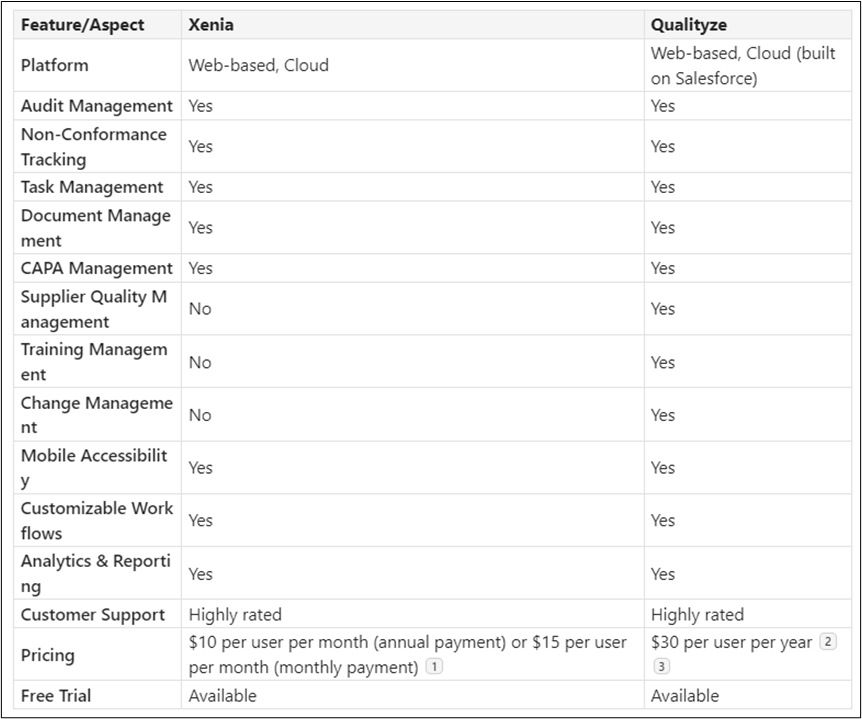
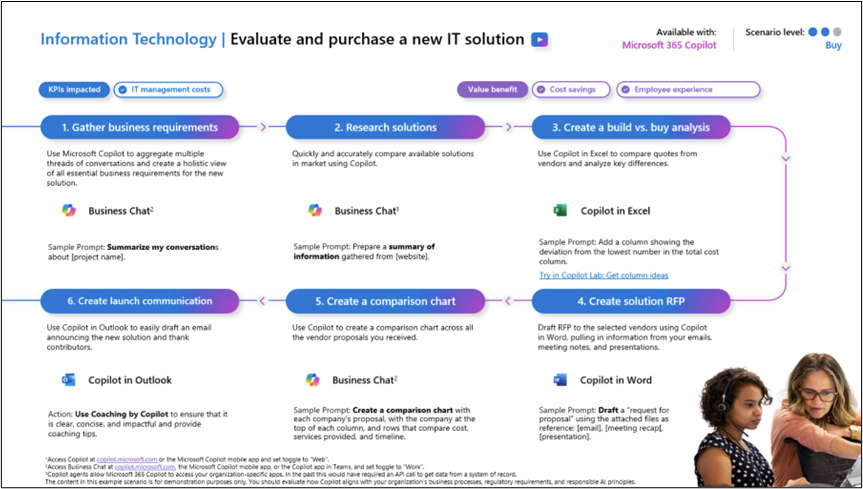
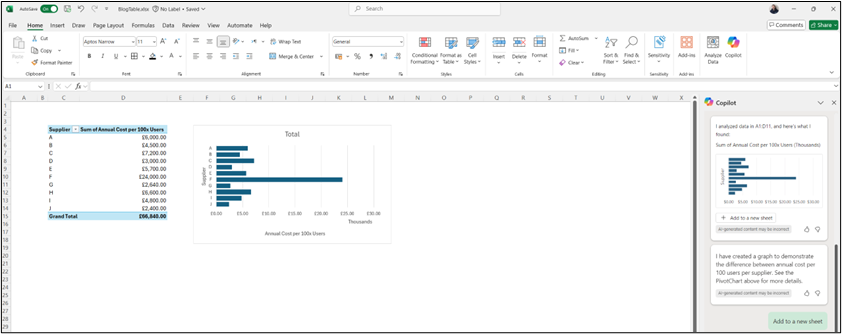
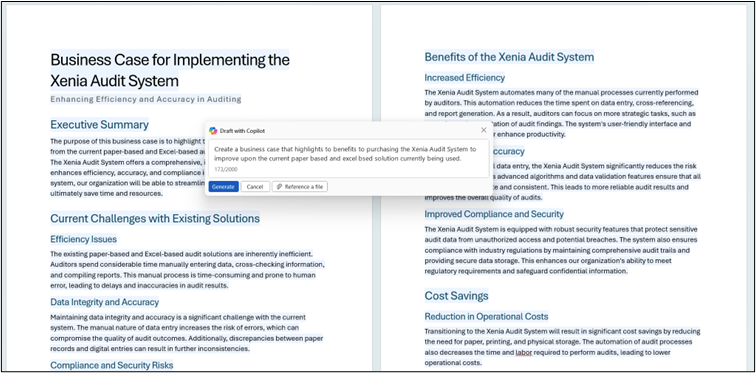
Firstly, as someone who works in the IT industry, I have decided to review how Copilot can assist an IT Department. A few suggestions are provided by the site, with some examples provided below: • Create a Project Plan • Draft a Product Strategy Document • Manage Application Installations • Onboard and Train New Users However, the item I will explore in more detail is the Evaluation and Purchase of a New IT Solution, this is mapped out in the guide below: This scenario initially utilised Copilot to collate and summarise information that would be stored within your organisation’s tenancy. Therefore, imagine that multiple meetings have been held and recorded within Microsoft Teams to discuss the new software that is required, these are supported with documents and conversations within a Microsoft Team that has been spun up for the project. Using a prompt, such as “Summarise conversations relating to Project ABC, outlining the key objectives and requirements that need to be met” will enable your team to start building out your specification to support the initiation of this project. Copilot can also be used to analyse data held on the web. Let’s imagine that the new software we require related to managing ISO Audits and non-conformances that come out of them. We can provide a prompt to start exploring this, such as “Provide a list of the top 10 software solutions that are available in the UK to manage delivery of ISO 9001 Audits, whilst enabling all Non-Conformances and actions to be logged, assigned and tracked. This solution needs to be web based and available on the cloud” which will gather results as demonstrated below: Further analysis could take place, such as asking Copilot to “Provide a table that compares features and prices between the Xenia and Qualityze solutions” Taking data provides by Copilot and placing it within Microsoft Excel can then allow for Copilot for Excel to perform even more analysis, such as plotting information on a graph. A simple example of this is shown below: As the project team is utilising Copilot, a large number of materials will be collated and stored within the organisation’s tenancy, within the applicable Microsoft Teams Channel. These materials can then be utilised within Copilot for Word to generate documents, such as an RFP or a Business Case. Furthermore, this could also be supported through the creation of a presentation by using Copilot for PowerPoint. Enabling users to quickly get their ideas and needs documented and ready to present to the board for quicker sign off. Finally, once the solution has been signed off and installed the IT Team would need to communicate this to the organisation. This is where Copilot for Outlook can support in drafting a clear and concise message to be delivered organisation wide: As demonstrated, a combination of Copilot tools and prompts can be used to support an end-to-end project delivery within an Information Technology Department, increasing time between initiation and delivery.
Next, I have decided to explore some of the more creative elements that are available within Microsoft Copilot, which lend themselves well to the Marketing Department. A few suggestions provided by the Microsoft Copilot Scenario Library are detailed below: • Collect and Share Product Feedback • Create New Offerings • Product Launch • Streamline Market Research and Strategy However, the item that I have decided to explore is Content Creation that is mapped out in the guide below: In this scenario we are able to get a bit more creative, however prior to that we need to understand our audience and generate some SEO keywords that will attract the right individuals, in this instance we will ask Copilot to “Identify 10 SEO Keywords for a blog post that will engage IT Managers who are looking to implement Artificial Intelligence (AI) within their organisation” We can then utilise these keywords within Copilot for Word to enable us to generate a blog post: This blog post could be enhanced further through the creation of AI images via Copilot. I decided to ask Copilot to “Create a fun and engaging image of an IT Manager alongside a personified version of Artificial Intelligence who is helping them with their tasks”, here is one of the results: Finally, I can start to publicise my blog on social media. Therefore, I asked Copilot to “Create an engaging and snappy social media post, inclusive of emojis, to publicise my blog titled “The Transformative Benefits of Introducing Artificial Intelligence into your IT Organisation”. The target market will be busy IT Managers.” As demonstrated, the combination of AI tools can allow for marketing materials and content to be generated quickly, leading to more posts being published and more leads/opportunities being generated.
In conclusion, I would recommend the use of the Microsoft Copilot Scenario Library to explore different journeys that can support your organisation and the functional or industrial areas that you work within.
Not only does this help in providing ideas and training to use the Copilot tools, but it could also be hugely beneficial in creating a business case to showcase all the great improvements and time saving efficiencies that you could introduce.
A great next step is to work with Valto in completing our free Microsoft Copilot Assessment. This 40-point check will evaluate your organization’s AI adoption and readiness, providing recommendations for security and setup.
If you need assistance with Microsoft Copilot, have any questions, or wish to take advantage of our free Microsoft Copilot assessment, please contact us. We’re here to help you through your AI journey.
“We work with organisations across many sectors of different shapes and sizes from 10 to 100,000 employees.”
Contact our team today!
Learn the key differences between Microsoft Copilot’s free and paid versions, including features, use cases, pricing, and how to boost productivity with the right setup.
7 May 2025

Discover how our consultancy team uses Microsoft Copilot across Outlook, Teams, Excel, Word and more to streamline workflows, boost productivity, and deliver high-quality client engagements.
7 May 2025
