
NewsOffice365
New Microsoft AI tools just announced at Microsoft Build 2025
All NEW Microsoft AI tools announced at Microsoft Build 2025 . Discover Microsoft CEO's AI vision to scale businesses with AI Chatbot Agents.
23 May 2025

News
Microsoft Office 365 is extremely popular and is used by over a million companies worldwide. This blog post will outline all the benefits and features included in Office 365 that make it so popular!
Microsoft Office 365 is extremely popular and is used by over a million companies worldwide. This blog post will outline all the benefits and features included in Office 365 that make it so popular!
Office 365 was launched by Microsoft in 2001. It is a cloud-based, subscription service. Previously Office 365 was sold as a one-time purchase, but more recently Microsoft has changed its model to a subscription-based service. An Office 365 subscription contains many Microsoft apps, which we have outlined below.
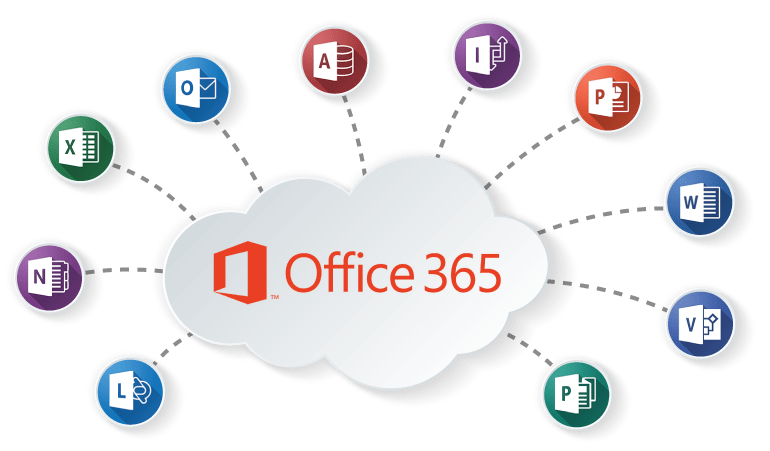
Office 365 contains Microsoft’s main applications such as Microsoft Word, PowerPoint, Excel, Outlook, and OneNote. Although, depending on the subscription plan that you choose, Office 365 could also include apps such as Microsoft Access, Yammer, SharePoint, OneDrive, Planner, Publisher, Teams, and Exchange.
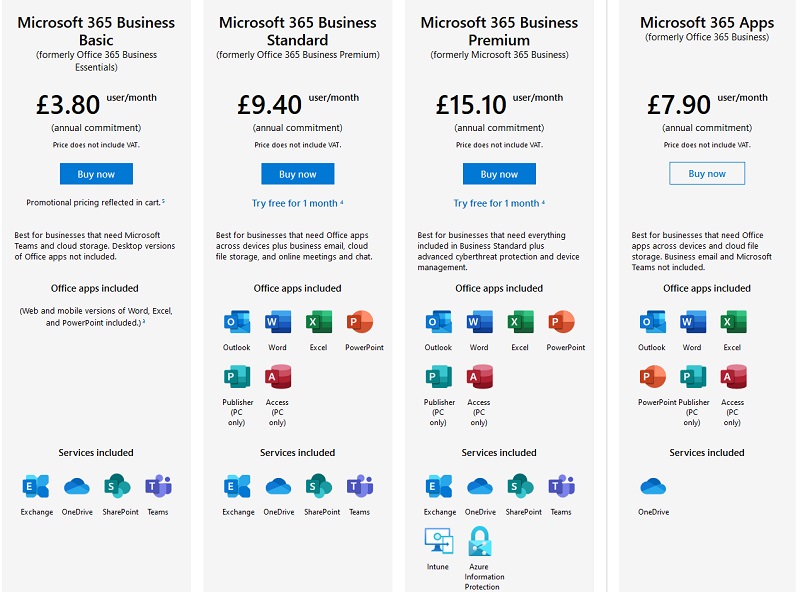
The price of Office 365 depends on which subscription you choose. The different prices and the benefits included in the different subscription options are outlined in the image below.
There are many benefits of Office 365 that make it the most popular choice of service for millions of organisations worldwide, including:
Office 365 has completely secure cloud storage. It has two factor-authentication, which ensures that any unauthorised person is unable to access any of your files or data, even if they have access to your device. This is an extremely important feature for organisations, as threat detection and malware software mean that security threats are dealt with immediately.
Due to Office 365 being cloud-based, it makes hybrid working much easier, enabling you to access your files and data from any device, anywhere in the world. Additionally, if there is ever an accident or situation that causes devices to be ruined or broken, all your files will have been saved in the cloud and regularly backed up. This means that even if physical devices are broken, all your files and data remain safe.
Due to Office 365 being subscription based, you never need to worry about having the latest version. Updates are performed automatically at predetermined intervals, so that all your apps such as Word, PowerPoint, and excel etc are always up to date.
Office 365 lets you share mailboxes, calendars, contacts, and documents in real time. The ability to share your calendar saves time going back and forth with proposed meeting times, which is beneficial now that hybrid working is on the rise. Sharing mailboxes is beneficial so that an entire department or a select few can receive the same emails, ensuring that nothing gets missed. SharePoint is an application included within Office 365, and any documents that are saved in here can be edited and viewed in real time by anyone that you choose to allow access to. Additionally, Microsoft Teams is also included within Office 365. This application enables you to instantly message a member of the team directly or an entire department through creating a message within a Teams Channel. Read more about Teams chats vs Channels to find out more about the features and differences of both.
Office 365 is subscription based with automatic upgrades included. Therefore, there is no surprise costs or added extras once you have chosen the subscription package that is right for your business. This means the cost you pay for Office 365 is predictable and helps you budget and plan for the year ahead.
Valto are here to help you with all your Microsoft 365 projects.
Valto are Microsoft 365 Specialists who provide a full range of services for the platform. This includes Microsoft Support, Training, Adoption, Consultancy and Migration. Learn more about the Valto story or Contact Us, our number is 03335 779 009.
All NEW Microsoft AI tools announced at Microsoft Build 2025 . Discover Microsoft CEO's AI vision to scale businesses with AI Chatbot Agents.
23 May 2025


17 November 2026 · 11:00 · 20 Stories, Manchester