
NewsOffice365
New Microsoft AI tools just announced at Microsoft Build 2025
All NEW Microsoft AI tools announced at Microsoft Build 2025 . Discover Microsoft CEO's AI vision to scale businesses with AI Chatbot Agents.
23 May 2025

News
Due to recent events a lot more of our customers are now quite rightly working from home and want to create their own Microsoft Team. To assist we have been increasing the amount of Microsoft Team and Office 365 readiness training throughout the past couple of weeks.
Due to recent events a lot more of our customers are now quite rightly working from home and want to create their own Microsoft Team. To assist we have been increasing the amount of Microsoft Team and Office 365 readiness training throughout the past couple of weeks.
Once our customers get started setting up their Teams, I often receive questions which the answers to which would be useful to everyone else who is in a similar position getting started with Microsoft Teams. So, I will be creating several short articles and videos to assist with these scenarios.
Tip: This blog article content has also been presented as a live demonstration video.
Watch the video (opens in a new tab)&feature=youtu.be
You may have noticed when you come to create a new Microsoft Team you are asked “What kind of team will this be?” and then presented with three options.
This is the most used type of Microsoft Team. It is frequently used by departments to provide a safe and secure place for their internal conversations and document collaboration.
By default, employees will not have access to a private team. It then relies on either the IT department, IT support provider or Owner (Super user) of the Team to add members.
Tip: We often refer to the Private Team as the Department Team. We find that this terminology is easier to understand and clear to end users who are adopting the system.
To avoid confusion, Public does not mean that external parties will be able to add themselves directly into your Team.
Public means that by default employees will not have access to a Public team. However, unlike a Private team an employee can add themselves into a Public team.
These can be very useful for projects where employees will come and go frequently from the Team.
They can be used for ADHOC social chats about specific topics. Which during the Coronavirus lock down where a lot of people will be self-isolating, providing a platform for social interaction can be very beneficial to your employees overall mental health.
Tip: We often refer to the Public Team as the Project Team. We find that this terminology is easier to understand and clear to end users who are adopting the system.
This type of Team will automatically add everyone in the organisation who has an Office 365 license that gives them access to Microsoft Teams into the Org-wide Team.
For small to medium sized businesses we would only expect to see one Org-wide Team. These Org-wide Teams are brilliant for pushing out latest updates and information about the Covid-19 outbreak and your latest guidance. It replaces the need for long email threads and chains which contain everyone in the organisation.
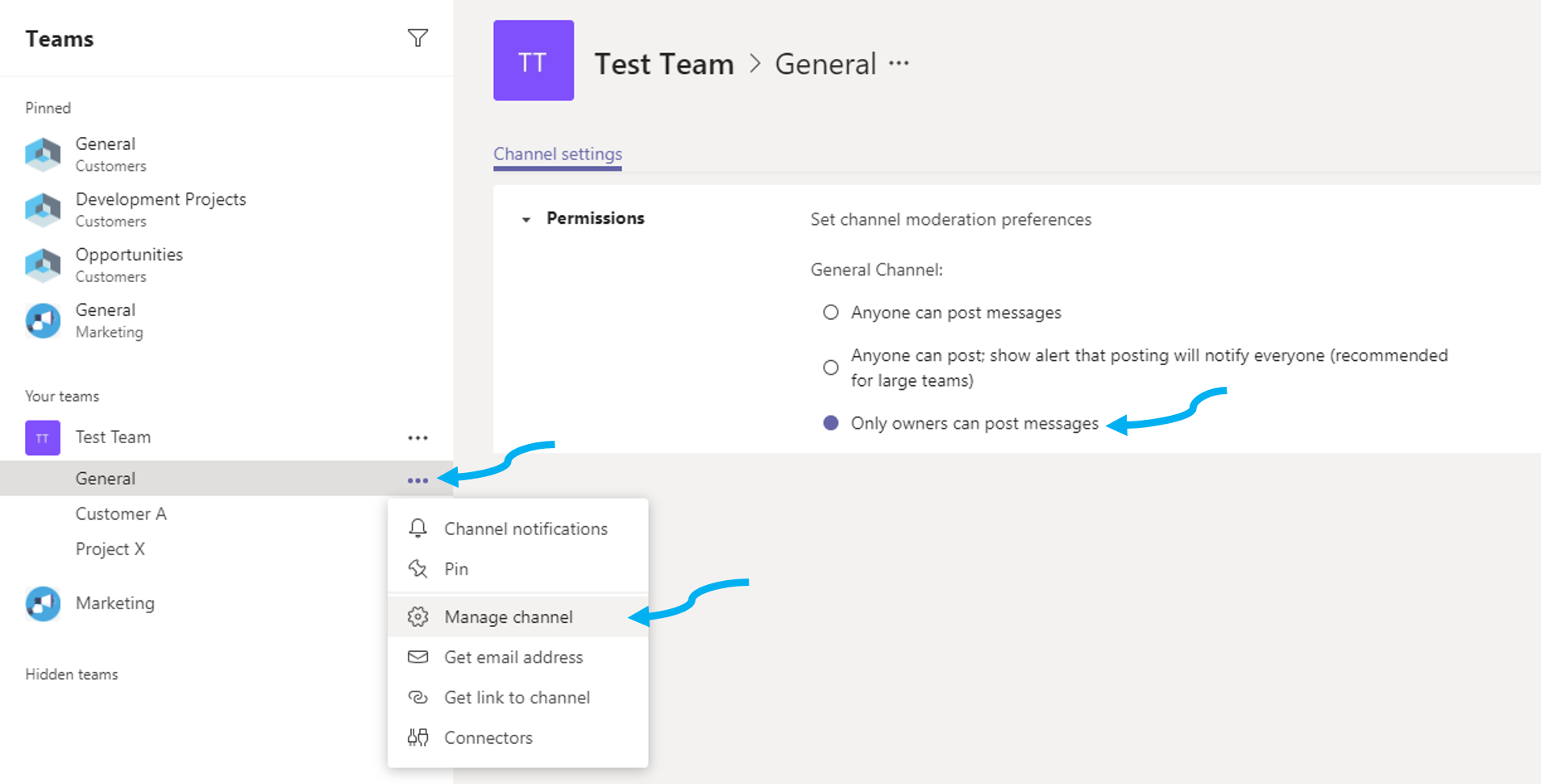
It is also worth noting that you might want to only allow specific people to post into the Org-wide team to stop it from becoming chaotic and overwhelmed with unofficial messages.
To do this you would “disable” posts from Members of this team and only allow Owners (a.k.a Admins) of the Team to post messages.
To do this simply click on the more options on the right-hand side of your “General” channel inside your Team, then select “Manage Channel”, then select “Only owners can post messages”.
Tip: We often refer to the Org-wide Team as the Company-wide Team. We find that this terminology is easier to understand and clear to end users who are adopting the system.
Find out more information about Microsoft Teams.
If you are looking to create your own Microsoft Team but need to have a play with it in a safe area first, try this interactive Microsoft Teams demo.
I hope you found this information useful, if you have any questions regarding Microsoft Teams, SharePoint or Office 365 please do not hesitate to contact me.
We’ve deployed Microsoft Teams for many organisations including Banks, Non-Profit, Manufacturing and many more. Get in touch with our specialists today to start planning your Microsoft Teams journey. Our Valto Microsoft Teams Services can help your organisation or you can contact us here. You may find our Microsoft Teams Governance Whitepaper useful.
 |
Dougie Wood |
| 10 Watergate Row Chester, CH1 2LD |
All NEW Microsoft AI tools announced at Microsoft Build 2025 . Discover Microsoft CEO's AI vision to scale businesses with AI Chatbot Agents.
23 May 2025


17 November 2026 · 11:00 · 20 Stories, Manchester