What Can Copilot Do? Exploring Functional Scenarios
Explore how Microsoft Copilot supports IT and Marketing teams with real-world scenarios, helping automate tasks, analyse data, create content, and accelerate project delivery.
7 May 2025
News
Discover the potential of using Copilot for image generation, experimenting with different styles and prompts to create unique visuals for SharePoint Intranet designs and beyond.

In a recent team meeting I was talking to my fellow Consultants about the ability to generate images with Copilot, and how beneficial this could be to assisting with our SharePoint Intranet designs, and customers who require support in generating imagery to make their site stand out from the crowd.
This gave me an idea to play around with image generation and see what I could learn with differing types of prompts, as I was doing this anyway then I thought I would share my findings within the article.
Let’s see how creative we can be!


My first thought was related to the types of images that could be created and the way that these could be styled. Would Copilot be able to generate similar images but in different mediums e.g. photo-realistic, cartoons or watercolours. For this example, I decided to use a simple initial prompt that I could add styles to. In the examples shown below, you will see each prompt, and some sample images. Initial Prompt: Create me an image of an adult male footballer wearing red and white stripes, they are running alone with a football at their feet. Style Prompt 1: Create me an image of an adult male footballer wearing red and white stripes, they are running alone with a football at their feet. The image must be in the style of a cartoon. Style Prompt 2: Create me an image of an adult male footballer wearing red and white stripes, they are running alone with a football at their feet. The image must be in the style of a watercolour painting. Style Prompt 3: Create me an image of an adult male footballer wearing red and white stripes, they are running alone with a football at their feet. The image must be in the style of an Andy Warhol painting. Style Prompt 4: Create me an image of an adult male footballer wearing red and white stripes, they are running alone with a football at their feet. The image must be in the style of a Salvador Dali painting. Style Prompt 5: Create me an image of an adult male footballer wearing red and white stripes, they are running alone with a football at their feet. The image must be in the style of a Vincent Van Gogh painting. Ok, so I could go on for a very long time creating so many different variations of this image. However, what we can see is that a simple change in the required style has provided such a variation to the types of images generated. If designing imagery for SharePoint Intranets, I would be able to use specific image rules from customer brand guidelines to provide guiderails for the types of imagery that can be used.

The second experiment was to create an initial prompt and then continue the conversation to see how far Copilot can be pushed to generate my image. In this example you will see my initial prompt, this will generate my first set of images. Initial Prompt: Create me an image of a female adult javelin thrower taking part in the Olympics that are being held in Paris, France. So, we have our first set of images. At this stage it is good to point out that images should be checked before putting them to use in Intranets or marketing materials. As you can see from the right-hand image, we have an athlete throwing but not holding the javelin whilst taking part in the “ODMICIS” which I can only assume was meant to read Olympics! So, for further prompting, I am going to continue to ask Copilot to make the image more French as the Olympics are set in Paris, so we want that to be really obvious. Let’s see how far Copilot can be pushed with the same continuous prompt. Let’s see our next results: Some flags, multiple Eiffel towers (??) and an attempt at the word “France” – great! What if we make the image more French again: So interestingly the images prior to these seemed more French to me, so perhaps Copilot is struggling for ideas now. Let’s try a final prompt of make the image even more French, the most French it could possibly be, with multiple references to France and see what results we get: That’s more like it! What I find interesting here is that I believe the first images that were generated were actually the best, which to me shows that having a simplistic but specific prompt will achieve your needs. During the conversation with Copilot, a number of suggestions are provided to me, regarding what should be added to the image. Like those below: A few of my other favourites included: • Place a baguette under her arm. • Add the Arc De Triumph • Add a Mime in the background. • Place them in the Moulin Rouge with can-can dancers. • Add a beret-wearing cat sitting on a windowsill.
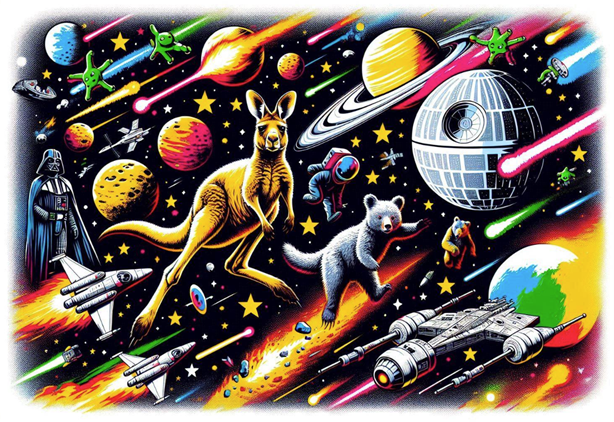
As a final experiment, I wanted to create a longer prompt, with lots of odd thoughts to just see what would be presented, so here it is:
Create an image of a kangaroo and bear who are lost in space. Include aliens, rockets and meteors passing them by. Darth Vader and the Death Star are also in the background, amongst lots of different colour planets and stars. The image must be bright and colourful.
As we can see the use of Copilot for image generation is a very powerful tool.
The ability to be able to document your thoughts, review images and then request updates allows you to generate imagery specific to your needs.
I would advise caution with how and where you are using images though. Within internal materials or SharePoint Intranets would be great, but I would not be jumping at putting them on a public facing website (unless in the form of a blog post like this).
What prompts have you tried, and what results did you get?
“We work with organisations across many sectors of different shapes and sizes from 10 to 100,000 employees.”
Contact our team today!

Explore how Microsoft Copilot supports IT and Marketing teams with real-world scenarios, helping automate tasks, analyse data, create content, and accelerate project delivery.
7 May 2025

Learn the key differences between Microsoft Copilot’s free and paid versions, including features, use cases, pricing, and how to boost productivity with the right setup.
7 May 2025

Discover how our consultancy team uses Microsoft Copilot across Outlook, Teams, Excel, Word and more to streamline workflows, boost productivity, and deliver high-quality client engagements.
7 May 2025