
NewsOffice365
New Microsoft AI tools just announced at Microsoft Build 2025
All NEW Microsoft AI tools announced at Microsoft Build 2025 . Discover Microsoft CEO's AI vision to scale businesses with AI Chatbot Agents.
23 May 2025

News
In this blog I will be comparing Zoom vs Microsoft Teams. I have created a video which reviews both products including license costs, usability and features. Recent events have meant employees are self-isolating because of the Coronavirus outbreak.

In this blog I will be comparing Zoom vs Microsoft Teams. I have created a video which reviews both products including license costs, usability and features.
Recent events have meant employees are self-isolating because of the Coronavirus outbreak. This means a lot of people are now working from home. This poses quite a few issues for organisations when trying to keep operations running as smoothly as normal.
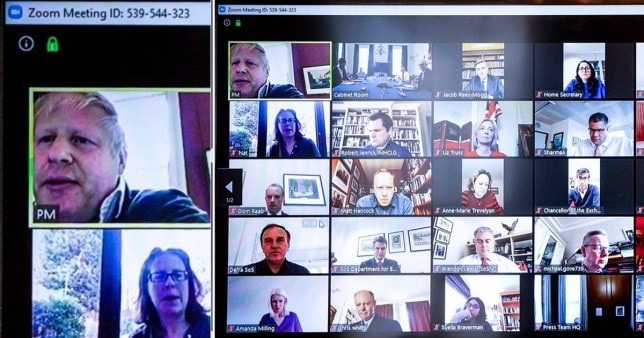
Remote working technologies such as Zoom, or Microsoft Teams are often used to help elevate issues such as replacing meetings with web conferences. The Prime Minister, Boris Johnson had recently shared an image of been seen using both Zoom and Office products simultaneously to continue working from home whilst self-isolating.
Zoom is a web-based video conferencing tool. This means you can access it with a login via any internet browser. It also has a desktop client and a mobile app that allows users to meet online, with or without video.

Zoom meetings can be recorded and allow for users to collaborate on projects. The sharing functions also allow to annotate on one another’s screens. Zoom offers video, audio, and a wireless screen-sharing performance across Windows, Mac, Linux, iOS, Android, Blackberry, Zoom Rooms, and H.323/SIP room systems.
Microsoft Teams is a collaboration platform hosted in Microsoft cloud Office 365. This means that it is accessible via any inter browser. It also has a desktop and mobile application that you can install to any of your devices.

It provides global, remote, and working from home teams with the ability to work together and share information via a common space. It is so much more than just video conferencing. It allows for document storage per Team and has a continuous chat room for all members of the team to interact with conversations.
Teams also integrates with your outlook calendar, provides one on one chat, wiki pages and so much more.
Zoom has a free service that you can subscribe to at any time by going to https://zoom.us/signup. However, it will only allow up to 3 attendees into a meeting for up to 40 minutes. At the end of this time it will automatically kick everyone out of the meeting and the meeting owner must create a new meeting invite if you wish to continue your call. However, you can upgrade your license to a quite costly minimum fee of £11.99 a month per user. More information on Zoom pricing can be found here https://zoom.us/pricing. You can learn more about how to use Zoom on Jotform’s guide “How to use Zoom“.
Microsoft is currently offer Teams completely free of charge for 6 months to assist businesses that are desperately trying to use technology to allow their employees to efficiently work from home. After this 6-month free trial is over a typical minimum license cost to continue using teams would be £3.80 per user a month. If you are interested in getting started with Microsoft teams, please contact us as we can ensure you get the free trial and the best value licenses.
FeatureZoomMicrosoft Teams
Audio CallsYesYes
Video ConferencingYesYes
Screen SharingYesYes
Electronic Hand RaisingYesNo
Mobile AppYesYes
Record MeetingsYesYes
Document StorageNoYes
Instant MessagingNoYes
Activity NotificationsNoYes
Pro Webinar (Live Event)NoYes
3rd Party App IntegrationNoYes
A lot of organisations are now weighing up the two key products Zoom vs Microsoft Teams to comparing functionality against cost. I have put together a short video below to review some key points.
Tip: This blog article content has also been presented as a live demonstration video below.
We compared both services security and compliance features and found the following information:
Zoom has recently come under scrutiny after several major cyber security concerns had been identified.
This included accidentally releasing the personal email addresses and photos of thousands of its users. This was due to a malfunction in its “Company Directory” feature which is designed to help users inside of an organisation find contacts.
Secondly an issue had come to light that although Zoom claimed they had been using end to end encryption on video meetings a third-party investigation concluded this was not the case. Meaning external hackers would easily be able to gain access to private video meetings and data.
Recently a security concern had been raised regarding the windows version of the Zoom application. This app was allowing attackers to send harmful link to users chat interfaces and gain access to their computer network. Zoom has yet to commit or investigate this latest issue.
You can read more articles about Zoom security issues here:
Microsoft take security very seriously and our market leaders with their cutting-edge technology. This includes a wide variety of different techniques to keep your business data safe.
These include things such as Multi Factor Authentication, which means that your employees must not only sign into Microsoft Teams with their email address and password. They must also provide a second layer of authentication from a mobile phone. Such as receiving a code by text message, answer an automated phone call or receive a push notification to their mobile app. This is the only way to ensure that even if a hacker got hold of your employee’s login credentials, they would still not be able to access the data as they do not have the employees’ mobile phone.
Another step you can take is to enable retention policies for Microsoft Teams. Retention policies enables businesses retain data that’s critical for your business to keep by preventing it from being moved or deleted. These policies might be for regulatory, legal, business, or security reasons.
It can also be used to remove documents and conversations that are not relevant to be stored on a long-term basis. Retention policies can also be used to keep data for a period and then delete it. For example, certain financial information, you might wish to ensure is kept for 7 years and at the end of this time be sent to the financial director for review before being deleted.
Zoom provides a free option for web conferencing for up to 40 minutes. However, it will immediately cut you off the call and you must schedule a follow up call if you wish to continue. Speaking from first-hand experience of this with previous customers free subscriptions of Zoom it is very frustrating for everyone involved.
To get round this you must purchase a license which is a minimum of £11.99 per user per month. Compared to Microsoft’s business essentials license which is £3.80 a month. This license not only gives your Microsoft Teams but also includes SharePoint (Document Storage); 1TB OneDrive storage; Exchange Mailbox (Outlook) and so much more. So, it really is a no brainer to spot the best value when comparing Zoom vs Microsoft Teams.
Microsoft are also offering 6 months free licenses for first time customers getting started with Office 365 and Microsoft Teams.
I hope you found this information useful, if you have any questions regarding Microsoft Teams, SharePoint or Office 365 please do not hesitate to contact me.
We’ve deployed Microsoft Teams for many organisations including Banks, Non-Profit, Manufacturing and many more. Get in touch with our specialists today to start planning your Microsoft Teams journey. Our Valto Microsoft Teams Services can help your organisation or you can contact us here. You may find our Microsoft Teams Governance Whitepaper useful.
 |
Dougie Wood |
| 10 Watergate Row Chester, CH1 2LD |
All NEW Microsoft AI tools announced at Microsoft Build 2025 . Discover Microsoft CEO's AI vision to scale businesses with AI Chatbot Agents.
23 May 2025


17 November 2026 · 11:00 · 20 Stories, Manchester