
Business Applications
Power Apps Licensing
At Valto, we’ve got years of experience working with Microsoft tools.

Valto are official Microsoft partners – let us help you get the best out of your PowerApps License
We’ve successfully delivered countless projects to businesses across the UK in multiple industries. When it comes to PowerApps, we’re on hand to provide support, consultancy, training and any help you require. With a PowerApps License, you can integrate data and information from across the full Office 365 (Microsoft 365) suite and a whole host of other third-party programs. You’ll be able to create custom apps, model-driven apps and canvas apps to better serve your team and your customers. However, to get the best out of the PowerApps development platform, you’ll need the right license for you. Our PowerApps team have identified the correct licenses for countless clients to save them time and money – let us help you. Get in touch with a UK Microsoft expert to find the right PowerApps program for you
PowerApps licensing, explained
To enable you or your team to create custom and canvas apps, modify existing apps and launch offline apps, you’ll need a PowerApps license.
In PowerApps, you’ll be able to run any flow capabilities that are triggered directly from a particular app, or within an app’s data. However, for standalone or extra flow functionality, users may need to opt into a separate Microsoft Flow plan.
PowerApps is, of course, a low-code platform that allows users with little or no coding experience to create custom model-driven and canvas apps. If you’re new to app creation and want some more hands-on experience before committing to a licence, the PowerApps Community Plan is a free program designed to familiarise users with the development platform.
PowerApps features with Microsoft 365, Office 365 and Dynamics 365 accounts
If you already have a Dynamics 365 or Microsoft 365 (formerly known as Office 365) subscription, some limited PowerApps features and capabilities will already be available to you. In order to run and create apps that use data beyond Microsoft 365, you will need a standalone PowerApps license; we particularly recommend licenses for larger businesses or anyone planning to feature Premium Data Sources or have a high app distribution. These are some of the reasons why you will need a PowerApps licence:
- To integrate and pull through data from third-party applications and programs like Salesforce
- To use on-premises data in your app
- To run your app using custom data sources
Below is an overview of the features and functionality included within the PowerApps for Microsoft 365 plan.
✔ Create and run unlimited apps (without Premium Data Connectors)
✔ Share apps
✔ Integrate and connect data from Microsoft 365
✔ Run canvas apps offline
✔ Use standard connectors to connect to cloud services
✔ Run PowerApps apps in a browser
✔ Run apps in PowerApps for mobile (iOS or Android)
To use Premium Data Connectors, like SQL Server or Dataverse (previously Common Data Service), you’ll need to upgrade to one of the standalone PowerApps licenses. If you want to create an app within PowerApps that deals with a high number of rows, for example, you will likely wish to use SQL Server in your app data management, and will therefore need a higher functionality licence.
Dynamics 365 users can build unlimited apps – both canvas and model-driven – as long as they function within their Dynamics 365 environment. Users within this profile can also use Premium Connectors.
To learn more about what’s included with Microsoft 365 licenses, speak to our experts.
Standalone PowerApps licensing
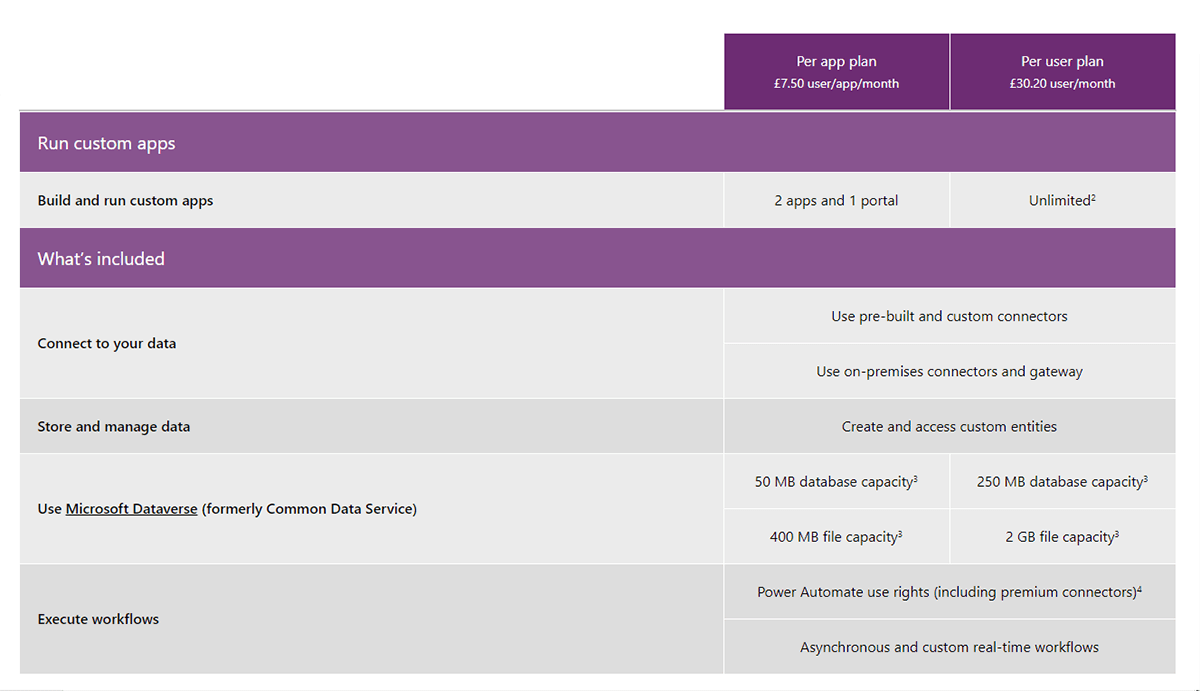
To do more with custom app creation for your business, there are two types of plans beyond PowerApps for Microsoft 365 – per app and per user. Let’s take a look at both to explain the differences.
PowerApps per app license
Although this licence is called ‘per app’, it actually allows you to run 2 custom apps and access 1 custom portal. This PowerApps licence essentially allows you to run an app for a specific business process. This licence is perfect for businesses after extra value and flexibility when it comes to working with apps. Individual users can run and work with applications for a particular business function, using the full PowerApps suite.
The per app licence includes a 50 MB database capacity and a 400 MB file capacity with Microsoft Dataverse (formerly known as the Common Data Service).
This licence is great if you’re looking to create a specific, single app for your business. Similarly, for building and customising a few unique apps, you might choose to stack or combine licences.
PowerApps per user license
This PowerApps licence essentially allows you to run multiple apps. Each individual user can work with an unlimited number of apps across PowerApps, without any restrictions or off-limits functionality. This licence replaced the old P1 and P2 plans that were previously in place.
The per user licence includes a 250 MB database capacity and a 2 GB file capacity with Microsoft Dataverse (previously Common Data Service).
We’d recommend this licence for businesses working with a large number of apps, or with plans to create multiple types of app across different data sources. With the per user licence, it’s possible to create multiple different app types on one account.
Need help deciding which licence plan is required for you? Book a consultation with one of our UK-based specialists today.
PowerApps portals
Microsoft’s portals service allows you to share or make your apps and associated data sources visible to authenticated external users (for example users logged in on LinkedIn or Facebook) as well as anonymous users. Your portal is essentially a web application that creates the ability for users to sign in to view or interact with your PowerApps app.
Use portals to share your data and apps with either internal or external users. You can tailor the authentication requirements according to your data and business protocols. You can also match the branding of your portal to your company’s. We recommend portals for anyone looking to share their app widely or set up a customer-facing app. You can use Power Platform functionality to use Microsoft Dataverse (Common Data Service), Power BI and Power Automate model-driven data right to your portal.
There are two ways to sign up for portal usage:
Login capacity
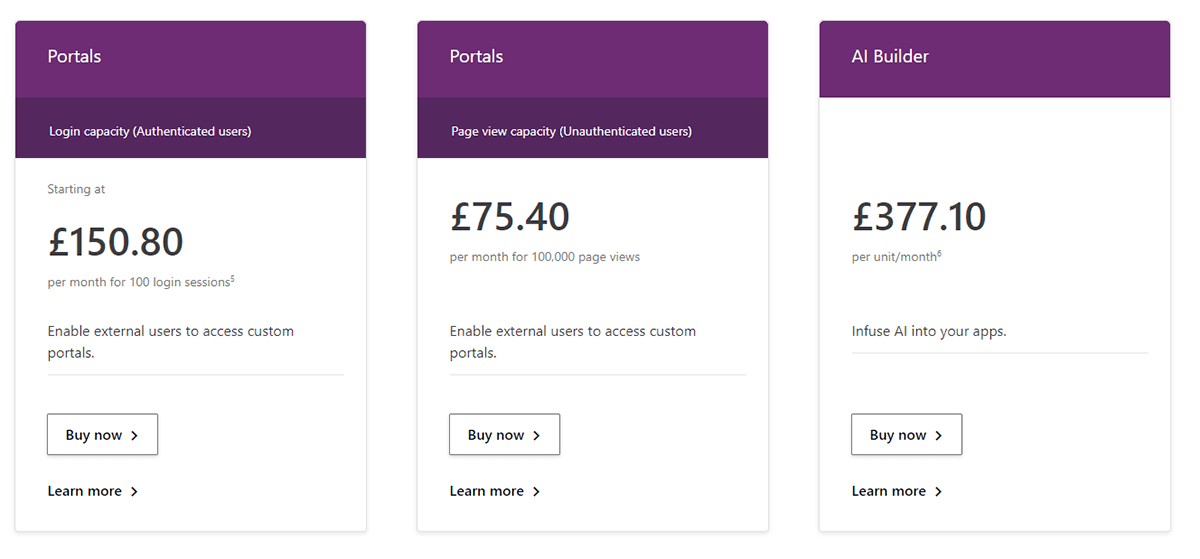
This portal licence allows authenticated users 100 daily login sessions per month. Each login allows an external user access to the portal for 24 hours.
Page view capacity
This portal system grants unauthenticated external users up to 100,000 page views for your data per month.
Learn more about portal and PowerApps add-on pricing – See Pricing.
PowerApps AI Builder
To add greater AI functionality and intuitive features to your PowerApps app projects, you may wish to opt for the credit-based AI Builder.
This add-on licence allows a user to run AI processes easily. With this function, your app can have prediction, automation and classification abilities without the need for complex code. Using Power Automate (Flow), processes that may have previously been time-consuming can be automated simply.
To learn more about the PowerApps AI builder and pricing, view Pricing Guide.
What license do I need for PowerApps?
The easiest way to decide which licence you need is to understand how many apps you want to create and run. Simplified, the per app licence is best for businesses who only need to run limited business functions, or those looking to limit spending. For unlimited functionality and the ability to create and run multiple apps, the per user licence is recommended. To share apps with external users and to integrate AI capabilities, there are dedicated PowerApps add-on licences as detailed above.
To make sure you only spend what you need to and to discuss whether you need the per app or per user licence, we recommend having a chat with one of Valto’s UK Microsoft experts.
Why are there different PowerApps licensing plans?
PowerApps licences come in different levels to suit multiple users. The different licences offer varying levels of cover and usability to fit a number of different budgets, requirements and resources. For example, if your business only requires one user to build and maintain a single app, you don’t need to pay for a more comprehensive licence.
Is Microsoft PowerApps Free?
No. There are different prices depending on which license you choose. For a full breakdown of how much PowerApps plans cost, please refer to our PowerApps pricing guide.
How much does a PowerApps license cost?
For a full breakdown of how much PowerApps plans cost, please refer to our PowerApps pricing guide.
How does the PowerApps per app plan work?
The PowerApps per app plan actually allows you to create 2 custom apps (and access 1 custom portal). You pay per month to be able to create an app to service a particular business scenario. To create multiple apps, either stack per app licences or upgrade to the per user plan.
I used to have a P1 or P2 plan – Do I need to get a new PowerApps license?
No, your plan will have automatically been replaced by the PowerApps per user plan, which allows the creation of unlimited apps.
Do you get full Power Automate capabilities with the PowerApps license?
PowerApps licences do retain Power Automate (previously Microsoft Flow) functionality. However under the PowerApps licence, flows must only use the same data sources as the app, and function within it. To learn more about Power Automate licensing and whether you need additional licenses, give our team a call.

Case study · Holstein UK
Holstein UK’s digital transformation journey with Valto
Holstein UK is undertaking one of the most significant technology investments in its history, partnering with Valto to modernise core systems, simplify complex processes, and build a connected, data-driven platform for the future. The programme is currently in active delivery, and this page will continue to evolve as new milestones, achievements, and insights emerge.
- AI & Automation
- Business Applications
- Power Platform
“Valto’s dedication and expertise has been instrumental for the improvement of Herts Mind’s IT infrastructure. We’re grateful for our partnership with the Valto support team, and we look forward to continuing this positive and productive relationship.”