Valto — Keep ahead of tomorrow

Modern Workplace

Voice

Support

Our team will guide you every step of the way in deciding on Microsoft Business Voice and implementing it for your business, clients and colleagues.

Migration and Setup

With Valto, making the switch to Business Voice to save time, money and hassle will be simple. We’re experienced Microsoft Experts who know the platform inside and out.

Ongoing Training and Development

We’re here when you need us for support, training or troubleshooting. Whether you’re experiencing challenges adding a new feature or want a little more in-depth knowledge, we’ll help.

Universal Communication Tool

With Microsoft 365 Business Voice you can call from anywhere at any time. Sync your phone number between your mobile device and office phone for simple on the go access, and instantly convert a simple call into a video chat or group conference. You’ll have conference numbers for participants to dial into, and a host of devices specifically designed for use with the Microsoft Teams app to enhance your calls.

Valto is an official recognised Microsoft partner here in the UK. This not only means that we have a direct line into the latest updates, guidance, releases and products released by the company in the US, but also means that our specialists were trained at Microsoft, by Microsoft. We’re very proud to be one of very few companies able to say that, and continue to provide the very best expert services to business across the UK. Our Microsoft Office365 consultants are the best in the business, with years of experience working with companies across many industries. We’ve worked to deploy Office365 products across countless organisations, providing hundreds of clients with all the tools they need for ultimate productivity at work. Our consultants also work on Office365 implementation projects, streamlining your Office365 package so each app is perfectly set up to complement your workflow.
Now you can use call, chat and meetings features all within one simple app. Dial external phone numbers without having to leave your network. Dip in and out of other Microsoft services – check your Outlook calendar, call a contact on Microsoft Teams, collaborate on in-meeting documents and more.
All meetings and conferences through Business Voice are provided with a dial-in number, making it simple for attendees to join from any device. Take the stress out of call management and add Business Voice to your Microsoft Licence today
Because it’s built directly into your Microsoft licence, you know you can trust Business Voice to keep your data, contacts and other information safe. Password management and multi-factor account authentication mean you can rest easy.
Once Valto sets up your Business Voice account, we’ll also be able to easily switch all your existing phone numbers to the new cloud service, so you’re up and running in an instant.
Whatever your team, colleagues, clients or partners are using to communicate, you’ll be supported. Working through the Microsoft Teams network, Business Voice is supported across desk phones, smartphones, PCs, Macs and tablet devices for universal communication made simple.
Arrange call queuing and transfer systems instantly and without hassle. Scale your calls as required by your business, set up bespoke hold music and input personalised greetings to match your company tone of voice.
Because it’s based in the cloud, Business Voice allows you to access and manage your voicemail messages anywhere at any time. Simply log into your account from any supported device to listen to transcripts and never miss a message.
You can set up your Business Voice account to automatically route calls depending on a range of factors including language, world time zone or respondent availability. You can also directly route to any existing providers through Session Initiation Protocol trunks.
Valto is an approved stockist of SIPPIO, an end-to-end solution for international calling in Microsoft Teams. It’s an Azure native platform that operates on a cloud system, providing reliability and security around the world, no matter where your colleagues or clients are. Cut out the need for expensive and complex international connection services with the SIPPIO Voice Panel app, and make sure any previously outdated or legacy telephone systems in your global offices are put to good use. With SIPPIO, you can use desk phones in any location around the world for voice calling, just as you would with Microsoft Teams video calling or instant chat. Ideal for teams operating on a remote working basis, SIPPIO provides DID service in more than 60 countries. Ask our experts about SIPPIO service integration as part of your business solution
Take Business Voice to the next level with Poly, which provides high-end audio and video solutions designed with business in mind. Comprising high-definition webcams and video bars, headsets, speakerphones and integrated USB-connected meeting display monitors, the Poly catalogue will make every video conference call the height of professionalism. Valto is a Poly approved stockist and can supply the perfect conferencing solution tailored for your business. Use Poly equipment in any business scenario – in the office conference room, to convert a disused space into the perfect video-friendly area, for remote working on the go, or in home offices. Ask our experts about Poly product integration as part of your business solution

What is Microsoft 365 Business Voice?

Microsoft 365 Business Voice is an addon to Microsoft Teams and a comprehensive all-in-one communication system designed for small and medium businesses . The cloud-based solution works seamlessly with the entire Microsoft 365 suite for easy, stress-free management. Business Voice combines instant messaging, voice calls and video meetings together into one convenient and simple app – Microsoft Teams.

At Valto, we live and breathe all things Microsoft. We provide integrated, intelligent and intuitive services for your business, encompassing everything from system installation and consultation through to advanced training and long-term support. As Microsoft Partners our specialists have been trained by Microsoft directly, so you know you’re in the best hands when it comes to transforming your business.

Download our Free Business Voice Overview Infographic.

Watch the video (opens in a new tab)

Give our Microsoft specialists a call for a free, no obligation initial consultation on Business Voice

What is Microsoft 365 Business Voice used for?

Previously, if your business wanted to make phone calls through Teams, you needed to have an Office 365 Enterprise plan (Office 365 E1, E3 or E5). That meant paying an additional cost on top of the more common business licence.

With Business Voice, companies with up to 300 users can now use full calling, conferencing and messaging functions integrated directly with their Microsoft package. Using Teams means you can work across smartphones, computers, tablets and office desk phones for the ultimate in convenience and flexibility.

Use Business Voice to…

  • Arrange calls and meetings to any phone number from your computer, mobile device or desk phone
  • Collaborate using Microsoft apps like Word, Outlook and PowerPoint within calls
  • Get real-time captions for calls, translate chat messages and transcribe voicemails
  • Make international calling painless and avoid costly extra line charges
  • Conduct video meetings with one click – no matter where the participants are
  • Easily reroute and queue calls automatically

How to get the most out of your Microsoft 365 Business Voice plan

The Microsoft suite now encompasses virtually every element of business management at the highest level. From intuitive data to instant messaging, simple scheduling to spreadsheet management, control your entire enterprise with the touch of a button.

Microsoft 365 Business Voice takes it one step further, bringing multiple forms of communication together into one easy to manage service. To enhance these features, you may choose to add third party services and boosters that can offer even greater functionality for your everyday processes.
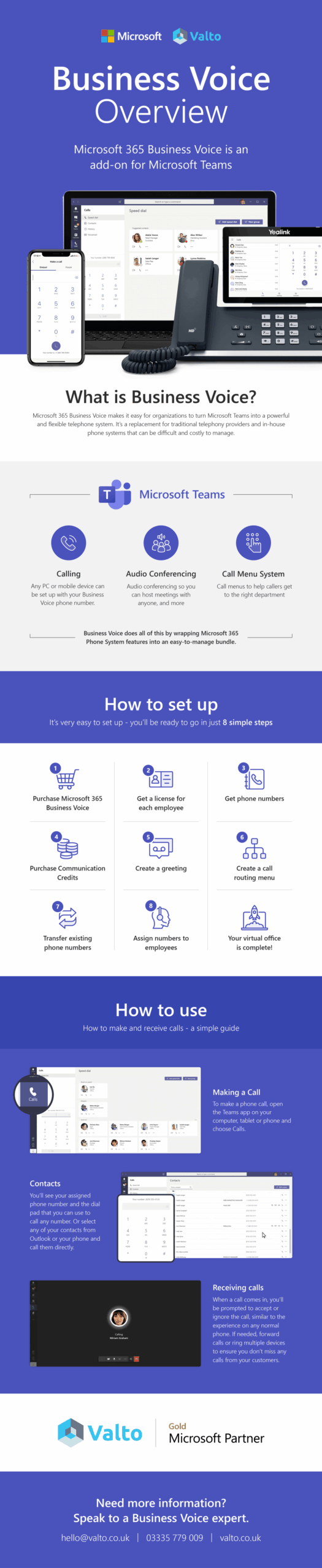
Watch the video (opens in a new tab)

The best visual infographic overview of Microsoft 365 Business Voice by Valto IT Services
Watch the video

Microsoft 365 Business Voice Services

Frequently asked questions

Microsoft’s Business Voice is a calling platform that operates on a cloud-based system. Designed for small and medium businesses, the service uses Microsoft Teams to allow users around the world to send chat messages, make and transfer calls, and hold video conferences. The service allows calls between mobile and landline phones using the public switched telephone network, so you can call external numbers right from within Microsoft Teams.
Business Voice was created specifically for small and medium sized businesses (with up to 300 users), particularly those already working with Microsoft 365 or Office 365 systems.
Business Voice is available to be added to Microsoft plans with Teams access in the UK. A selection of eligible plans include Microsoft 365 F1, F3, Business Basic, Business Standard and Business Premium (E1, E3, A1 or A3), Office 365 Business Essentials, Office 365 Business Premium, Microsoft 365 Business and Office 365 Enterprise (E1 or E3). Get in touch with Valto’s Business Voice specialists for a quick and easy introduction to the service and to get set up on it straight away.
With Business Voice, you get an enterprise grade phone system delivered from Microsoft’s ultra-secure cloud systems. Every online meeting comes with its own number to dial into, plus you’ll receive PTSN calls available to use with any number. Business Voice users can also migrate any existing phone numbers or generate brand new ones as needed.
It’s entirely up to you whether you use new numbers. With Business Voice you can bring over existing company or personal phone numbers and continue to use them, transferring from your current provider to Microsoft. Alternatively, you can use new phone numbers.
Because Business Voice works through Microsoft Teams, you can use any device supported by Teams. So, that means you can turn your desk phone, smartphone, tablet, Mac or PC into an international calling device with just one click.
Within the UK, your plan comes with 1,200 minutes for every user, every month. Included minutes will be pooled collectively at the tenant level. If required, you can add additional minutes using Microsoft Communications Credits.
Yes – the Business Voice (without calling plan) was designed with this in mind. Valto will help migrate your current calling plan to Business Voice to seamlessly work with your Microsoft licence.
Business Voice is designed for use with up to 300 users. Ask the Valto team about setting up global partners and remote work colleagues for chat and call functions. For large businesses who require service for more than 300 users, we can help set up an enterprise system with Microsoft E5.

Talk to us about Voice