Valto — Keep ahead of tomorrow

News

Non Conformance Report System

View top ten SharePoint intranet examples and discover how Modern SharePoint Intranets make a difference to employee engagements

Office365SharePoint
Published
22 February 2022
Screenshot of the YouTube front page for the Non conformance report video

Non Conformance Report System with SharePoint

If your organisation is facing the challenge of digitally capturing non conformance report as part of adhering to an ISO standard such as ISO 9001 or ISO 27001 (and others) we have a pre-built product that will help the ISO management process for you!

ISO Audit Portal in SharePoint Online

Our clients that use this system for ISO 9001 management find it very useful to be able to have online audit software built as a SharePoint portal to navigate through their non-conformance items.

All the users can securely sign in using their Office365 email address and password.

You can enable multi factor authentication to ensure your company data remains safe.

SharePoint Online is a content management product from Microsoft that is contained with Office 365.

Our system is built allowing you to use your existing Microsoft 365 licenses.

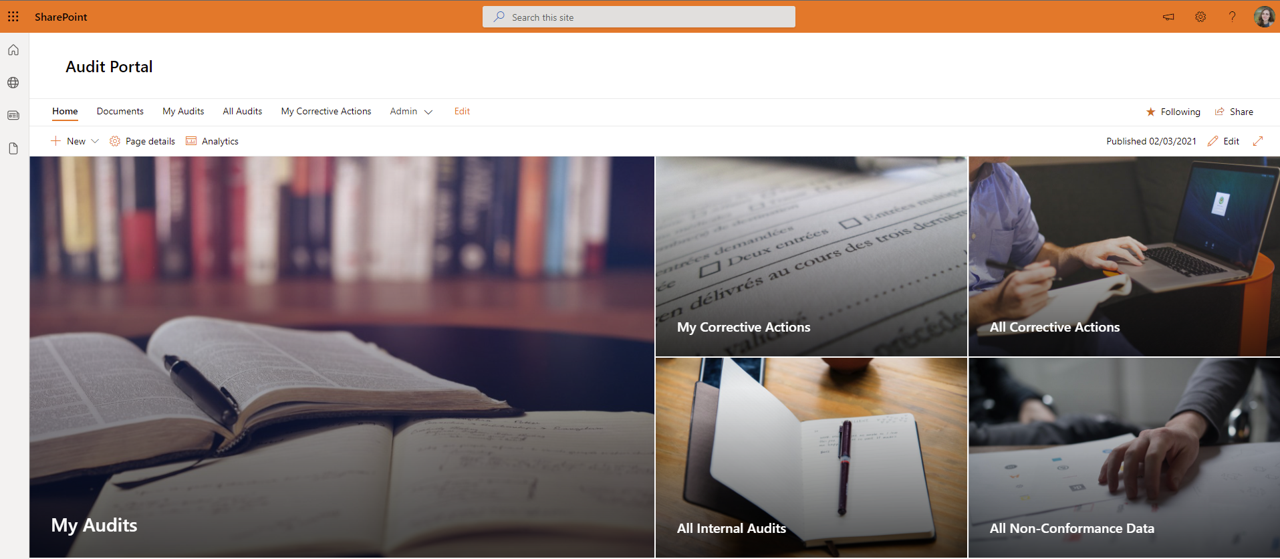
The Audit Portal can also provide navigation to other useful resources such as Audit schedule, audit reports, directory of auditors, improvement log and controlled documents. This becomes your one stop shop for everything related to audits.

An Audit portal should be able to handle everything you require from planning the audit right through to closing a non-conformance and everything in between.

For example as an end user I might wish to see all of the audit items or corrective actions that are assigned too me.

However, someone with an interest in the overall quality management system such as an auditor, can easily get access to all of the internal audit items or corrective actions to check on their progress.

You can easily change the colours, background images, text and terminologies to fit your organisations brand or use keywords that your employees already understand.

Screenshot of the YouTube front page for the Non conformance report video

Non Conformance Report Database

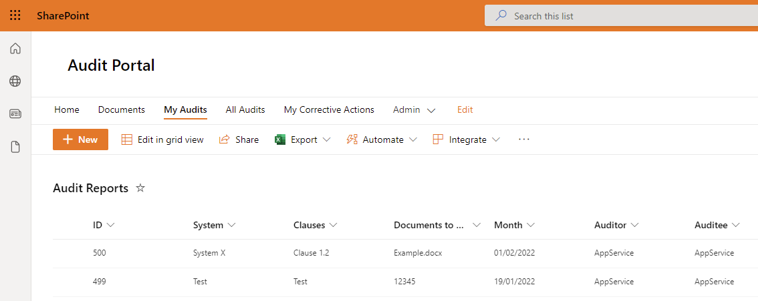
The system has a database known as the audit reports list that stores all of the audit items.

The list is completely configurable and will allow you to store your own categories, tags or questions against it.

The database can be filtered in a number of ways.

Perhaps you are auditing one system against all or multiple clauses.

You might be auditing one department against a particular chapter and its clauses for example “6.Planning”.

The system is very flexible in terms of being able to filter and search for items.

Audit reports can also be prepared in a sandbox area ahead of the next audit.

This means you can prepare for next year without impacting the current years audit.

Then using a copy workflow it will inject the next set of audit items into the live audit reports database.

It is from this list of audit items that you can raise non-conformances against using the “new” button at the top of SharePoint.

How to raise a non conformance report (NCR)

Once you have created your internal audit items, you can then raise a new non conformance against it. This is a fundamental part of the electronic quality management system software.

Using this simplistic form you can create a non conformance effortlessly like a ticketing system.

This example of a new non conformance report item will allow you to input a relevant title, make the severity of the NCR and gives a text box to enter details.

The severity box that is a drop down choice field allows you to select a severity level which is typically Major or Minor. However, you could also define your own severity levels if required.

Based on your choice of how serious the non conformance is will then impact the due date of when it needs to be resolved.

The higher the severity the sooner that it must be actioned.

The options around this can be configured to your requirements. Including what fields are displayed on the new non conformance report form.

Also what the due date of the non conformance should be based on the severity level.

The non-conformance is linked to the audit report so it will share all of the same information such as auditee and auditor etc.

It is also worth noting that any type of non conformance could be raised within this system. It does not just have to be audit related it could also be supplier or products/parts for example.


A screenshot of a SharePoint Audit Portal

How to raise a Corrective Action

Now that you have created your non-conformance, you can now raise corrective actions against it. This is key element of a CAPA system.

The corrective action form is designed to not only capture what must be done to help resolve the non-conformance but it will also contain key information to help complete the corrective action.

Our CAPA quality systems corrective action form can be customised to include any fields that you feel would be required to assist in the correct action process.

In this example we have give the corrective action a title to make it easy to distinguish from other corrective actions like a ticketing system.

A multi line text box that allows the employee raising the corrective action to detail what is expected to be carried out to complete this corrective action.

There is an attachments field that can be used to attach relevant documents related to the correct actions. It could also be used for attaching related images.

Finally the corrective action will need to be assigned to an employee to carry out. However, this step could also be automated.

For example if an area of the business or department the corrective action was assigned too could determine what employee was to be automatically assigned.

You could use this as a food safety management systems.

If so the corrective action might be assigned to the relevant head of department within the food safety system.

Screenshot of the Office 365 login portal requesting a password

How to complete a Corrective Action

Once a non conformance report has been created and corrective actions have been assigned.

It is then down to the assigned employees to action their assigned corrections.

The system will automatically email them the details of the non-conformance along with their assigned corrective actions.

All of the tasks are stored safely within a SharePoint Online list. Meaning if you have lost the email regarding your corrective actions.

You can gain access to a list of all corrective actions assigned to you via the Audit Portal.

This will include the due date the corrective action must be completed which is automatically based on the non-conformance severity level.

Once the assigned employee feels they have completed the corrective action, they must complete this form.

This form can be customised to your requirements of what information you would like captured at this point.

However, typically it would include a text box for a root cause and a separate text box to enter preventative steps to ensure it does not happen again.

It is commonplace to then revisit a corrective action in the future to ensure the preventative action has was a success.

The form could also contain an attachments area for uploading images taken as part of this process.

Often an ISO 9001 or ISO 27001 Auditor you will be looking specially for hard evidence that these corrective actions have actually been completed.

Rather than just taking the word of the employee that is has been completed.

A SharePoint list showing all of the audit report items in the audit portal

Approving Corrective Actions within a Non Conformance Report

An internal auditor will have a view similar to this where they can see all of the corrective actions assigned to a non-conformance report and the current actions status.

Once a corrective action has been marked as complete, it then must be reviewed and approved by the internal auditor to check it has met the requirement.

The internal auditor can then see the full action details that have been submitted including the root cause.

They will then decide if this corrective action meets the criteria requested.

The internal auditor will be looking for specific evidence to verify that the correction is complete. This might take the form of photo evidence or documentation.

If it does not meet the requested criteria, the action will be rejected and sent back to the assigned employee with comments of what further actions must be taken.

However, if it is approved it will then change the corrective action to be complete.

All of the corrective actions assigned to a non-conformance must be complete before the overall non-conformance can be marked as complete.

How to answer a Non Conformance Report

Now that all of the corrective actions have been marked as complete, along with all of the non-conformances have been marked as complete, you will notice the complete button for the overall audit report item will then appear at the top.

If any new non-conformances or even new corrective actions against a non-conformance is raised the complete button will disappear.

Before you mark the overall report item as complete you will need to make sure that all of the fields in the report are properly populated.

This form can be customised to your specific requirements. However, it would typically include details of the system and clause it relates to.

Typically, you would also expect to enter an overall verification statement into your audit report.

As well as who the stakeholders are of that particular non-conformance report.

These fields can then be used to get the email addresses of the stakeholders, for issuing notifications when anything changes or gets updated.

Controlled Documents – ISO 9001

If you are starting your journey with an ISO accreditation we have a controlled documents system that will support you with this.

This system provides version control along with an automated review cycle and approval process for all of your key documents.

It will also track who has read specific key documents from around your organisation.

Although we have specified in the video that this controlled documents system is aimed at organisations using ISO 9001 it can also be used for other ISO accreditations such as ISO 27001 and more.

Non Conformance Report FAQ’s

Below are some of the frequently asked questions we get asked about this product. Please feel free to reach out to us with further questions via one of the forms on this page.

How to write non conformance report example

Our product will help your employees to write a non conformance report through a pre-define set of fields in a form.

This will ensure that the quality of information being provided is achieved with a high level of consistency.

What is an internal audit non conformity report

Essentially during an audit a nonconformity is every time your find evidence that a process has not been delivered as it was intended.

This is then documented down along with any corrective actions and preventative actions to form a report.

It is worth noting that our product is not just aimed at internal audits. You can select a category of audit types to raise non conformances against.

What is a ISO 9001 non conformance report?

When working towards an ISO 9001 accreditation you will come across the term non conformances a lot.

ISO 9001 defines a nonconformity  as the failure to meet one or more requirements laid out throughout the mandatory clauses.

What is a corrective action?

To give a specific definition within ISO 9001 under clause 10.2 a correction action is realizing and defining a problem. Then containing the problem and determine its cause.

Once this has been done you would take appropriate action to prevent it happening again.

What is ISO 9001?

ISO 9001 is a standard to help ensure you have a successful quality management system operating within your organisation.

What is ISO 27001?

ISO 27001 is the leading standard that is focused on information security. It is one of the most used information security management standards in the world. You can read more about it by clicking here.

Is this Quality Management System Software?

Yes, this will assist you in creating a properly managed QMS within your business.

You can combine this with our other products that will support a rounded quality management system, such as our controlled documents system.

Is this food safety management systems?

Yes, we have a number of clients that are achieving ISO 22000 through using this as their food safety management system.

Non Conformance Report – Next Steps

I hope you found this article useful, if you are interested in getting some assistance with SharePoint Online, please feel free to contact me with any questions using our contact us form.

Author

Free Icon Download | Linkedin Dougie Wood

Solutions Architect

Talk to our team

Share this

Related reading

NewsSharePoint

Mastering Document Control with SharePoint

Struggling with document versioning, policy visibility or outdated files? Learn how Valto’s SharePoint-based Controlled Documents Solution solves the most common document control challenges.

7 May 2025